

Most anti-detect and stealth browser solutions focus on providing strong browser fingerprints and preventing leaks. In many cases, that’s enough to avoid immediate blocks based on invisible JavaScript challenges running on the page.
However, once you start actually interacting with a website through browser automation, you’re giving anti-bot systems many more signals to analyze. I’m talking about how you move the mouse, where you click, how often you interact with elements, how you scroll through a page, which links you follow, how quickly you navigate, and more.
These behavioral cues can also play a role in whether your automation gets blocked. That’s why it’s fundamental to consider browser automation humanization techniques that make your automation behave more like a regular human user.
Here, I’ll walk you through the main approaches for making automated user interactions more realistic and human-like. I’ll explain how these methods work, how to implement them, and where AI fits into the picture.
What Humanization Is and Why It’s Required
Bypassing anti-bot systems through browser automation starts with spoofing browser and device fingerprints, addressing CDP detection, and eliminating other potential leaks.
Still, advanced anti-bot systems don’t just look at technical fingerprints. They can also analyze how a user behaves while interacting with a page or navigating through a website by collecting a range of behavioral signals to determine whether a visitor is likely human or automated. This is what user behavior analysis is all about.
Mouse movement, typing patterns, scrolling, clicking, navigation, and timing can all become signals. If these interactions look suspiciously robotic, anti-bot systems may respond with a direct block or, more commonly, present a challenge such as a CAPTCHA. Now, here is where browser automation humanization comes in.
Humanization is the practice of making automated interactions behave more like those of a real human user. In practice, that includes more natural mouse movements, variable typing speed, realistic scrolling, pauses between actions, and less predictable interaction patterns.
Humanization is usually available as a configurable feature in some open-source anti-detect browsers, or built directly into premium stealth cloud browser solutions.
Give your AI a web data layer – Decodo’s Web Data API turns any site into clean, structured data your models can actually use.

Browser Automation Humanization Techniques: Summary Table
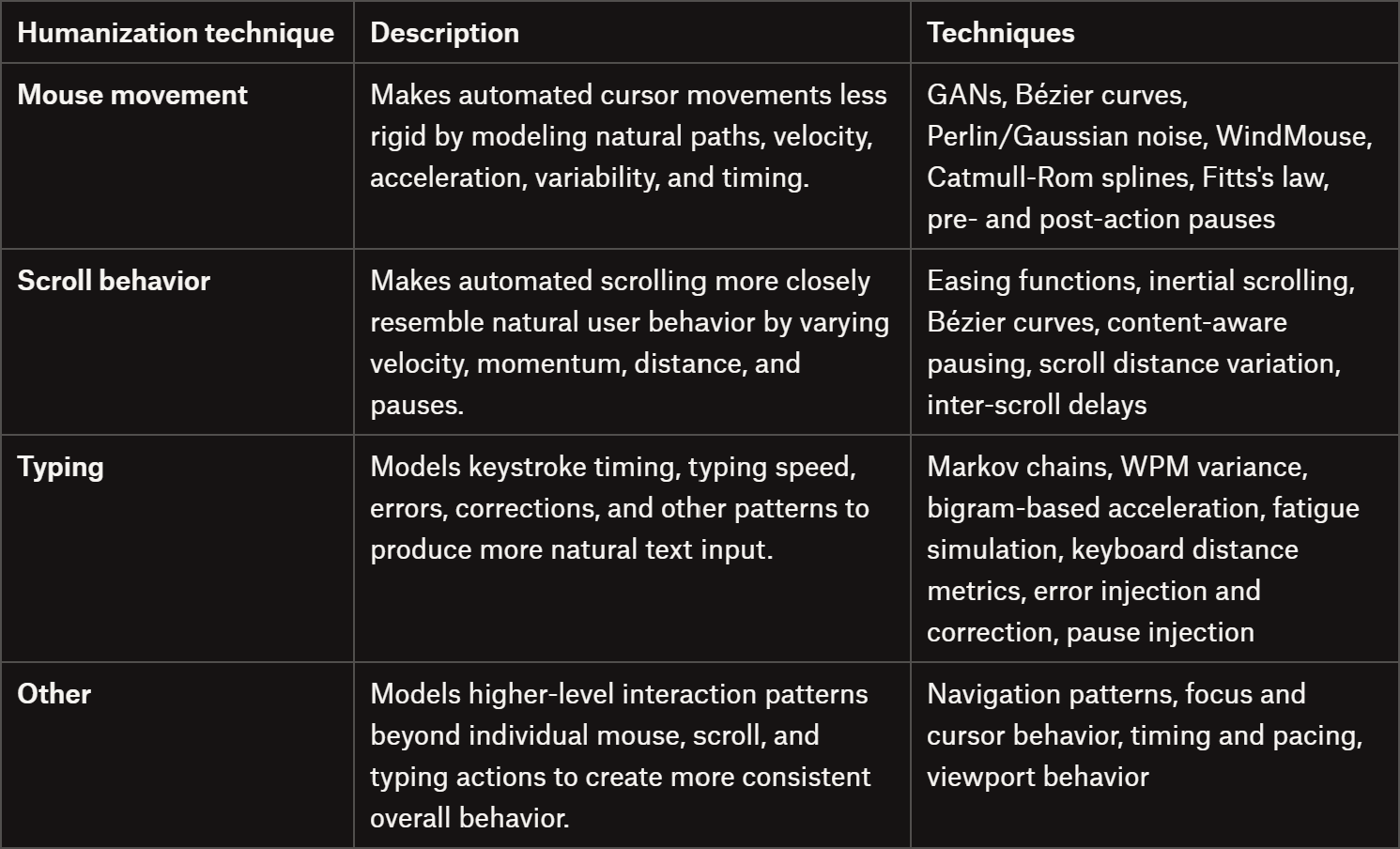
If you want a quick overview of what humanization practices look like in browser automation, take a look at the summary table below:
DataImpulse is trusted by teams running ad verification, web scraping, SERP tracking, and market research. Ethically sourced proxies, globally accessible, and fairly priced.
Mouse Movement Humanization Techniques
Mouse movement humanization aims to make automated cursor trajectories less rigid and more representative of natural pointer behavior. Instead of moving directly from point A to B, the idea is to model curvature, acceleration, variability, and timing to produce more natural-looking interactions.
Implementation Approaches
There are several ways to generate human-like mouse paths, ranging from mathematical curves to probabilistic models and machine learning. The most popular are:
GANs (Generative Adversarial Networks): Learn movement patterns from recorded human cursor data and generate new trajectories that reproduce characteristics of the training data.
Bézier curves: Generate smooth paths between points using control points. They’re relatively simple to implement and are widely used in browser automation projects.
WindMouse: Model cursor movement using a combination of attraction toward the target and stochastic forces, producing curved trajectories with changing velocity.
Catmull-Rom splines: Interpolate between a sequence of points, producing smooth paths that pass through the specified control points to avoid simply connecting them with straight segments.
Now, the path itself is only part of the equation. Velocity and timing also matter when modeling pointer behavior. For this reason, you may also need:
Fitts’s law: States that the time required to rapidly move to a target area is a function of the distance to the target and the size of the target.
Perlin / Gaussian noise: Noise can be introduced into an otherwise smooth trajectory to add small variations and imperfections.
Pre- and post-action pauses: Small pauses before and after interactions can make sequences less mechanically uniform. Avoid one fixed delay everywhere.
Interesting Projects for Further Reading
If you want to explore the topic further, these projects provide useful implementations and references:
Ghost Cursor: JavaScript library for generating human-like cursor paths and mouse interactions in Puppeteer or on any 2D plane.
OxyMouse: Python library implementing Bézier, Gaussian, Perlin, and custom mouse-movement algorithms.
HumanCursor: Python package for generating cursor movements with variable speed, acceleration, and curvature.
WindMouse: Python implementation of the WindMouse algorithm with configurable movement dynamics.
Human Mouse: Python project for human mouse movements via Bézier curves and spline interpolation.
Shy Mouse Playwright: Playwright/Patchright library for achieving more natural mouse movements and interactions, inspired by HumanCursor.
Human Cursor: Browser automation library focused on generating more human-like cursor movements in Playwright and Patchright.
Typing Humanization Strategies
Keystroke pattern emulation focuses on replicating more authentic typing behavior in automated systems. Rather than instantly inserting text into input fields, it models factors such as inter-key latency, variations in typing speed, correction patterns, and input accuracy to generate typing sequences that more closely resemble those of real users.
Implementation
Reproducing natural keystroke patterns involves multiple complementary strategies, each targeting different aspects of human typing behavior.
The most effective implementations combine several of these methods:
Markov chains and stochastic processes: Model typing as state transitions where each keystroke probability depends on previous character sequences. This technique captures bigram dependencies and word-length effects in a statistically grounded framework.
WPM (Words-Per-Minute) variance: Implement dynamic timing based on word complexity. Common words accelerate naturally while technical terms slow down, reflecting genuine cognitive load variations.
Bigram-based acceleration: Frequent letter pairs (like “th”, “er”, “in”) are typed in rapid succession since fingers don’t need to reposition. Modeling these transitions realistically prevents the mechanical uniformity of constant delays.
Fatigue simulation: Progressive typing slowdown accumulates naturally over extended text (e.g., decrease speed by 0.05-0.1% per character). This gradual degradation mimics concentration loss that real users experience during repetitive input.
Keyboard distance metrics: Calculate spatial relationships between keys to predict latency. Adjacent keys require minimal repositioning time, while distant keys or shifted characters introduce measurable delays.
Beyond timing mechanics, behavioral authenticity for typing actions requires modeling deliberate imperfection:
Error injection and correction cycles: Introduce realistic typos at 2-5% frequency, with neighbor-key errors being most common.
Pause injection points: Natural conversations with keyboards include micro-pauses before complex words (averaging 200-300ms) and extended hesitations when encountering specialized terminology.
Interesting Projects for Further Reading
Several open-source implementations provide battle-tested approaches to keystroke humanization:
Bumblebee: A Python library supporting mouse and keyboard automation with configurable behavior profiles (”natural”, “careful”, etc.). Includes integrated WPM control, typo injection, and optional reinforcement-learning-generated cursor trajectories for coordinated input sequences.
HumanTyping: Advanced typing simulator built on Markov chain theory, modeling variable speed based on word frequency, automatic bigram acceleration, fatigue progression, neighbor-key errors, character swaps, and delayed error detection.
Clavier: A Python project for analyzing typing patterns based on physical keyboard layouts. It can calculate distances between keys, words, and consecutive keystrokes.
Human Typer: A Python package for simulating human keyboard typing with configurable typing speed and error rates.
Scroll Humanization Practices
Scroll humanization makes automated scrolling resemble typical user interaction. Instead of relying on constant speeds or fixed pixel increments, it accounts for variations in scroll velocity, momentum, scroll distance, and pauses between movements.
Implementation
Some of the most common ways to model more realistic scrolling behavior are:
Easing functions (cubic, quadratic, elastic, etc.): Employ standardized easing curves to model acceleration and deceleration during scrolling to make it more organic.
Inertial scrolling simulation: Model physical momentum where scroll velocity gradually decreases over time, mimicking the behavior of touch-screen scrolling or trackpad momentum.
Bezier curves: Generate smooth scroll paths using control points, similar to mouse movement curves, to avoid linear or step-based scrolling patterns.
When modeling realistic scrolling behavior, there are several other factors worth considering:
Content-aware pausing: Introduce pauses at logical content boundaries, such as headings, images, and section breaks, where users are likely to stop to read or process information.
Scroll distance variation: Real users don’t typically scroll the same distance on every action. Varying scroll distances helps avoid overly uniform movement patterns.
Inter-scroll delays: Add variable pauses between scroll events to account for the time users spend reading, scanning, or deciding where to scroll next.
Interesting Projects for Further Reading
For more information and practical implementations, take a look at the project below:
Ghost Scroll: A Puppeteer script that makes automated scrolling behave more like human scrolling by combining smooth movements with randomized scroll patterns.
Other General Humanization Considerations
Humanization of automation doesn’t stop at mouse movement, typing, and scrolling. Beyond these core techniques, several higher-level humanization patterns can help create a more consistent and natural automation experience:
Navigation patterns: Users don’t navigate websites linearly. As humans, we may revisit pages, use the back button, open links in new tabs, or change direction based on what we encounter. So, you should simulate that behavior.
Focus and cursor behavior: Real users frequently move their cursor between elements, change focus, and briefly hover over interactive components. Performing a task too mechanically can raise suspicion.
Timing and pacing: Human interactions happen at varying speeds. Introducing realistic pauses between actions, along with variation in task duration, can make automation less uniform.
Viewport behavior: Users generally need to see an element before interacting with it. Make sure that elements you’re interacting with are visible within the current viewport.
Keep in mind that these behaviors need to work together. If your bot moves the mouse like a human but types like a machine or navigates through pages at an unrealistic speed, the overall behavior may still appear automated.
Similarly, if interactions are too humanized (e.g., taking excessively long to move the mouse or type), they might become unusual in their own way. Ultimately, you want to find a balanced combination of behaviors that produces a consistent and realistic overall interaction pattern.
Can AI Help with Browser Automation Humanization?
Yes! As you might expect, AI and machine learning can play a pivotal role in browser automation humanization. Recent research explores how machine learning can be used to reproduce aspects of human browsing behavior, including navigation decisions, cursor trajectories, and more.
For example, BrowserAgent uses supervised and rejection fine-tuning to train an agent to interact with websites through actions such as clicking, scrolling, and typing. WebExperT takes a different approach, focusing on human-like planning and “fast-and-slow” reasoning for web navigation.
AI can also be applied at a lower level. Projects such as Scribe use collected mouse-movement data to train models that generate human-like cursor trajectories for browser automation.
The key distinction is that AI can learn and reproduce behavioral patterns from data, rather than relying entirely on coded humanization rules. This opens the door to more complex and variable interaction patterns across different browsing tasks, but with less deterministic control over the final output.
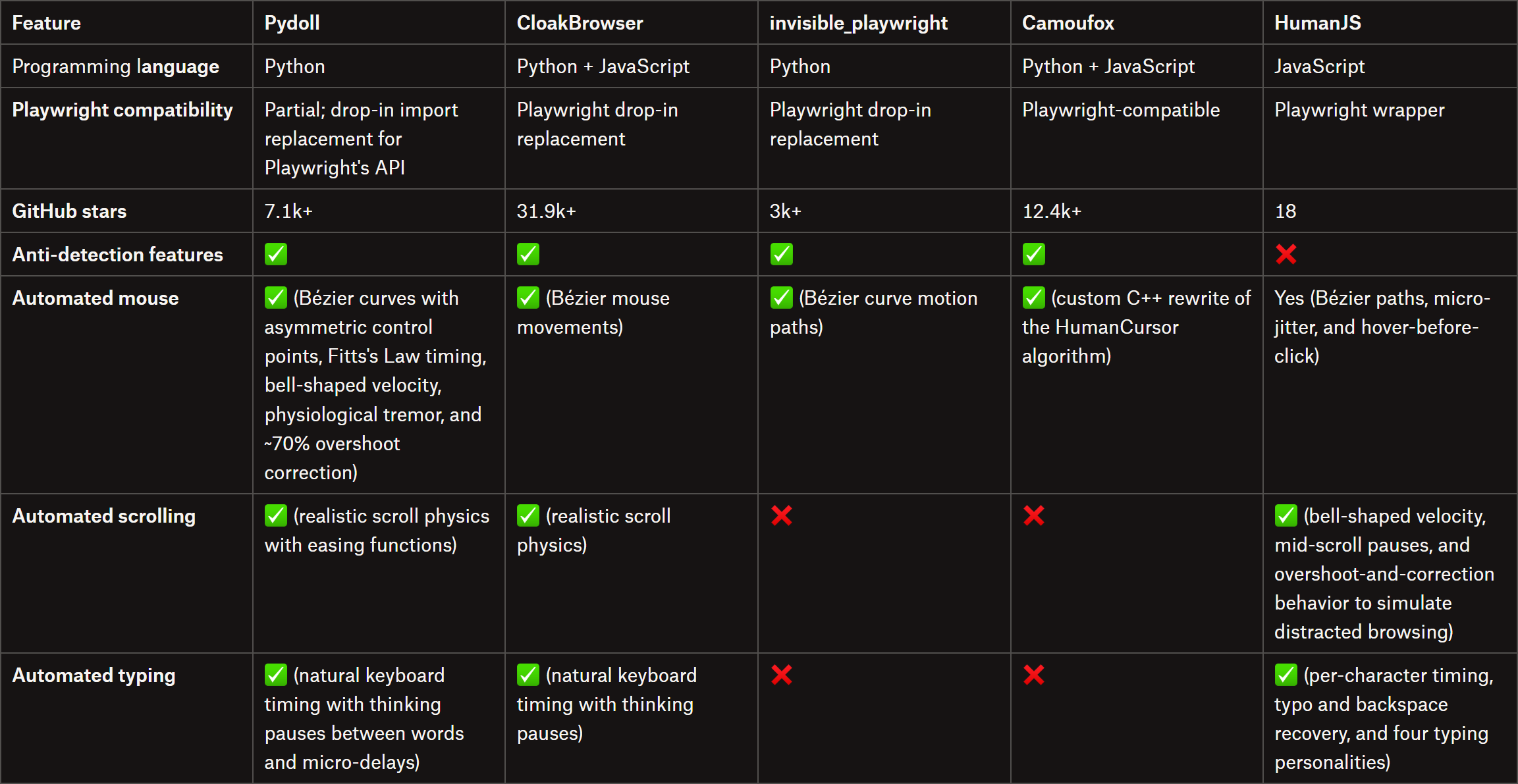
Browser Automation Libraries Supporting Humanization Features
For further reading, check out:
Can invisible_playwright Beat Bot Detection? A Hands-On Test and Review
THE LAB #106: Is Camoufox still effective, and do the forks help?
Conclusion
Fingerprint spoofing alone isn’t enough to stay under the radar of anti-bot systems. For proper browser automation, you also need to make the user interactions look more human-like. After all, moving the cursor directly from point A to B or scrolling by the exact same number of pixels at fixed intervals makes your automation look obviously robotic.
Humanization strategies help you make automated interactions more natural, from generating more realistic mouse trajectories and varying scrolling behavior to modeling keystroke timing and introducing natural-looking typos and correction patterns.
You now know what browser automation humanization is all about, how to implement these techniques, and which libraries already provide built-in support for them. Thanks for reading, and see you in the next one!
Did you like this article? Share it with someone who might find it useful and get a discount on paid plans.