invisible_playwright is an open-source anti-detect browser engine for Playwright. It lets you write automation scripts that control Firefox while reducing the risk of bot detection.
In this post, I’ll explain what the tool is, how it works, and which features it offers. I’ll also show you how to use it, evaluate its performance against anti-bot detection systems, and compare it with other similar libraries.
What Is invisible_playwright?
invisible_playwright is a Python library created by Federico Elia. It patches Firefox at the C++ source level to help bypass bot detection systems.
The project is open source and free to use, and is designed to help avoid anti-bot systems and CAPTCHA challenges such as reCAPTCHA v3, Cloudflare Turnstile, DataDome, Kasada, Akamai Bot Manager, PerimeterX, hCaptcha, and Imperva.
The library addresses two questions that anti-bot systems typically ask:
Is this a real browser? Yes, as the tool employs Firefox patched at the native level.
Is a real person using it? It simulates human-like interactions to make automated activity look more natural.
At its core, invisible_playwright works as a drop-in replacement for Playwright. The core difference is that it combines a modified browser engine, configurable fingerprints, and built-in human-like interactions. As of this writing, the project boasts more than 2k GitHub stars!
Now that you know what invisible_playwright is, let me introduce what it brings to the table.
Drop-In Playwright Replacement
invisible_playwright is 100% compatible with Playwright. That means you don’t need to rewrite your code. Both sync and async work, and every method remains the same. So, there’s no learning curve.
You can switch from standard Playwright like this:
Old code vs new code
That’s the only change needed. Now, each Playwright browser automation session will automatically get a distinct fingerprint. Note that the browser fingerprint generated includes GPU, audio, fonts, screen, and roughly 200 other fields.
Human-like movement and interaction
invisible_playwright simulates more natural mouse interactions. As opposed to instantly moving the pointer to a target, the cursor travels toward the target along a human-like path. This behavior is controlled through the humanize option, which applies to actions such as clicking, hovering, and dragging.
Enabled by default (humanize=True), you can disable it by setting it to False:
with InvisiblePlaywright(humanize=True) as browser:
    page = browser.new_page()
    # Browser automation logic....
Fingerprint Seeds for Reproducibility
To make runs reproducible, you can pin a specific fingerprint. This helps with debugging, as if a scrape fails with a specific seed, you can replay it exactly.
You can use this feature like this:
# Initialize the InvisiblePlaywright engine
sf = InvisiblePlaywright()

# Create a new Playwright-like browser instance
with sf as browser:
    # Access the randomly assigned fingerprint for each run.
    print("seed =", sf.seed)

    page = browser.new_page()
    # Browser automation logic....
This will produce an output like this:
Note the seed number
Then, you can reuse the same fingerprint with:
# Same fingerprint every time
with InvisiblePlaywright(seed=1561645783) as browser:
    page = browser.new_page()
    # Browser automation logic....
The seed-based fingerprint generation adopted by invisible_playwright is deterministic. In other words, you are not rolling the dice on every run. Instead, the fingerprint is derived from a known seed value, making the same fingerprint reproducible across runs. This makes bugs easier to reproduce and debug, which is particularly useful when scraping at scale.
Proxy Support
invisible_playwright natively supports SOCKS5, SOCKS4, HTTP, and HTTPS proxies. You can configure a proxy as follows:
proxy = {
    "server": "http://your-proxy-domain.com:1234",
    "username": "my_wonderful_username",
    "password": "my_very_secret_password",
}
with InvisiblePlaywright(proxy=proxy) as browser:
    page = browser.new_page()
    page.goto("https://example.com")
DNS traffic is routed through the proxy by default, helping prevent local DNS leaks. The timezone is automatically derived from the proxy’s exit IP, keeping the browser configuration consistent with the proxy location.
If needed, you can override it by specifying a custom timezone:
with InvisiblePlaywright(proxy=proxy, timezone="Europe/Rome") as browser:
    #  Browser automation logic....
Reliable access is the foundation of any scraping project. IPRoyal offers 64M+ residential IPs to help you reach any website without blocks or bans.
invisible_playwright lets you pin specific fingerprint fields while keeping the remaining fields derived from the seed. You can do that through the pin parameter:
In this example, the GPU, screen resolution, and CPU core count remain fixed, while other fingerprint fields continue to be generated from the seed. That’s useful when you want to target a specific device configuration without manually defining the entire fingerprint.
CLI Usage
The PyIP invisible-playwright package installs an invisible-playwright CLI command. The main supported commands are:
invisible-playwright fetch: Downloads the patched browser engine if it’s not already installed. The download is approximately 240–265 MB, depending on your platform. The engine is cached locally after the first download, and the command also verifies its SHA-256 hash.
invisible-playwright version: Displays version information for the patched browser engine, the invisible_playwright library, and other information.
The output of the “invisible-playwright version” command
MCP Server
invisible_playwright can also run as an MCP server, giving Claude Code, Claude Desktop, Cursor, Codex, and all other MCP-compatible clients access to a real stealth Firefox browser.
The exposed MCP server supports navigation, page reading, clicking, typing, screenshots, and JavaScript-based data extraction. You can register it in Claude Code with:
claude mcp add stealth -- uvx aihawk
The server is bundled via AIHawk, which also provides a UI and OpenRouter support for users who prefer not to work directly from the command line.
Multiple Integrations
invisible_playwright works with a long list of Python frameworks:
Scrapy, via the scrapy-playwright middleware.
Crawlee for Python, with a plugin subclass or single-line setup.
Playwright MCP, with two flags on the Microsoft server.
CodeceptJS, through the firefox block configuration.
Robot Framework Browser, with named keyword arguments.
How invisible_playwright Avoids Anti-Bot Triggering
Anti-bot systems generally rely on two main signals to detect automated browsers:
Browser identity, via fingerprinting signals.
Interaction behavior, such as whether mouse movements and clicks resemble those of a real user.
invisible_playwright addresses both areas by patching Firefox at the source level and supporting human-like interactions. Discover how!
Browser Identity and C++ Level Patching
Vanilla Playwright relies on the host machine’s native browser fingerprint and the default configuration of a fresh browser session. Signals like GPU, installed fonts, screen resolution, canvas rendering, and other browser properties can make automated sessions easier to identify.
invisible_playwright addresses this by patching Firefox at the source-code level. Instead of injecting spoofed values through page-level JavaScript, it sets fingerprint data inside the browser engine before it becomes accessible to scripts.
Rather than simply spoofing navigator.webdriver or injecting modified canvas data, the library configures several fingerprint surfaces, including:
GPU and WebGL values that are coherent and matching.
Canvas and WebGL rendering that’s deterministic per seed.
Fonts bundled with the browser for consistency across platforms.
Audio context data from the profile instead of the host device.
WebRTC that offers a synthetic ICE candidate.
Timezone and DNS routed through the proxy.
Input events with proper isTrusted values.
These properties are derived from a single seed, helping keep different fingerprint surfaces consistent with one another. Anti-bot systems can often identify spoofed environments when individual signals contradict each other, such as a browser reporting Windows-related properties alongside macOS-specific characteristics.
Human-Like Input and Event Fields
Most humanization libraries rely on Bézier curves to generate smooth mouse movements from point A to point B instead of instantly teleporting the cursor. That’s an improvement, but it may not be enough on its own. After all, a perfectly smooth curve with uniform timing can still look artificial.
invisible_playwright goes further by generating Bézier-curve mouse paths from the selected seed. This makes movement patterns vary between browser identities while remaining reproducible for debugging.
It also patches the browser’s native input handling so pointer events contain more realistic values, including:
Variable timing: Movement timing adapts to the device’s refresh rate instead of following a uniform schedule.
Appropriate pressure: Pressure is set to 0 while hovering and to a non-zero value when clicking.
Correct pointer type: pointerType is consistently set to mouse.
Accurate movement deltas: movementX and movementY reflect the actual pointer displacement.
Sub-pixel coordinates: Pointer positions can account for fractional coordinates on scaled displays.
These properties are determined by the browser’s native input-handling code, rather than being added or modified by the automation driver. Such a level of control requires patching the browser binary.
In your Python project, install invisible_playwright with:
pip install invisible-playwright
Then, download the patched browser engine using the CLI:
invisible-playwright fetch
You can now use invisible_playwright much like standard Playwright. For example, the following script opens a bot detection test page, waits 10 seconds for the test to complete, and takes a screenshot of the result:
from invisible_playwright import InvisiblePlaywright

# Create a new InvisiblePlaywright instance
with InvisiblePlaywright() as browser:
    page = browser.new_page()

    # Visit the bot detection test and wait for 10 seconds
    page.goto("<BOT_DETECTION_PAGE_TEST_URL>")
    page.wait_for_timeout(10000)

    # Take a screenshot of the entire page
    page.screenshot(path="antibot-challenge.png")
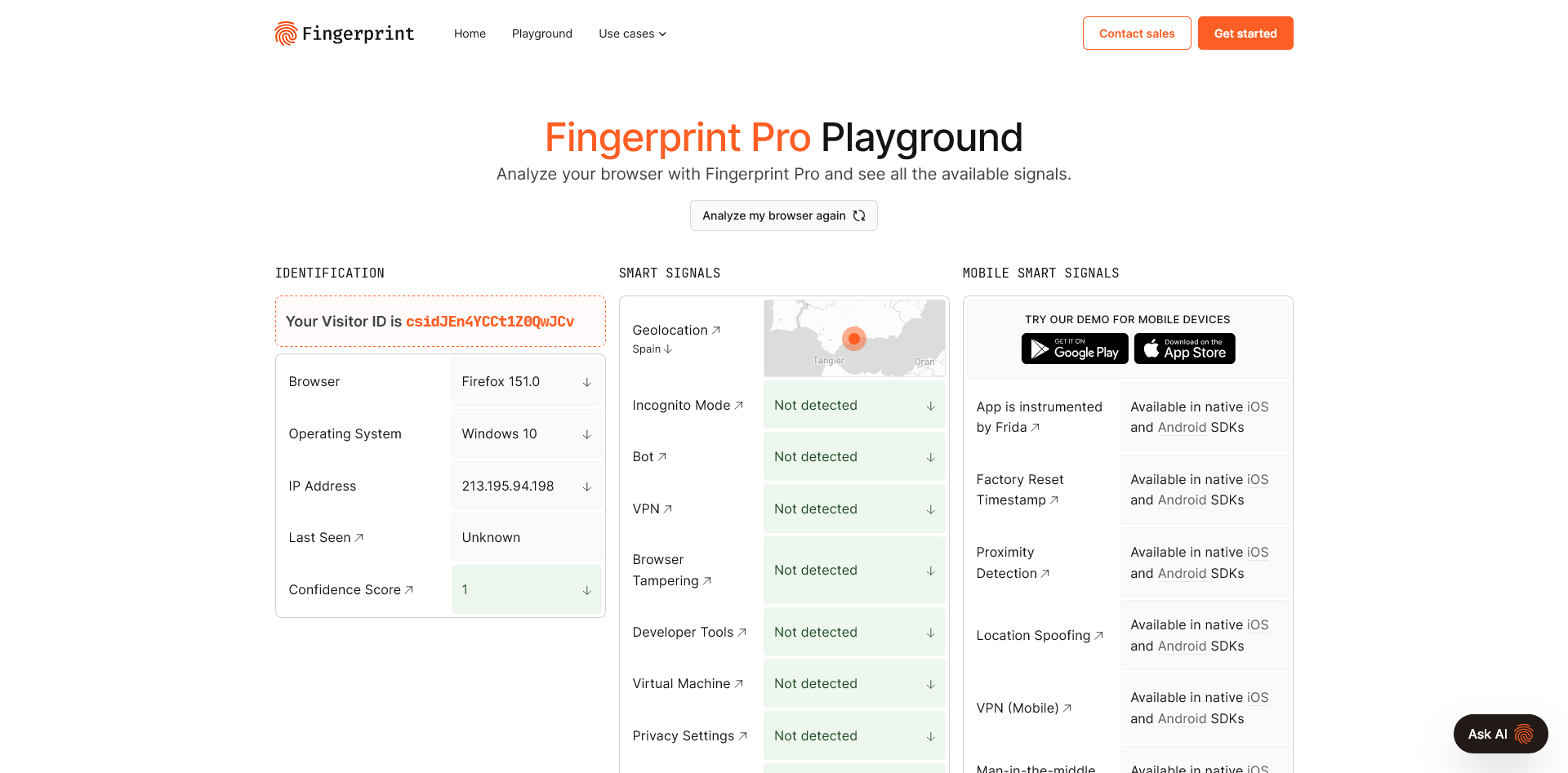
Vs Fingerprint
The result was:
invisible_playwright vs Fingerprint
Note the “Confidence Score” of 1 from Fingerprint, one of the most complete and popular device intelligence and visitor identification platforms.
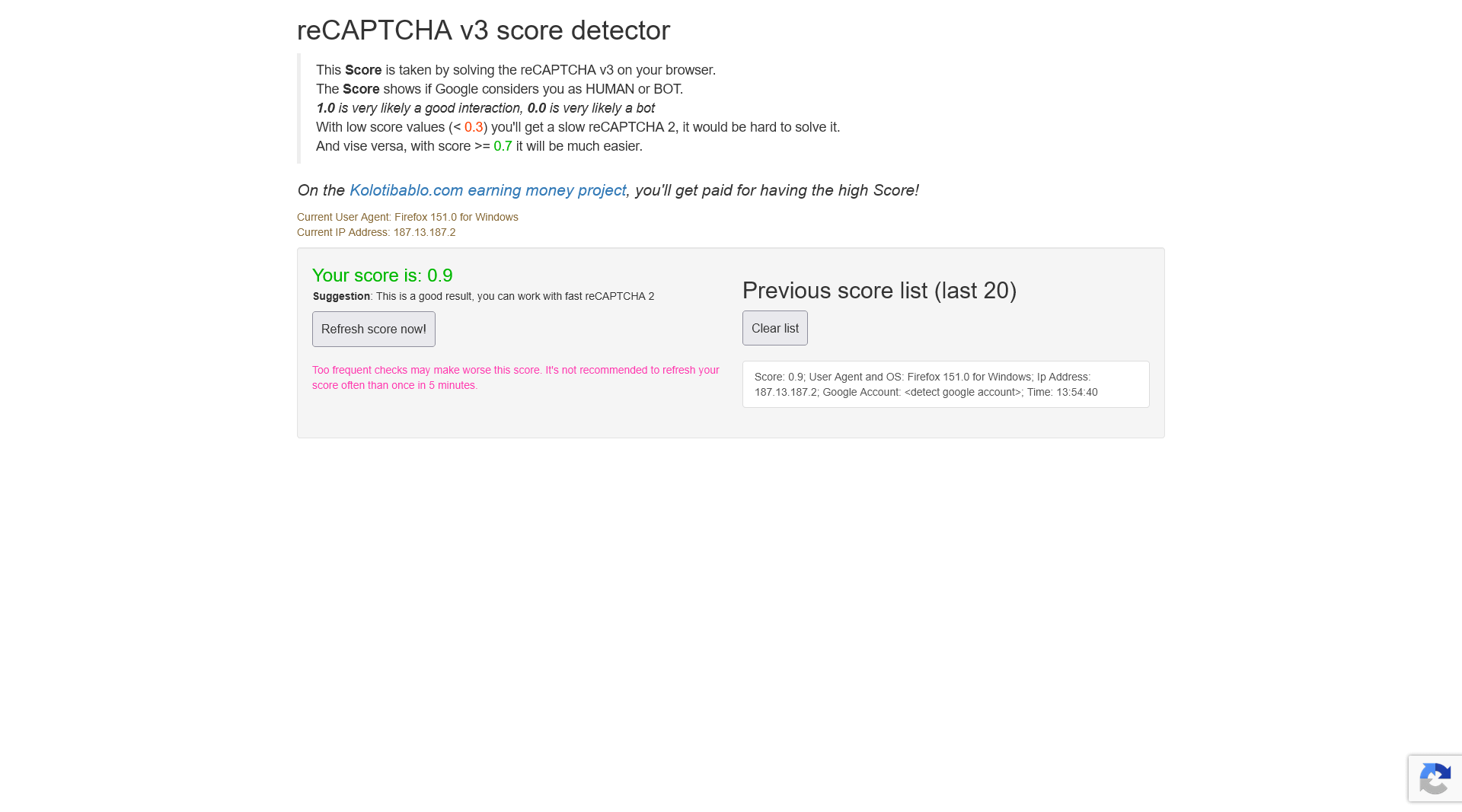
Vs AntCpt.com’s Score Detector for reCAPTCHA v3
The result was:
invisible_playwright vs AntCpt.com’s reCAPTCHA v3 score detector
A score of 0.9 is excellent and matches the score I achieved in my regular browser session.
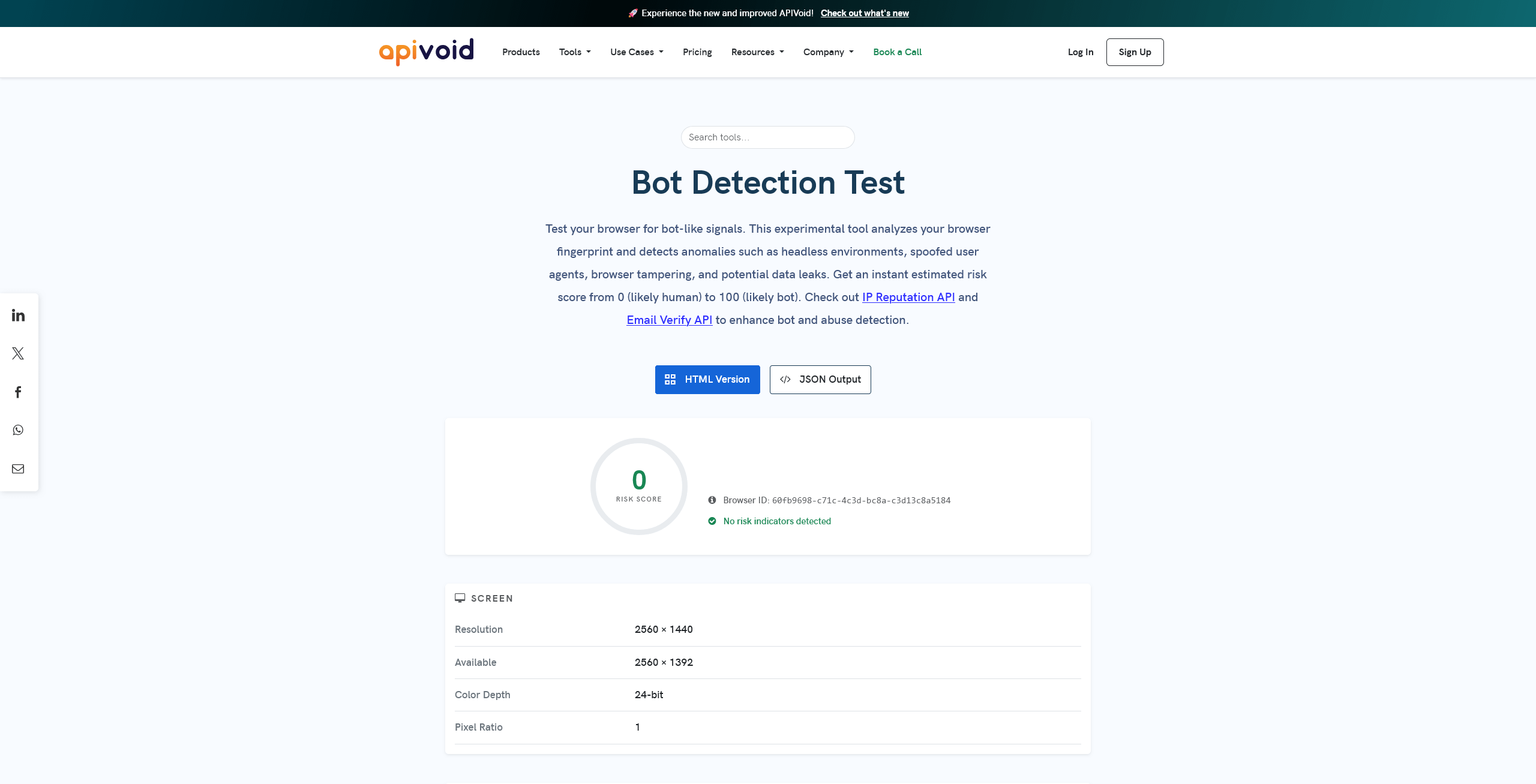
Vs APIVoid’s Bot Detection Test
The result was:
invisible_playwright vs APIVoid’s Bot Detection Test
The detected risk score was 0, indicating a very low likelihood that the session came from a bot.
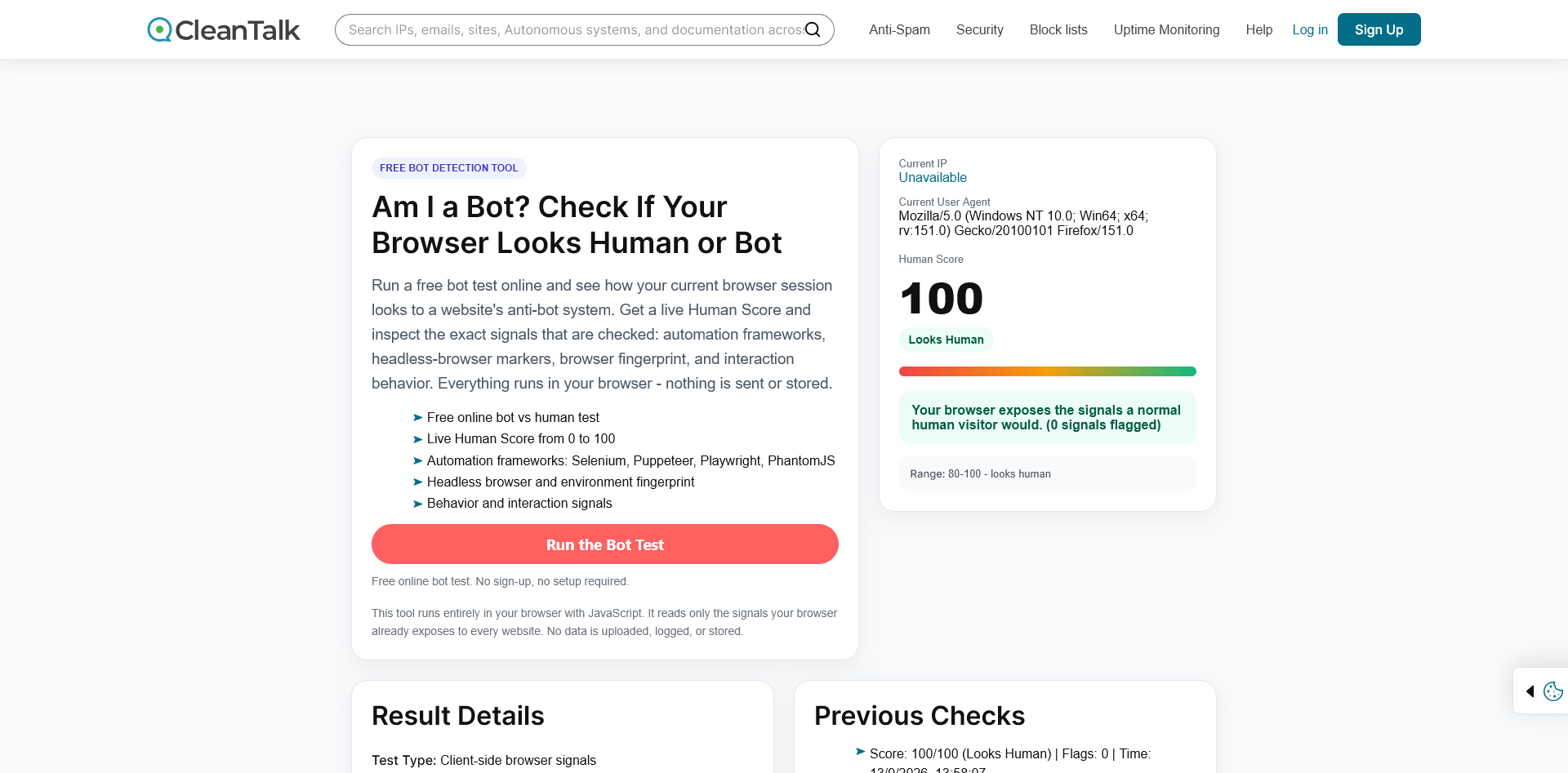
Vs CleanTalk’s Am I a Bot?
The result was:
invisible_playwright vs CleanTalk’s Am I a Bot?
The test returned a 100/100 score with a clear “Looks human” result.
Vs Pixelscan’s Bot Detection Test
The result was:
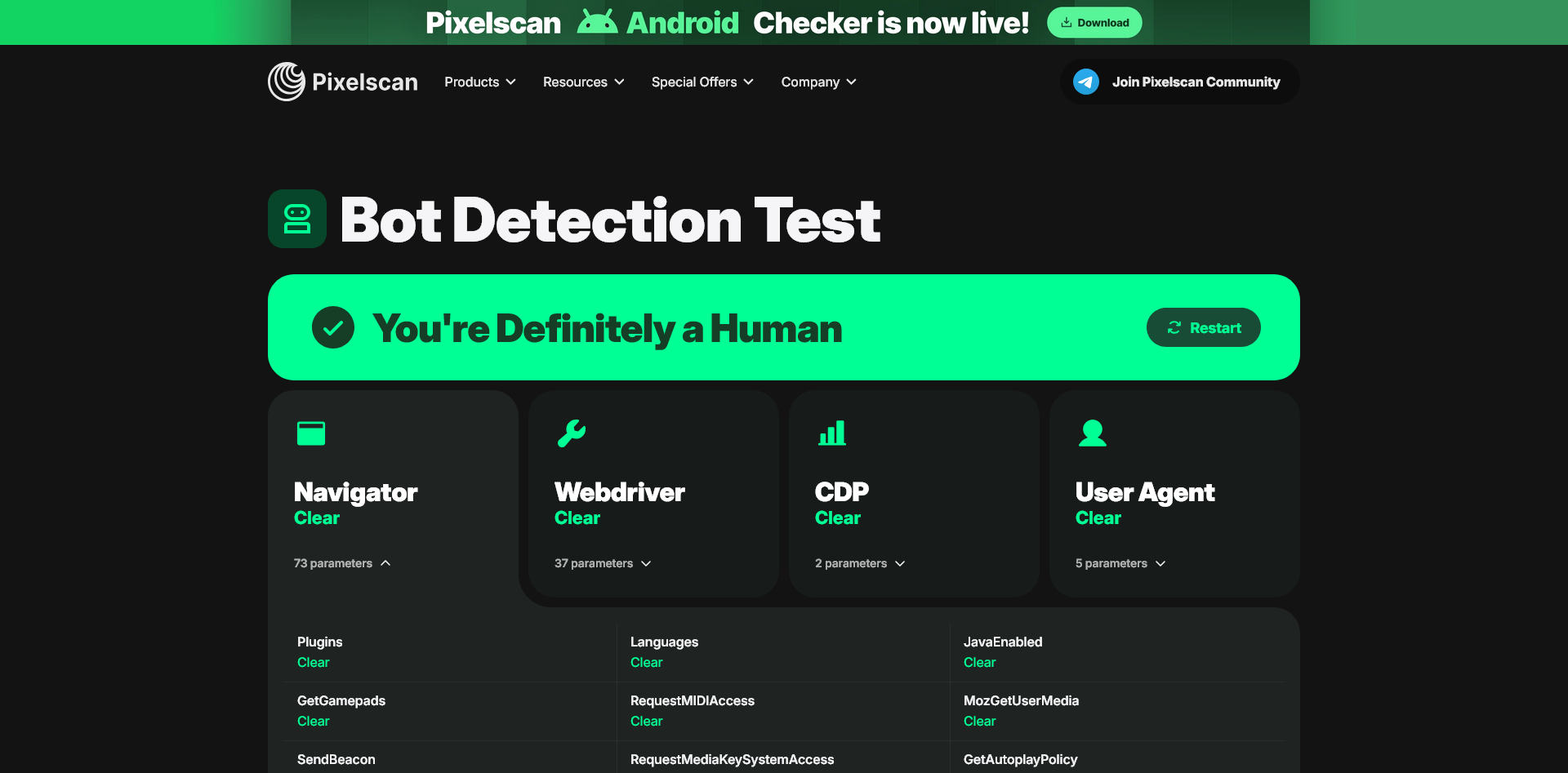
invisible_playwright vs Pixelscan’s Bot Detection Test
The “You’re finally a Human” message is a strong indication that the tool successfully passed the test.
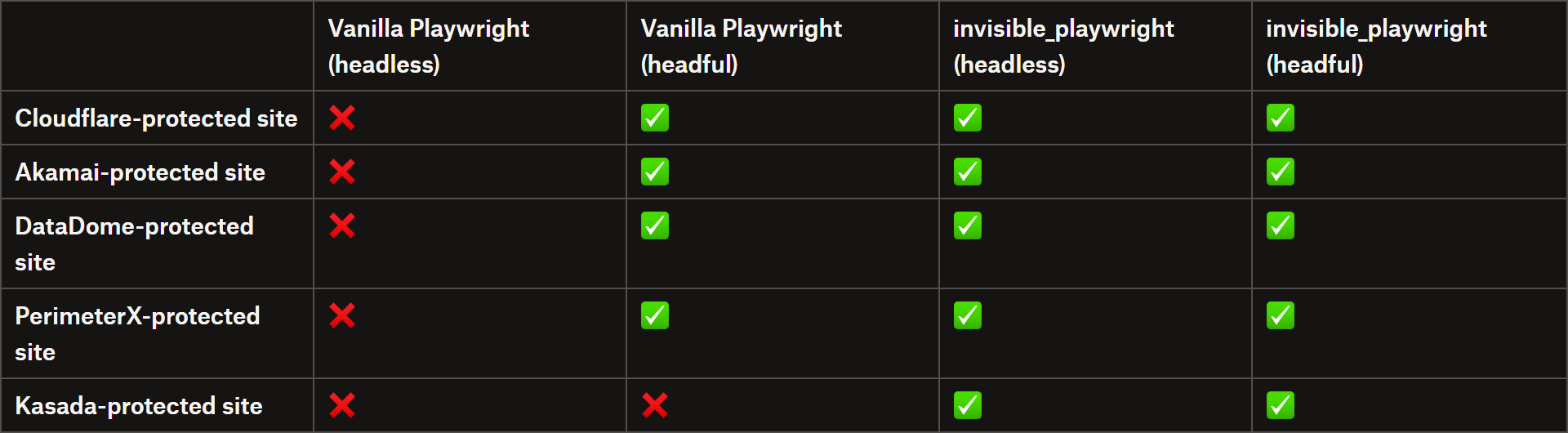
To evaluate invisible_playwright, I ran a simple script against a chosen website protected by each of the major anti-bot systems. The results are summarized in the following table:
invisible_playwright vs anti-bot performance benchmarks
Note: All tests were performed locally using my ISP-provided residential IP address.
In this limited experiment, invisible_playwright successfully loaded all five test sites, achieving a 100% success rate. By comparison, vanilla Playwright consistently failed in headless mode and also struggled with Kasada in headful mode.
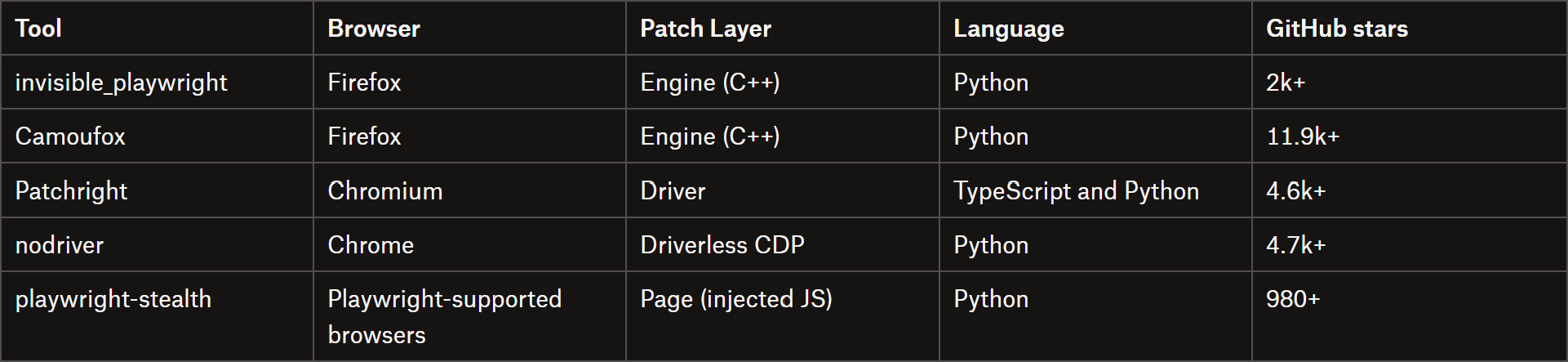
Comparisons with Other Stealth Browser Automation Tools
invisible_playwright vs other stealth browser automation tools
Each approach involves trade-offs. Firefox has a smaller market share than Chromium, which may itself be a detection signal. At the same time, it’s currently the only browser engine that can be patched at the native binary level.
Chromium-based tools typically patch the browser driver or inject JavaScript into the page, leaving more detectable surface area exposed.
playwright-stealth is lightweight and works with multiple browsers, but it relies on injected JavaScript, which anti-bot systems may detect. Camoufox uses a fingerprint database in place of seed-derived values, so it doesn’t provide the same reproducibility across runs.
invisible_playwright, by contrast, focuses on reproducible fingerprints and deep, native-level browser patching.
The Web Scraping Club is a reader-supported publication. To receive new posts and support my work, consider becoming a free or paid subscriber.
Final Comment
Let me get straight to the point: invisible_playwright looks like a very solid choice for web scraping projects where bot detection is a concern. The library not only performed well in my tests and delivered on its promises, but is also exceptionally well documented, with a long list of guides, examples, and low-level explanations of how it works.
There is one potential downside, though. Because of that, and the fact that the project is fully open source, anti-bot providers could potentially reverse-engineer its implementation as it gains adoption within the community.
That’s probably my biggest concern with the library, along with its reliance on a single main maintainer. However, both are challenges that apply to many open-source stealth browser automation tools.
I also want to add a personal note and give a shout-out to Federico Elia, the author of the library. In the era of AI, where almost anyone can vibe-code a product or library in a matter of hours, or even minutes, it’s genuinely refreshing to see this level of robustness and documentation. In my experience, that combination is still far from common. Well done!
The biggest advantages of invisible_playwright are definitely its full Playwright compatibility and straightforward setup. The seed-based fingerprinting is another particularly interesting feature that not all anti-detect browser automation libraries offer.
Keep in mind that the tool requires Firefox and Python. If you need Chromium or Node.js support, you’ll have to look elsewhere. Otherwise, I strongly recommend giving this project a try and seeing how it performs for yourself!
Did you like this article? Share it with someone who might find it useful and get a discount on paid plans.