

If you follow these pages or, in general, the industry news, you know for sure that Google is becoming harder to scrape, as it also removed the destination URL from its search results.
Shopee is a website that's hard to tackle: custom bot protection, the need for accounts to use the website, and strict geographic controls.
Shein is another hard target, and when talking with other professionals, it’s sometimes not even economically viable to extract data from there, since it requires too much effort and you need many customers to cover the extraction costs.
So, when ScrapeUnblocker came to me asking for a test, and I saw the chance to extract data from these sources, I immediately wanted to test them, and this is my recap.
What ScrapeUnblocker is
ScrapeUnblocker is an anti-bot bypass API. You send a URL, and the service chooses the best-performing path to that site. The docs describe it as “dedicated site plugins, real browser rendering, rotating premium proxies, automatic challenge solving”, and it claims to beat Cloudflare, DataDome, PerimeterX, Akamai and hCaptcha among other protections. You can’t choose the route yourself: you only see the result.
The public API is three endpoints on https://api.scrapeunblocker.com:
/getPageSourcereturns the HTML of any URL, or the same page as Markdown, or structured JSON./serpApiruns a Google search and returns organic results, ads and the AI Overview as JSON./getImagedownloads an image in its original format, for image hosts that block plain requests.
Every call is a POST with the parameters in the query string and the key in the x-scrapeunblocker-key header.
On top of these, there are 75 plugins listed in the plugins page. A plugin is a ready-made scraper for one website: you pass a few fields (a keyword, a market, a product id) and you get parsed JSON back. The list covers e-commerce (Amazon, Walmart, Shein, AliExpress, Taobao, Shopee), travel (Booking, Airbnb, Skyscanner), real estate (Zillow, Idealista, Rightmove), jobs, reviews and a long list of Google products (Shopping, Maps, Trends, News, Hotels). The Shopee plugin is very new, the changelog dates it to October 23, three days before my tests.
The rest of the product is built around the same API key:
an MCP server (
npx -y scrapeunblocker-mcp) and a Claude Code plugin, with tools likefetch_markdown,google_search,search_and_readandrun_plugin;official SDKs for Python, Node.js, PHP and Ruby (the Python one is
pip install scrapeunblocker);Spider Cloud, which hosts your Scrapy project from a git repository and lets you choose, run by run, how much of the crawl goes through the unblocking API;
a no-code area where you describe the data you want in plain language, and the results arrive by email as CSV or JSON.
The features of /getPageSource
Even if my tests use /serpApi and two plugins, most of the options live on /getPageSource, so a quick tour is useful. With markdown=true you get the page as Markdown, by default only the main content. With parsed_data=true you get JSON extracted from Schema.org, __NEXT_DATA__ or AI-generated rules, plus a page_type (product, listing, article, search results and so on). With get_cookies=true you get the HTML, the cookies of the target site and the country of the exit IP. And with steps you can drive a real browser after the page loads (click, type, scroll, wait, up to about ten actions), using the selectors that list_elements=true gives you.
The billing rules are simple, and in my opinion they’re the best part of the docs. One request is one credit, whatever the target needs (there’s no multiplier for JavaScript rendering). Errors on their side, timeouts, blocks (403) and concurrency refusals (429) are free. When the target itself says a page doesn’t exist, you get its 404 or 410 with an X-Origin-Status header, and that one is billed, because the page was reached and retrying won’t change the answer.
My first call was the pricing page itself. While I was reading the docs, a plain curl on scrapeunblocker.com/pricing returned a “Vercel Security Checkpoint” page, so it looked like a good first test.
Through /getPageSource with markdown=true the page came back in 3.5 seconds. One detail: the first 175 lines of the Markdown were the cookie consent banner (Cookiebot), and the prices came after it. So “main content only” doesn’t remove cookie banners, and you have to cut them yourself before passing the text to an LLM.
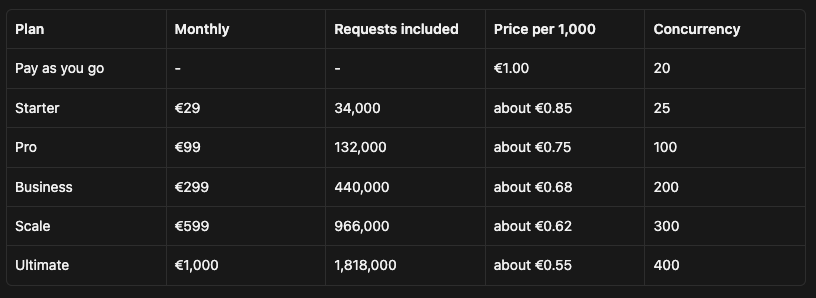
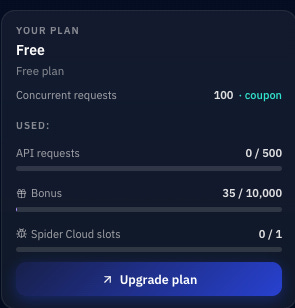
Here are the prices I read in that Markdown. They’re in euros, VAT may apply, and there’s a free trial of 500 requests without a card.
How I set up the tests
Before showing the results, I want to be clear about what we can and can’t see. ScrapeUnblocker is a black box: we send a request and we get JSON back. We don’t know which route served it (a browser, a direct fetch, an internal API), and we don’t see what Google or Shopee answered on the way. So this test measures what you get as a customer, and whether the data is right.
For this reason, I wrote a small client on plain requests (client.py) that does one attempt per call, with no retries. The official SDK retries 429, 502, 503 and 504 automatically, which is what you want in production, but it would hide the failures from my numbers. Every call is logged with status, latency, size, and the ScrapeUnblocker headers (X-Origin-Status, X-SU-Error-Code and so on) in artifacts/calls.jsonl. All the calls ran in sequence from my laptop in Italy, on October 25, 2026.
Ten requests per target is a small sample. It’s enough to see if the tool works and what the data looks like, so read the success rates below as a first check. If you need a number for a contract, you need a few thousand calls.
This is the smallest working version of the two calls, the same file you find as 04_minimal_example.py:
import os

import requests
from dotenv import load_dotenv

load_dotenv()
API = "https://api.scrapeunblocker.com"
HEADERS = {"x-scrapeunblocker-key": os.environ["SCRAPEUNBLOCKER_KEY"]}

serp = requests.post(f"{API}/serpApi", params={"keyword": "assicurazione auto", "proxy_country": "it"},
                     headers=HEADERS, timeout=(10, 125))
serp.raise_for_status()
data = serp.json()
print(data["proxyCountry"], "| organic:", len(data["organic"]), "| ads:", len(data["topAds"]) + len(data["bottomAds"]),
      "| AI Overview:", data["aiOverview"] is not None)
for r in data["organic"][:3]:
    print(r["position"], r["title"][:60], r["url"])

shopee = requests.post(f"{API}/marketplace/shopee-search",
                       params={"q": "iphone case", "country": "sg", "max_results": 3},
                       headers=HEADERS, timeout=(10, 125))
shopee.raise_for_status()
for p in shopee.json()["products"]:
    print(p["position"], p["price"], p["currency"], p["discountPercent"], p["labels"], p["name"][:50])
And this is its output:
IT | organic: 10 | ads: 2 | AI Overview: True
1 Assicurazione Auto: Preventivo RCA Online https://www.unipol.it/veicoli-mobilita/assicurazione-auto
2 Assicurazione auto: la polizza pensata per te da Prima https://www.prima.it/assicurazione-auto
3 Assicurazione auto online: scopri la polizza Linear https://www.linear.it/assicurazione-auto
1 34.9 SGD 41 ['10.25 PRICE: $34.90'] Beats iPhone 17 Drenched Case with MagSafe and Cam
2 73.9 SGD 32 ['10.25 PRICE: $73.90'] Beats iPhone 17 Rugged Case with MagSafe and Camer
3 52.9 SGD 41 ['10.25 PRICE: $52.90'] Beats iPhone 17 Kickstand Case with MagSafe and Ca
The timeout of 125 seconds for the read comes from the errors page: a call can take up to its time cap (60 seconds for a page) plus up to 60 seconds in the queue when all their capacity is busy.
Google SERP
For Google I chose ten keywords that should give different kinds of result pages: commercial queries, where you expect ads, informational queries, where you expect an AI Overview, and a couple of local ones. I spread them over nine countries and left one without proxy_country, to see where the default exit is. One page per call (pages_to_check=1), because every page is billed as one request.
There’s also a small trap in the list. The SERP guide lists 24 countries for /serpApi, and Brazil isn’t one of them. For a country that isn’t available, the docs say the call doesn’t fail: it’s served from another exit, and the response gets two extra fields, requestedCountry and note. So I added “seguro de carro” with proxy_country=br to see the fallback.
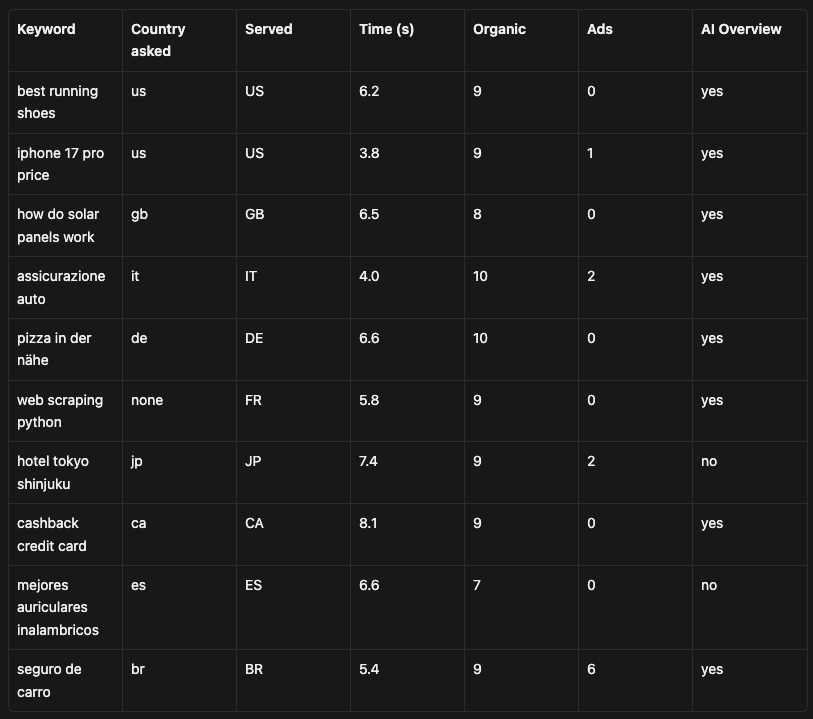
All ten calls returned 200 at the first attempt, between 3.8 and 8.1 seconds (median 6.3). With no country, the request went out from France. And Brazil wasn’t a fallback at all: the response says "proxyCountry": "BR", with no requestedCountry and no note, and the results are Brazilian (santander.com.br, nubank, bbseguros). So the country list in the SERP guide is older than the service.
What’s inside the response
Every organic result has four fields, title, url, description and position, and the positions go from 1 to the last result with no gaps. The interesting field is url. Remember the goto wrapping from August: Google rewrites the result links for the clients it classifies as automated, and to get the real address back you need one more request per link. Out of the 89 organic results I collected, none pointed to a Google domain. Every URL is the real destination, like https://www.unipol.it/veicoli-mobilita/assicurazione-auto. I can’t tell from the outside if ScrapeUnblocker gets the page unwrapped or resolves the links on its side, but as a customer you get the final URLs, with no extra work.
The AI Overview was there on 8 of 10 queries, also on commercial ones like “iphone 17 pro price”. It comes as text and markdown, plus sources (the cited hostnames) and references (the cited pages, with title, URL, source name and snippet). For “assicurazione auto” the overview starts with “Puoi confrontare e calcolare i preventivi per l’assicurazione auto in modo semplice e gratuito tramite il Preventivatore pubblico IVASS...” and cites eight sites, from ivass.it to prima.it and genertel.it, with ten references, all with a real URL. If you track how brands appear in AI answers, this is probably the most useful part of the payload.
Ads appeared on 4 of 10 queries, 11 in total, and only the Brazilian one had ads at the top (4 at the top, 2 at the bottom). The docs say that every paid result ends up in topAds or bottomAds, never in organic, and in my sample no organic URL was an ad link. I’ll be honest, I expected more ads on “best running shoes” in the US. But I can’t compare with what a real user saw from the same exit at the same time, so I’m only reporting it.
Shopee
The Shopee plugin has two endpoints. /marketplace/shopee-search takes a keyword (or a shop id, or a Shopee search URL) and a market, and returns one results page of up to 40 products. /marketplace/shopee-product takes a product URL, or a shop id plus an item id, and returns one product with the profile of the shop. It works on eight markets: Singapore, Indonesia, Malaysia, Thailand, Vietnam, the Philippines, Taiwan and Brazil.
The plugin page is also clear about what you won’t get. Stock, units sold, the rating count of a product and its reviews are missing, because Shopee doesn’t show them to visitors who aren’t logged in. And in four markets (Indonesia, Thailand, Vietnam and the Philippines) a product comes back with only its title and main image, plus price, rating, labels and shop. The response says which case you’re in, with dataLevel set to full or meta.
So I planned ten calls to check both claims. Six searches in six markets, one of them (Malaysia) with sort=sales and a price filter between 100 and 300 ringgit. Then four product calls on the first product of four searches, two in markets the docs call “full” (Singapore and Brazil) and two in “meta” markets (Indonesia and Thailand). Since the product comes from a search, I can also compare the two answers for the same item.
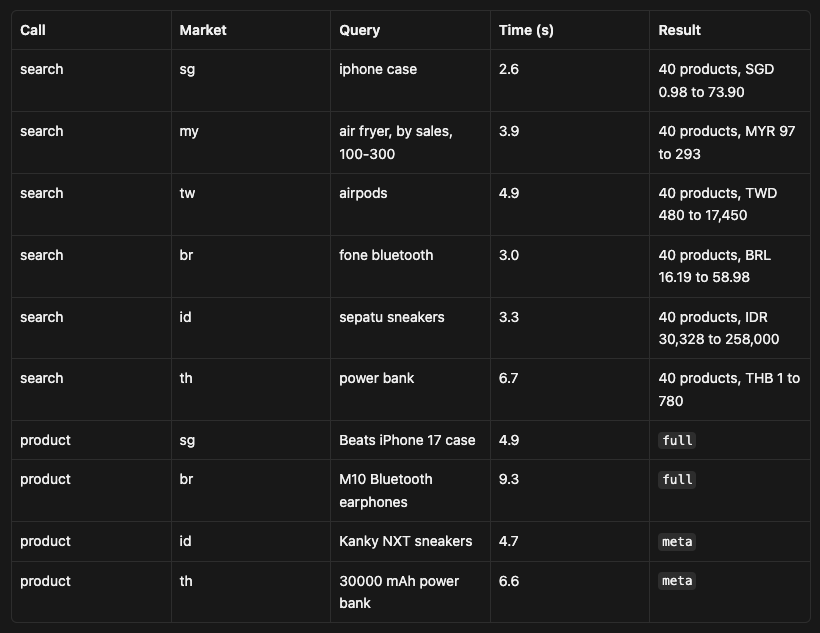
Again ten out of ten at the first attempt, between 2.6 and 9.3 seconds (median 4.8). In Lab 110 the same error came back from the app, from an HTTP client and from two real browsers. Here I got 240 products in six currencies in about 25 seconds of total waiting, which is quite a change.
What a product looks like
The Singapore product is the Beats case sold by the Apple Flagship Store, and it’s the full level. You get the description, brand, categories, two variations (four colors and four iPhone sizes), 16 models, five images, the estimated shipping days (1) and the listing date. The shop block has the rating (4.93), the number of ratings (309,348), followers (186,823), number of products, response rate, the official shop flag and the date the shop joined Shopee. The Brazilian product adds the attributes, the spec rows the seller filled in, like “Tipo de Conexão: Sem fio (Bluetooth ou Wifi)” and the homologation number.
The two meta products are exactly what the docs describe: title, one image, price, rating, labels and the shop, and nothing about the listing. So if you need descriptions or variations in Indonesia or Thailand, this plugin doesn’t give them to you, and it says so in the response.
For all four items the price, the discount, the rating, the labels and the title were the same in the search and in the product call. There’s one exception, and it’s a small one: originalPrice. In Brazil the search said 79.90 and the product said null, and in Thailand it was 279 against null. So if you need the crossed-out price, take it from the search.
Two prices to check
Two results in the searches looked wrong to me at first. In both cases the explanation was in the JSON.
The cheapest power bank in Thailand costs 1 baht, with an original price of 198. Its label is “ราคาพิเศษสำหรับลูกค้าใหม่”, which means “special price for new customers”. The docs warn you that price is what Shopee shows to a visitor who isn’t logged in, and that it can be a promotional or new-customer price. This is the case they mean. If you’re doing price monitoring, you need labels to decide which prices a normal buyer would pay.
The second is the price filter. In Malaysia I asked for air fryers between 100 and 300 ringgit, and the response shows that the plugin passed the filter to Shopee’s own search URL (https://shopee.com.my/search?keyword=air%20fryer&sortBy=sales&minPrice=100&maxPrice=300). One product out of 40 came back at 97 ringgit, with an original price of 250 and the label “Shopee Lagi Murah”. So the filter is Shopee’s, with Shopee’s logic, and if the range matters for your data you should filter again on your side.
Two smaller details. In Taiwan, 11 of the 40 products had rating: null. And on 36 of the 209 discounted products in the searches you get discountPercent without originalPrice (the example in the docs has the same shape). So make the proper data quality checks before ingesting these products on your data pipeline, so that it won’t break in later stages.
Shein
After Shopee I wanted one more e-commerce target, and Shein was the natural one, since fast-fashion price tracking is one of the use cases its plugin page lists. The Shein plugin is smaller than the Shopee one. It has only a search endpoint, /marketplace/shein-search, on the US store, and it returns the first results page, up to 20 products. You can sort by relevance or price and filter by a price range in dollars. The docs also say that Shein limits bursts of searches, so I left three seconds between calls.
Since there’s no product endpoint, for the product pages I used /getPageSource with parsed_data=true on the URLs the search returned. This is the generic route, the one you’d use on any website, so it’s also a way to compare the plugin with the generic unblocker on the same items. I ran six searches (one sorted by price and one with a price filter) and four product pages, the first product of four of the searches.
All ten calls returned 200. The first search took 53.8 seconds, and every call after it took between 1.7 and 6.7 seconds (the searches around 2 seconds each). I don’t know why the first one was so slow, and with one cold start in my sample I can’t say if it happens every time. Every search returned 20 products, with title, price, original price, discount, rating, review count, category, image, sold-out flag and the code of the store that sells the product.
The sort and the filter showed the same behavior I saw on Shopee. With sort=price_low the prices go up from 3.43 to 4.80, except for one product at 9.08 at position 11. With a filter between 10 and 30 dollars on “men hoodie”, one product came back at 9.85 (original price 16.59). Also, reviewCount in the search stops at 1001 for popular products, which is how Shein’s “1000+” ends up in the JSON. The product page gives the exact number (1,468 and 1,680 ratings on two of my items).
The parsed product pages are rich. You get material, composition, fit, care instructions, neckline, sleeve type and a list of images, all extracted without a line of parsing code on my side. The price is a different story. Only one of the four products had the same price in the search and in the parsed page (12.39 dollars for a mini dress). The other three were higher on the page: 2.91 against 2.71, 13.08 against 10.08 and 17.70 against 12.40.
So I fetched the raw HTML of the two biggest differences (two more calls) and looked for both numbers. On the kids sneakers, the price the page shows to the user is 12.40, in aria-label="Price $12.40" and in the product:price:amount meta tag, the same as the search. The 17.70 comes from the Schema.org data in the page, where every size has its own offer, with prices from 12.40 to 19.00. So parsed_data took one of those offers instead of the price on the screen.
The hoodie was stranger. In a few minutes I got three prices for the same product: 10.08 from the search, 13.08 from the parsed page and 12.83 in the HTML I downloaded later. From the outside I can’t tell why the price moved, only that it did. For Shein, I’d take the price from the plugin, and I wouldn’t compare prices from different calls as if they were taken at the same moment.
What it costs
The whole test, including the pricing page, the minimal example and the Shein calls, was 35 billed requests. At the pay-as-you-go price of €1 per 1,000 that’s €0.035, and it’s well inside the 500 free requests of the trial. Since every request costs the same, a Shopee product with variations and shop profile costs like a Google page, which costs like any HTML page.
To put a number on it, monitoring 10,000 keywords a day on Google, one page each, is about 300,000 requests a month. That fits in the Business plan (€299 with 440,000 requests included). One Shopee search per keyword in each of the eight markets, for 1,000 keywords a day, is 240,000 requests a month, again in the Business plan. These are just list prices from their page, and if you go above 1.8 million requests a month there’s an Enterprise plan with custom pricing.
How the API compares with the Oxylabs Web API
A few days ago, for another Tool of the Week, I tested the Oxylabs Web API, and the two products answer the same need: one key, and the web as JSON or Markdown. But the endpoints are designed in a different way, so I put them side by side. The Oxylabs column comes from its docs as of October 19 and from the endpoint list I downloaded on October 20 with GET /v1/scrapers.
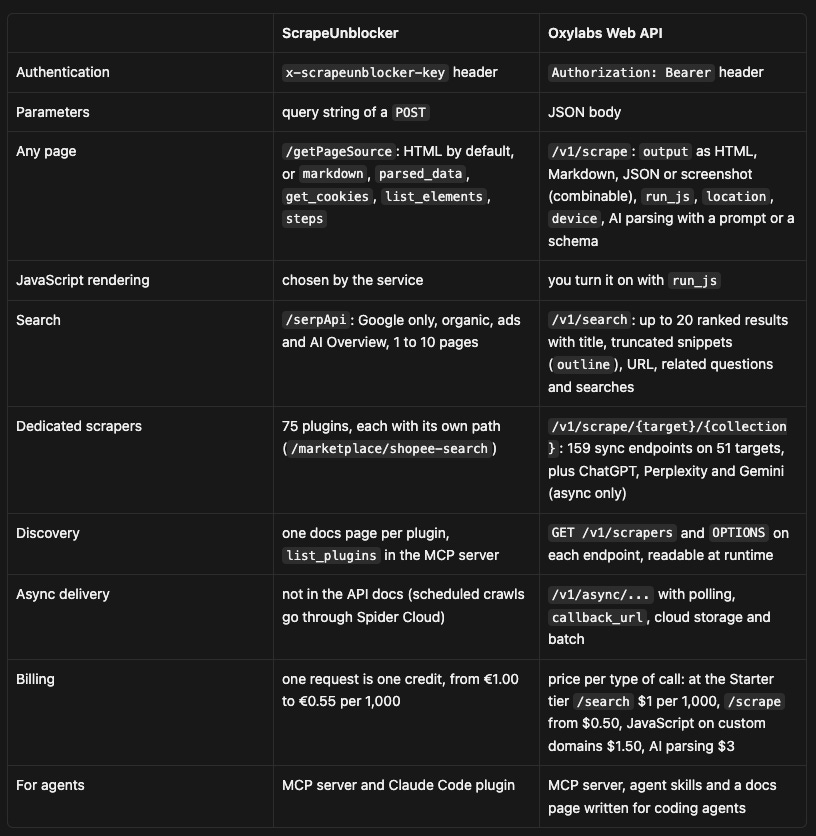
The biggest difference, in my opinion, is how much you decide. With Oxylabs you choose if a page needs JavaScript, which formats you want and if the job runs now or later, and you pay a different price for each choice. With ScrapeUnblocker you send the URL and the service decides the route, at the same price for every call. You get less control, and in exchange the cost of a project is easier to calculate (I’ll leave it to you which side of this you prefer, it depends a lot on the project).
On dedicated scrapers, the two catalogs overlap less than I expected. Out of the 75 ScrapeUnblocker plugins and the 54 Oxylabs targets, only 12 websites are in both lists: Google, Bing, Amazon, Walmart, Target, Best Buy, Etsy, eBay, AliExpress, Alibaba, TikTok Shop and YouTube. Even there, the coverage isn’t the same. On Google both have the SERP, Shopping, Maps, Trends and Hotels, but only ScrapeUnblocker has Images, Jobs, News and Ads Transparency, and only Oxylabs has AI Mode and Lens. On Amazon both have products, search and best sellers, while reviews are only on ScrapeUnblocker and pricing and sellers only on Oxylabs.
Outside these 12, the catalogs go in different directions. The ScrapeUnblocker plugins cover a lot of Asian and European marketplaces (Shopee, Taobao and Tmall, 1688, Zalando, Vinted, Leboncoin) and travel (Booking, Airbnb, Skyscanner, Tripadvisor). They also cover real estate, jobs, review sites and SEO tools like Ahrefs, Semrush and Similarweb. The Oxylabs targets have a lot of US retail and grocery chains (Kroger and its regional stores, Costco, Instacart, Publix, Safeway) and Latin American marketplaces (Mercado Libre, Magazine Luiza, Falabella). Then there are Flipkart, Lazada, Allegro and the three AI assistants. Remember that both have a generic endpoint for any URL, so a site missing from a list can still be scraped. You just don’t get a parser maintained for you.
Final considerations
All three targets worked on every request I sent, 32 calls without a single error. On Shopee the search and product calls gave the same price for the same item, and Google results came from the country I asked for (Brazil included, even if the docs don’t list it). On Shein it’s less clean: on the product I checked in the HTML the plugin had the price shown on the screen and parsed_data didn’t, and on another product the price moved between calls. With these numbers, I can’t say more than this about reliability. What I can say is that the hard part of Google and Shopee, the part where a whole Lab article ended without a working scraper, is handled on their side.
What you still need to do is read the data correctly. On Shopee that means the new-customer prices, the price filter that lets some results through and the originalPrice that disappears in the product call. On Google it’s totalResults, which doesn’t match the real count. On Shein it’s the parsed_data price, which can be the price of one size instead of the one on the screen. Each of these takes a few lines of code to handle once you know about it, and each one would put wrong numbers in a dashboard if you used the JSON as it comes.
There are two next steps I’d like to try. The first is a bigger sample with some concurrency, to see how the success rate holds at the limit of a plan. The second is the same comparison I did on Shein, between the plugin and /getPageSource, on Shopee product URLs.
The code of the tests (client.py, the test scripts from 01_smoke_test.py to 06_shein_page_prices.py) is in our GitHub repository. Let me know in the comments if you’ve already used ScrapeUnblocker on these or other hard targets.