

This is a guest post written by the Hyper Solution team. For an independent benchmark of proxy prices, visit our Proxy Pricing Benchmark tool.
We came up in the sneakerbotting world. When you are racing thousands of other bots for a pair of shoes that sells out in four seconds, you do not open a browser. A browser is too slow, too heavy, and gives away too much. You send raw HTTP requests, and you win or lose on a very short list of signals: does your TLS handshake look like Chrome, are your headers in the exact order Chrome sends them, and do you carry a valid antibot token.
That is the whole game. And it turns out the same three signals are all you need to pull one of the hardest DataDome targets on the web, hermes.com, straight off its own JSON API.
This post is a showcase of a request-based Hermès scraper we built and are open-sourcing. No browser, no headless Chrome, no page rendering. We warm one session through DataDome, then hit the bck.hermes.com API directly and get back clean structured JSON. We will walk the flow, share the real numbers from scraping the entire US catalog, and show what it costs versus buying the dataset. Every number here is reproducible with a free Hyper Solutions key.
Everything below runs with zero browsers in the loop. The cost scales with kilobytes, not with a browser farm.
The three signals that actually matter
Strip away the folklore and a request-based bot against a modern antibot lives or dies on three things:
TLS fingerprint. Your ClientHello has to look like a real Chrome, JA3/JA4 and all. We use
[bogdanfinn/tls-client](https://github.com/bogdanfinn/tls-client)with a Chrome profile and randomized extension order.Header order. Not just which headers you send, but the order you send them in, including the HTTP/2 pseudo-header order. Get this wrong and you are flagged before the server reads a single value.
A valid antibot token. For DataDome that means a
datadomecookie minted from real sensor data. This is the part you cannot fake by copying headers, and it is exactly what the Hyper Solutions API generates.
We have written before about why header order is not enough on its own and why TLS fingerprinting matters. Hermès is the case study that puts all three together, down to details like the API calls sending each header lowercase over HTTP/2, while DataDome’s own geo.captcha-delivery.com endpoints run HTTP/1.1 and want Chrome’s Title-Case names. We matched every request against a real browser capture to get those right.
Here is the header block for a bck.hermes.com API call, straight from the scraper. The order is declared explicitly, not left to the map:
header := http.Header{
    "sec-ch-ua-platform": {`"Windows"`},
    "x-xsrf-token":       {xsrf}, // minted by /sync-form, see below
    "user-agent":         {UserAgent},
    "accept":             {"application/json, text/plain, */*"},
    "sec-ch-ua":          {ClientHints},
    "origin":             {"https://www.hermes.com"},
    // ... sec-fetch-*, referer, accept-* ...
    http.HeaderOrderKey: {
        "sec-ch-ua-platform", "x-xsrf-token", "user-agent", "accept",
        "sec-ch-ua", /* ... exact Chrome order ... */, "cookie", "priority",
    },
    http.PHeaderOrderKey: {":method", ":authority", ":scheme", ":path"},
}
Why no browser, and why the API
The obvious question from the web scraping side is: why go to this trouble instead of driving a headless browser that handles DataDome for you?
Bandwidth. A browser loads the whole product page every time (HTML, JavaScript, CSS, fonts, images, and every XHR the page fires), which is megabytes per product, and you pay residential proxy rates on all of it. But here is the thing: that page is just a wrapper around a JSON API. Hermès’ own frontend fetches product data from bck.hermes.com, and once you hold a warmed session you can call that endpoint directly:
GET https://bck.hermes.com/product?productsku=H100044FPG2&locale=us_en

{ "sku": "H100044FPG2", "title": "Habascule single earring", "price": 445,
  "variants": { "colors": [...], "finishes": [...] },
  "categories_breadcrumbs": [...], "stock": {...}, ... }
That response is the structured product object: price, every color and finish variant, breadcrumbs, stock, dimensions, material. No HTML to parse, no rendering, no XHR replay. One small request in, clean JSON out. It weighs about 37 KB. The equivalent full page render is on the order of a hundred times heavier.
Warming the session through DataDome
Hermès puts DataDome in front of everything, so the one thing you cannot skip is the bootstrap. We warm a fresh session once, then reuse it for dozens of API calls:
Load the homepage. If DataDome challenges it (a
403with an inlineddobject, or an XHR challenge carrying ageo.captcha-delivery.comdevice link), we solve it, either interstitial or slider, through the Hyper Solutions API.Post the tags. DataDome’s client tag fires
chthenleon a real page load; we do the same to raise the session’s trust score.Call
/sync-form. This is what mints thex-xsrf-tokencookie (and the rest of the ecom session cookies) that every subsequent API call echoes back as a header.Hit the API. With the session warm,
bck.hermes.com/products(category listings) andbck.hermes.com/product(full detail) return JSON directly. The session rotates after a set number of calls so no singledatadomecookie is stretched too far.
Session bootstrap and API flow.
The DataDome solves and the tags posts are the only places we hit the Hyper Solutions API. Everything else is plain HTTP. That distinction is the whole cost model: sensor calls are the metered part, and we amortize them across every product a warm session pulls.
Finding every product
You do not need a sitemap. Hermès exposes its full category tree at bck.hermes.com/menu, and each category is a paginated listing endpoint:
GET https://bck.hermes.com/products?category=WOMEN&sort=relevance&pagesize=144&locale=us_enWalk the menu, page through each top-level category, and collect the SKUs. A useful quirk we verified against the live data: a top-level category already aggregates its entire sub-tree. Pulling WOMEN returns all 2,785 women’s products, and every subcategory beneath it adds essentially nothing new. So the whole US catalog is a handful of listing crawls.
That catalog is 7,690 unique products for the US. Worth noting, because the products sitemap makes the catalog look like it has on the order of a million URLs, but most of those are not live, purchasable products. The API listing is the real catalog, and it is far smaller than the sitemap suggests.
The numbers
We scraped the entire US catalog end to end (discover every SKU, then fetch full detail for each) on a modest 8 concurrent sessions. Here is the product-detail run, measured end to end:
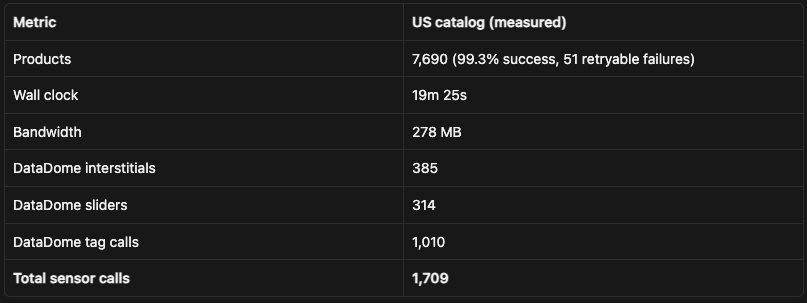
Discovering every SKU first (walking the menu and paginating each category) adds only about another minute, ~10 MB, and ~56 sensor calls on top. The scraper prints the derived ratios at the end of the run:
~26,000 products per GB of bandwidth (37 KB per product).
~4,500 products per 1,000 DataDome sensor calls (0.22 sensor calls per product).
Scrape summary and blog metrics for the US catalog run.
The sensor calls are dominated by session bootstrapping plus the occasional mid-run challenge; give each session more calls before it rotates, or cleaner proxies, and that ratio improves further.
Buy versus build
Two inputs set the cost: bandwidth on residential proxies (we quote Bright Data’s $3.50/GB, though cheaper proxies bring it down) and DataDome sensor data (Hyper Solutions pay-as-you-go at €3 per 1,000 calls).
The whole US catalog costs a few euros to scrape. The ~0.29 GB of bandwidth is about $1 of proxy, and the ~1,765 sensor calls are about €5. That is the entire purchasable US catalog, refreshed in about twenty minutes on a modest 8 concurrent sessions (~400 SKUs a minute, ~50 per thread per minute).
Scaled to all of Hermès’ markets, it grows but stays cheap. Per-market catalogs vary (across 18 markets we measured, Canada was the largest at ~10,000 SKUs, Brazil the smallest at ~3,000, averaging ~7,150), so across the 39 markets the country selector lists that is on the order of ~280,000 records. Held to the same measured ratios, that is roughly 11 GB of bandwidth (~$37 of proxy) and ~63,000 sensor calls (~€190).
Buying the data ready-made is a perfectly reasonable alternative, and for plenty of teams the right one: you are paying for convenience and for someone else maintaining the pipeline. As a reference point, Bright Data’s self-serve dataset estimator starts at $500 for up to 200,000 records ($2.50 per 1,000), with the per-record rate dropping only at much larger volumes.
The thing to notice is scale. A catalog like Hermès is small (7,690 US records, a few hundred thousand across every market), so it sits right at the entry of that pricing, well inside the smallest tier. If you already run request-based scrapers, producing the data yourself costs a fraction of the purchase price and gives you a dataset you can re-pull whenever prices or stock move, rather than a one-time snapshot. If you don’t, buying it may be worth the premium. For a target this size, though, the maths lean toward building.
One more advantage of going straight to the API is completeness. The /product response hands back the full structured object in a single call: price, every color and finish variant, dimensions, material, stock, breadcrumbs. A page-rendering pipeline has to reconstruct all of that from the DOM, and often misses the parts that never appear as plain text on the page. The scraper writes it verbatim, one raw product per line of JSONL, so nothing is normalized away. Here you get the whole record for free, at a fraction of the bandwidth.
(US figures are measured on a single run; multi-market totals are projected across the 39 markets from those ratios and the per-market catalog sizes we measured across 18 markets, and are illustrative.)
Try it yourself
The scraper is written in Go, uses bogdanfinn/tls-client for the fingerprint and fhttp for header ordering, and calls the Hyper Solutions API only for the DataDome sensor data. It is open source:
github.com/Hyper-Solutions/hermes-scraper
Two commands: one discovers every category and collects SKUs, the other fetches full product detail and prints the metrics above.
go run ./cmd/skus     -locale us_en -out skus.json
go run ./cmd/products -in skus.json -out products.jsonl
You need two things: a Hyper Solutions API key for the DataDome sensor data (free to start, no credit card), and a sticky residential proxy (request-based scraping still runs on residential IPs). Grab a key and point it at any locale.
Same idea we keep coming back to: figure out the antibot flow once, then run plain requests forever. Hermès and DataDome are a hard target, but the sneakerbot playbook (real fingerprint, real header order, real token) ports over cleanly. And it does it at a fraction of the bandwidth a browser would burn.
Want the numbers in your own terminal? Spin up a free Hyper Solutions trial, no credit card, clone the repo, and run the two commands above against any Hermès locale. The same API mints the sensor data for DataDome, Akamai, Incapsula, and Kasada, so it carries over to whatever request-based target you hit next.
This showcase uses publicly available product data and is provided for educational purposes only. Figures are from measured runs and multi-market projections, and are illustrative.
