

Having a look at The Scraping Club's Google Search Console, I’ve seen hundreds of searches for how to scrape club data from fussball.de. Of course, given the name of this newsletter, it was ranking pretty high in the results, even if not particularly relatable, but this number of requests made me curious, and I want to dig deeper into this website.
Give your AI a web data layer – Decodo’s Web Data API turns any site into clean, structured data your models can actually use.

To be honest, when I started, I expected a hard target. If everyone in Germany is looking for a solution to scrape it, it should be difficult to do.
Well, it wasn’t, at least for the club directory: there’s no anti-bot at all, and the data is available in plain HTML from endpoints anyone can call. But the interesting part is somewhere else, on match dates and scores. They are hidden behind a custom web font, and the HTML you download contains characters that don’t have any meaning until the browser draws them.
So the article has two parts: in the first one, we’ll scrape the club directory, which is what people search for. In the second one, we’ll see how to get the results, where we decode the font, first the easy way and then in a way that keeps working if the site removes the shortcut we use today.
All the code is in The Lab repository, in the 117.fussball_de_scraper directory.
How fussball.de is built
If you want data about German amateur football, there’s basically one place where you can find it: fussball.de, the portal of the German Football Association (DFB). Every registered club, from the Bundesliga down to the last Kreisliga team, has a profile there, and every league has its fixtures and results there.
So, before writing any code, I mapped the layers between my client and the data.
The first layer is the delivery. Every response carries x-varnish and x-azure-ref headers, so pages come from a Varnish cache behind Azure Front Door. I looked for the usual signs of an anti-bot (challenge scripts in the HTML, a 403 on the first request, cookies set by the server) and found none. The homepage, a club profile and the search endpoint don’t send a single Set-Cookie header. Even Wappalizer said there was nothing installed so I tried a basic test: I fetched a club page with python-requests and its default user agent (python-requests/2.33.0, no custom headers): 200, full content.
The scraper we’ll create later uses a Chrome user agent and a German Accept-Language header (see http_client.py), and with those it ran at 48 requests per second without a block.
Tired of getting blocked while scraping the web?
ScrapingBee handles proxies, browsers, anti-bot systems, and retries so you can focus on your data. Get clean Markdown, JSON, or HTML from the web with up to a 99.9% success rate. ScrapingBee is SOC 2 Type II and GDPR compliant, and trusted by 4,000+ developers.

The second layer is how the data is delivered. The front end is an AngularJS application (all those data-ng-* attributes), but almost everything is rendered on the server. League tables, club profiles and matchday pages arrive as complete HTML. A few blocks are loaded later from endpoints with an ajax. prefix (ajax.club.prev.games, ajax.actual.table, ajax.search.club.loadmore), and they return HTML fragments, sometimes wrapped in JSON.
The third layer is the obfuscation, and it’s the only real obstacle; it covers dates, kick-off times, scores, and referee names in fixtures.
Part 1: the club directory
Finding the search endpoint
There’s no public list of clubs, but there’s a club search at /suche.verein, with two fields: club name and postal code (PLZ) or city. My first try was the obvious one, /suche.verein?plz=84428, and it returned “Keine Ergebnisse gefunden” (no results). The form has a data-rest-form attribute, so I opened the site’s JavaScript bundle (script.js, 2.3 MB) and found the directive behind it:
function onFormSubmit(event){
    // Don't submit the form
    event.preventDefault();
    // Get prepared URL with REST data
    var url = AjaxDataService.getDataUrl(attributes.action, collectFormData(), true);
    // Do the actual request
    requestGET(url);
}
The form fields become path segments, the same /-/key/value style that every fussball.de URL uses. So the URL the site really sends is /suche.verein/-/plz/84428, and it returned two clubs.
Side note: later in the day the query string version returned the same two clubs too, and I can’t say why it didn’t work the first time. I stick with the path form, because it’s what the site’s own form sends.
With a city it’s more interesting: /suche.verein/-/plz/München says “167 Treffer” (167 results) but shows only 20, with a “Mehr laden” (load more) button. The button is a form, and its attributes contain the real endpoint:
<form data-ajax-type="json" data-ajax-target="#clublist ul" data-ajax-defaults="{'max':20,'offset':20}"
      data-ajax-resource="https://www.fussball.de/ajax.search.club.loadmore/-/mime-type/JSON/or/false/plz/M%C3%BCnchen" ...>
I called it directly. It returns JSON with an html field (the list items), a lastIndex and a final flag. The page size is a parameter, and the server accepts bigger values than 20: with max/500/offset/0 I got all 167 clubs of München in one call, with final: true.
DataImpulse is trusted by teams running ad verification, web scraping, SERP tracking, and market research. Ethically sourced proxies, globally accessible, and fairly priced.

Covering all of Germany
The next question is how to list every club, since there’s no “all clubs” query. I tested what the plz parameter accepts:
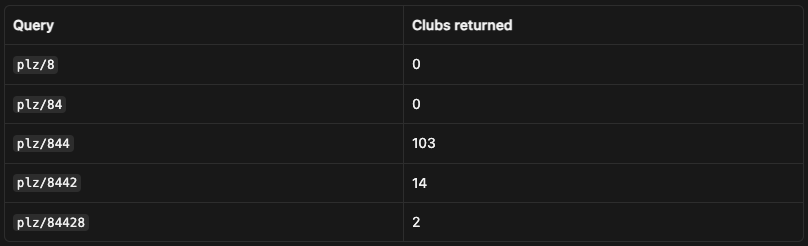
So one or two digits return nothing, and three digits work. Then I looked at the 103 clubs for 844, and they weren’t all in the 844xx area. There was 1.FC Wolfsburg (38440), ASG Vorwärts Dessau (06844) and Brinkumer SV in Weyhe (28844). T
he match is on any part of the postal code, not only on the start. And this is great news for full coverage: every five-digit code contains its own first three digits, so querying every combination from 000 to 999 reaches every club. The cost is that each club comes back a few times, and you deduplicate by club ID.
This is the core of clubs.py:
SEARCH = BASE + "/ajax.search.club.loadmore/-/mime-type/JSON/or/false/plz/{plz}/max/5000/offset/0"
CLUB_URL = re.compile(r"https://www\.fussball\.de/verein/(?P<slug>[^/]+)/-/id/(?P<id>[\w-]+)")


def search_prefix(prefix):
    r, _ = get(SEARCH.format(plz=prefix))
    data = r.json()
    sel = Selector(data["html"])
    clubs = []
    for li in sel.css("li"):
        href = li.css("a::attr(href)").get("")
        m = CLUB_URL.match(href)
        if m:
            name = " ".join(t.strip() for t in li.css("p.name::text").getall()).strip()
            clubs.append({"club_id": m["id"], "slug": m["slug"], "name": name, "url": href})
    return prefix, clubs, data.get("final")
And this is the output of clubs.py directory with 4 workers:
prefixes queried: 1000 in 20.1s (4 workers)
prefixes with results: 1000, largest: 552 with 208 clubs
prefixes where the endpoint said final=false: []
search hits: 69503, unique clubs: 23220
HTTP status counts: {200: 1000}
So 1,000 requests and 20 seconds are enough to list 23,220 unique clubs. The largest prefix returned 208 clubs, well under the max/5000 I send, and no response had final: false, so no list was cut.
Reading the club profiles
Each club has a profile at /verein/{slug}/-/id/{id}. The data we want is in a block with id clubProfile, as label and value pairs:
<div class="column-left">
    <div class="value">
        <a href="http://www.tsv-buchbach.de/fussball" target="_blank">www.tsv-buchbach.de/fussball</a>
    </div>
    <div class="label">Website</div>
</div>
The labels are Gründungsjahr (founding year), Vereinsfarben (club colors), Adresse and Website. Empty fields contain only a space. I read each block by its label, and I take the link href when there is one, so the website comes out as a full URL:
FIELDS = {
    "Gründungsjahr": "founded",
    "Vereinsfarben": "colours",
    "Adresse": "address",
    "Website": "website",
}


def parse_profile(html_text):
    sel = Selector(html_text)
    row = {v: "" for v in FIELDS.values()}
    for block in sel.css("#clubProfile .factfile-data .row > div"):
        label = block.css(".label::text").get("").strip()
        if label not in FIELDS:
            continue
        href = block.css(".value a::attr(href)").get()
        text = " ".join(t.strip() for t in block.css(".value ::text").getall() if t.strip())
        row[FIELDS[label]] = (href or text).strip()
    row["name"] = sel.css("#clubProfile .factfile-headline .headline::text").get("").strip()
    row["association"] = sel.css("#clubProfile .factfile-headline .subline a::text").get("").strip()
    return row
Before the full run, I tested 2,000 random clubs with 8 workers. I wanted to see where the rate limit is:
profiles fetched: 2000 in 41.7s (8 workers, 48.0 req/s)
HTTP status counts (including retries): {200: 2000}
latency median 0.138s, p95 0.220s, max 0.515s
  founded   1871/2000 (94%)
  colours   1552/2000 (78%)
  address   1616/2000 (81%)
  website   1497/2000 (75%)
At 48 requests per second I didn’t find it: 2,000 responses, all 200, and the latency didn’t grow. Then I ran all 23,220 clubs with 4 workers (I don’t need more speed than that, and there’s no reason to load a public site more than necessary):
profiles fetched: 23220 in 797.8s (4 workers, 29.1 req/s)
HTTP status counts (including retries): {200: 23220}
latency median 0.121s, p95 0.196s, max 0.643s
  founded  21732/23220 (94%)
  colours  18041/23220 (78%)
  address  18831/23220 (81%)
  website  17422/23220 (75%)
It took about 13 minutes to read every club registered on fussball.de, without a single error or retry.
“Data is the new oil.”
You’ve heard it a hundred times, but do you know who does the drilling?
With AI, it’s more true than ever. Models are trained on data scraped from the web. Agents need browser automation that doesn’t fall over at the first CAPTCHA. But who’s doing the heavy lifting? Proxies that actually work.

That’s why we partnered with Geonode for an aperitivo on 5 November in Milan.
No talks to sit through but just people who build scrapers, data pipelines and AI agents for a living, and a drink.
If you’re one of them, here’s the link to join: https://luma.com/5c4v7zjk
So the answer to the search that started this article is 17,422 club websites, in a CSV with the club name, the regional association, the address and the founding year.
I also checked that the empty fields are really empty. 23,218 of 23,220 pages have the clubProfile block with its name and association, so a missing website there means the club didn’t enter one (the value is just a space). The other two pages answered 200 without the block. When I opened them again later, SG Fulde had its profile and FC Wesuwe still didn’t, so a retry on “200 but no profile” is worth adding if you need every last row.
One detail if you plan to use this data: the same club can be registered in two regional associations, and then it has two profiles with two IDs. For example, Brinkumer SV appears as brinkumer-sv-bremen and brinkumer-sv-niedersachsen, with the same address. If you need one row per club, deduplicate on website or address after the scrape.
Part 2: the results
What the HTML contains
The results are where fussball.de puts its only protection. This is the score cell of FV Illertissen vs TSV Buchbach, as it arrives from the server:
