

LEGO sets are one of the main passions of my youth (and not only). I have a couple of them in my actual office, tons of them still in my parents’ house. In case there’s someone working at LEGO in the audience, a sponsorship paid in bricks would be seriously taken into consideration.
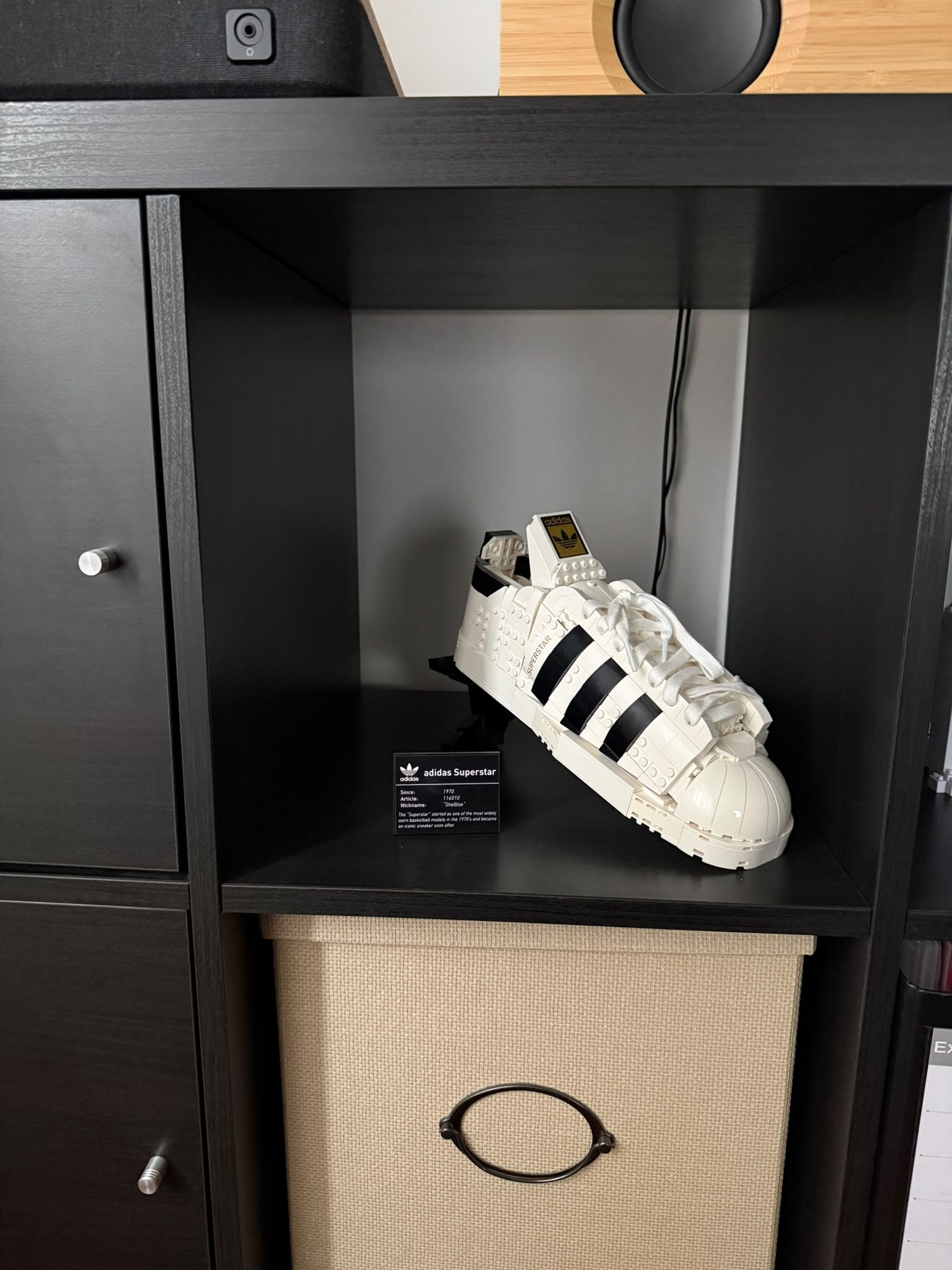
This week I also bought my 1-year-old son his first DUPLO set. I was returning from the Extract Summit and, as every parent who stayed far from his child, felt guilty about it.
Marketing teams working for the shops in the airport know this feeling very well, so they put toys at every corner, and I almost fell for it. I’ve found a nice DUPLO set, around 29 EUR, but it was too big to fit in my backpack, and since I needed to travel with Ryanair, I preferred not to trigger the well-known money thirst of their ground personnel when they see extra baggage (sorry guys, I know you’re incentivized to behave like that).
Anyway, I didn’t buy it; I shared the link to the game on the LEGO website with my wife, and there it was costing 25 EUR. But I was no longer feeling guilty, so I didn’t purchase it.
Then a couple of days after, I saw the same toy inside a supermarket, at 17 EUR. Now it’s no longer a guilty feeling driving me, but the fact that I’ve found a bargain.
Game bought, child happy with his new colorful train, and life goes on as good as always.
So, when I was thinking about how to test the new Decodo Web Data API, I suddenly found an inspiration in creating a small and naive price comparison tool for LEGO sets, to answer a specific question: is there still room for LEGO resellers, buying from one website and selling to another one?
Trying to answer this question could be a good battleground for the Web Data API, so I’ve selected two websites to compare data from: eBay and StockX. Both of them are protected by anti-bots, and they’re a great use case for some of the features I wanted to test more.
But first, let’s see the product in details.
What the Decodo Web Data API is
The Web Data API is one base URL, https://data.decodo.com/v1, with one API key sent as a bearer token. It has four endpoints.
/scrapetakes a URL and returns the page as HTML, Markdown, a screenshot, or the list of XHR calls./searchtakes a query and returns a Google results page as JSON./maptakes a URL and returns the URLs of the website, without downloading them./crawlfollows the links from a starting URL and downloads the pages.
I used the first three for this article and left /crawl out of the test.
Before we start, just keep in mind that this product replaces the older Decodo Web Scraping API and Fast Search API.
The price is per 1,000 successful requests and depends on two choices: the proxy pool (standard or premium) and JavaScript rendering. On the free and $19 plans, according to the billing page, a standard request costs $0.50 per 1,000, a premium one $1.00, and a premium one with JavaScript $1.50. The default pool is premium. /search costs $0.75 per 1,000.
You can try it without paying. There’s a free plan with all four endpoints and no credit card required. According to the product page, it gives you $5 of credit, or up to 10K requests every month, with a rate limit of 10 requests per second. For reference, all the tests of this article took about 1,800 calls. My dashboard shows a spend of $1.76 for the scraped websites, so the whole work fits in the free credit.
For all the tests I wrote a thin client around requests. It adds the bearer header, retries the failed calls and logs every call (status, latency, bytes) to a JSONL file. This is the whole client.py, and all the other scripts of this article import it.
"""Minimal Decodo Web Data API client (https://data.decodo.com/v1).

Every call is appended to artifacts/calls.jsonl with status, latency and payload size,
so the article numbers come from logged runs.
"""

import json
import os
import random
import time
from pathlib import Path

import requests
from dotenv import load_dotenv

HERE = Path(__file__).parent
load_dotenv(HERE / ".env")

API = "https://data.decodo.com/v1"
RETRYABLE = {408, 429, 500, 502, 503, 504, 524}
ARTIFACTS = HERE / "artifacts"
LOG = ARTIFACTS / "calls.jsonl"
ARTIFACTS.mkdir(exist_ok=True)


class WebDataError(RuntimeError):
    pass


def _headers() -> dict:
    key = os.environ.get("DECODO_WEB_DATA_API_KEY", "").strip()
    if not key:
        raise WebDataError("DECODO_WEB_DATA_API_KEY is not set")
    return {
        "Authorization": f"Bearer {key}",
        "Content-Type": "application/json",
        "Accept": "application/json",
    }


def _log(entry: dict) -> None:
    with LOG.open("a") as f:
        f.write(json.dumps(entry) + "\n")


def call(method: str, path: str, payload: dict | None = None, attempts: int = 3) -> dict:
    for attempt in range(1, attempts + 1):
        t0 = time.time()
        try:
            resp = requests.request(method, f"{API}{path}", json=payload, headers=_headers(), timeout=180)
        except (requests.Timeout, requests.ConnectionError) as exc:
            _log({"ts": t0, "path": path, "payload": payload, "status": type(exc).__name__, "attempt": attempt})
            if attempt == attempts:
                raise WebDataError(f"{path} failed after {attempts} attempts: {exc}") from exc
            time.sleep(2**attempt + random.random())
            continue
        elapsed = round(time.time() - t0, 2)
        try:
            body = resp.json()
        except ValueError:
            body = {"raw": resp.text[:1000]}
        first = {}
        if isinstance(body, dict) and isinstance(body.get("results"), list) and body["results"]:
            first = body["results"][0] if isinstance(body["results"][0], dict) else {}
        _log({
            "ts": t0, "path": path, "payload": payload, "status": resp.status_code,
            "attempt": attempt, "elapsed_s": elapsed, "bytes": len(resp.content),
            "task_id": first.get("task_id"), "target_status": first.get("status_code"),
            "api_status_code": body.get("status_code") if isinstance(body, dict) else None,
            "error": None if resp.ok and "results" in body else resp.text[:300],
        })
        # A failed scrape comes back as HTTP 200 with {"status": "failed", "status_code": 613, ...}
        failed = isinstance(body, dict) and "results" not in body and body.get("status") == "failed"
        if resp.ok and not failed:
            return body
        if failed:
            if attempt == attempts:
                raise WebDataError(f"{path} -> scrape failed {body.get('status_code')}: {body.get('message')}")
            time.sleep(1 + random.random())
            continue
        if resp.status_code not in RETRYABLE or attempt == attempts:
            raise WebDataError(f"{path} -> {resp.status_code}: {resp.text[:500]}")
        time.sleep(2**attempt + random.random())
    raise WebDataError("unreachable")


def scrape(url: str | None = None, attempts: int = 3, **params) -> dict:
    payload = dict(params)
    if url:
        payload["url"] = url
    return call("POST", "/scrape", payload, attempts=attempts)


def map_site(url: str, attempts: int = 2, **params) -> dict:
    return call("POST", "/map", {"url": url, **params}, attempts=attempts)


def search(query: str, attempts: int = 2, **params) -> dict:
    return call("POST", "/search", {"query": query, **params}, attempts=attempts)
I had to add the "status": "failed" part after a first run, as you’ll see when I talk about eBay results. With the client in place, a first call looks like this.
from client import scrape

body = scrape("https://ip.decodo.com")
result = body["results"][0]
print(result["status_code"], result["type"], len(result["content"]))
# 200 raw 49377
The xhr parameter on StockX
The first page I wanted to extract data from is the list of LEGO collectibles on StockX, sorted by highest bid. StockX is a marketplace with bids and asks, just like a stock exchange, so for every product it knows the highest bid, the lowest ask, and the last sale. Seems a great way to understand the market price for a LEGO set.
The request is the same /scrape call as before, with one more field.
{
  "url": "https://stockx.com/brands/lego?category=collectibles&order=DESC&sort=highest_bid",
  "xhr": true,
  "geo": "Italy"
}
With xhr set to true, the content field of the response becomes an array, with one object for every call the page made. Each object has url, method, status_code, request_headers, request_payload, response_headers and response_body.
Just like when you open your network tab in the browser, most of the requests you’ll see are what you’d expect from a modern website: the cookie banner, Datadog, ad networks, a Cloudflare challenge call. In the middle there were six POST calls to https://gateway.stockx.com/api/graphql, and one of them had a response body of 122 KB. Its request_payload says the operation is getDiscoveryData, and the response contains the 40 products of the page.
{
  "title": "LEGO Marvel X-Men: The X-Mansion Set 76294",
  "model": "Set 76294",
  "condition": "New",
  "market": {
    "state": {
      "highestBid": {"amount": 353},
      "lowestAsk": {"amount": 384}
    },
    "statistics": {
      "last90Days": {"averagePrice": 469, "salesCount": 242},
      "lastSale": {"amount": 506}
    }
  }
}
So yes, with one parameter you get the internal API responses of a protected website and its requests too. In the payload I could read the variables of the GraphQL query (country, currency, page index, filters, sort) and the persisted query hash.
Some interesting points about the API usage:
The billing confirms that
xhrrenders the page anyway. When I filter my dashboard by requests with JavaScript enabled, all the 14 StockX calls are there, and only 2 of them hadheadlessin the payload. So you should count anxhrrequest at the JavaScript rate, which is $1.50 per 1,000 on the smaller plans.The second is that there’s no filter. You get every call, analytics included, and you look for yours in the list. There’s a browser action called
fetch_resourcethat takes a regex and returns only the first call that matches. I didn’t use it, because I wanted to see everything.The third is the role of
geo. My first request had nogeo, the exit IP was in Turkey, and the GraphQL variables saidcountry: TR, currency: USD. Withgeo: "Italy"they becamecountry: IT, currency: EUR. So the proxy location decides which market StockX shows you, and for a price comparison with eBay Italy I need the Italian one.
Ten pages of the catalog
The code that reads a page is short. BASE is the URL of the sorted list and GEO is “Italy”. We ask for the page, we look for the getDiscoveryData call in the list, and we parse its body.
def fetch_page(page: int, tries: int = 3) -> dict:
    url = BASE if page == 1 else f"{BASE}&page={page}"
    last = "no attempt"
    for attempt in range(1, tries + 1):
        t0 = time.time()
        try:
            body = scrape(url, attempts=1, xhr=True, geo=GEO)
        except WebDataError as exc:
            last = str(exc)[:200]
            continue
        calls = body["results"][0]["content"]
        for c in calls if isinstance(calls, list) else []:
            if "gateway.stockx.com/api/graphql" not in c.get("url", ""):
                continue
            req = json.loads(c.get("request_payload") or "{}")
            if req.get("operationName") != "getDiscoveryData":
                continue
            data = json.loads(c["response_body"]).get("data") or {}
            browse = data.get("browse")
            if not browse:
                continue
            return {
                "page": page, "attempt": attempt, "elapsed_s": round(time.time() - t0, 1),
                "xhr_calls": len(calls), "variables": req["variables"], "browse": browse,
            }
        last = f"getDiscoveryData not in {len(calls)} captured calls"
    return {"page": page, "error": last}
Then a second function turns the GraphQL response into flat rows. The set number is in the model field (”Set 76294”), and the prices are under market.
def rows(result: dict) -> list[dict]:
    out = []
    for pos, edge in enumerate(result["browse"]["results"]["edges"], 1):
        n = edge["node"]
        state = (n.get("market") or {}).get("state") or {}
        stats = (n.get("market") or {}).get("statistics") or {}
        m = re.search(r"\d{4,7}", n.get("model") or "") or re.search(r"\b\d{4,7}\b", n.get("title") or "")
        out.append({
            "page": result["page"], "pos": pos, "set_number": m.group(0) if m else None,
            "model": n.get("model"), "title": n.get("title"), "url_key": n.get("urlKey"),
            "condition": n.get("condition"), "is_ad": bool(edge.get("isAd")),
            "highest_bid": (state.get("highestBid") or {}).get("amount"),
            "lowest_ask": (state.get("lowestAsk") or {}).get("amount"),
            "last_sale": (stats.get("lastSale") or {}).get("amount"),
            "sales_90d": (stats.get("last90Days") or {}).get("salesCount"),
            "avg_90d": (stats.get("last90Days") or {}).get("averagePrice"),
        })
    return out
I ran it on the first 10 pages. All 10 returned the GraphQL response, and one of them needed a second attempt. A call took between 21 and 82 seconds, with most of them around 25.
The result is 400 products (397 different set numbers) with highest bid, lowest ask, last sale and the sales of the last 90 days, all with “New” conditions.
Curious to know which is the most expensive? A vintage Star Wars theme set, Cloud City, with a bid of 1,821 euros.
eBay Italy and the browser check
For every set number, I wanted the first page of an eBay.it search to read price and condition from the result cards, without opening the detail pages. This means 397 searches, and I started with the cheapest configuration.
In my first probes the standard proxy pool failed, with and without JavaScript. The premium pool without JavaScript returned the results page in about 3 seconds. So I launched the full run with premium and no JS, and here I found the two most important things of this test.
A failed scrape is an HTTP 200
When Decodo can’t get a page, the HTTP status of the API response is still 200. The error is in the body.
{
  "status": "failed",
  "status_code": 613,
  "message": "We were not able to scrape the target. You can try the following: 1) Switch between JS and non-JS rendering, 2) Retry the request, 3) Switch to a different geo-location.",
  "task_id": "7528388964445613057"
}
My client crashed on the first one, because it looked for results in a response that had none. If you check only response.ok, you’ll make the same mistake. The good news is that a 613 isn’t billed.
A block page is a success
The second thing is worse, in my opinion, but it’s not a fault of the tool but a trick website behavior. In many responses, the status was 200, results was there, and the content was a page of 13 KB with the title “Ci scusiamo per l’interruzione” (sorry for the interruption). It’s the browser check that eBay shows before the real page. For the API this is a success, and the response codes page says that a 200 is billed.
So I added my own check on the content, with up to 5 attempts for every search. These are the numbers of the full run: 874 calls for 397 searches.
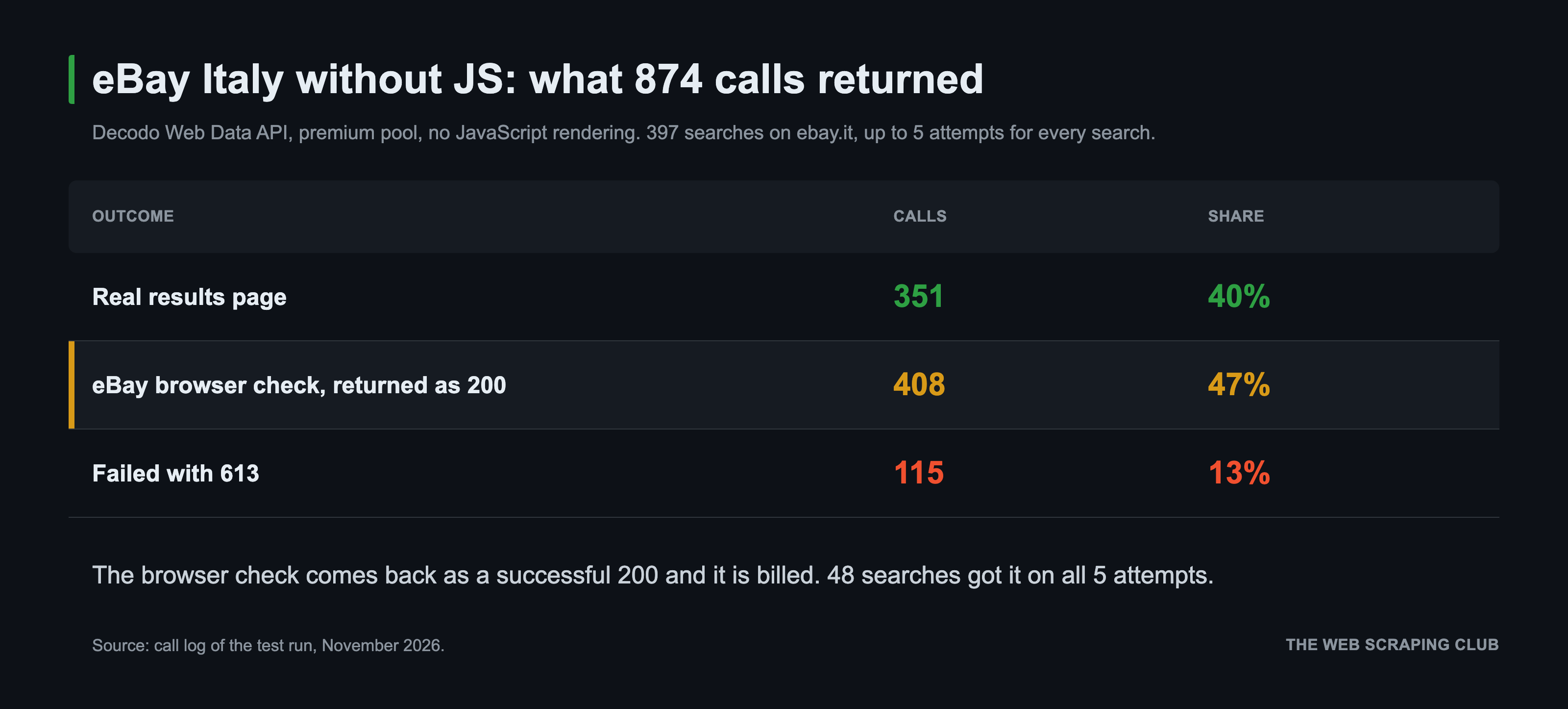
Only 40% of the calls returned data, and 48 searches completed the browser check on all 5 attempts. At the list price of $1.00 per 1,000, the 408 check pages are about 40 cents, so the money is a small problem. The bigger one is the data: without a check on the content, almost half of my responses would have been empty pages marked as good, which means you’ll be billed for them. Not a big issue for this test, but keep it in mind if you plan to use the API on a larger scale.
JavaScript rendering fixes it
The error message of the 613 suggests to switch between JS and non-JS rendering, so I tried headless: "html" on the 48 missing searches. All 48 came back with the listings.
But at that point I had made hundreds of calls, and the share of 613 errors had grown during the run. To be sure that the difference came from the rendering, I ran a control: 24 searches without JS and the same 24 with JS, one after the other, at the same concurrency.
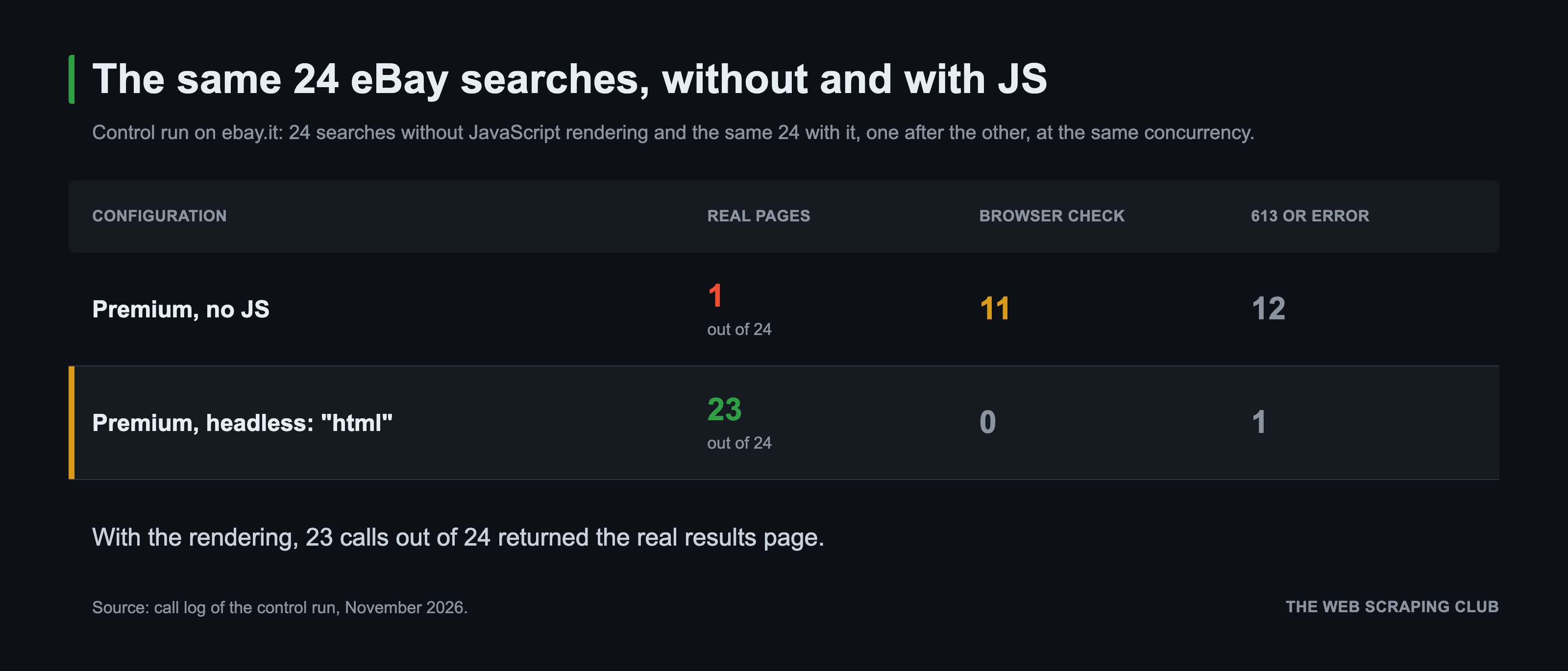
With the rendering, 23 calls out of 24 returned the real page. Then I ran all 397 searches again, only with JS and with up to 3 attempts. It took 393 calls: 378 real pages, 11 browser checks, and 4 errors, with a median page time of 5 seconds, and the run ended in 8.5 minutes with 6 workers. At the end of the loop, 395 of 397 searches had their page.
The 4 errors were something new: an HTTP 429 that arrives in 0.2 seconds with the message “Requests for this page type are temporarily limited. Please try again later.”, so I was rate-limited.
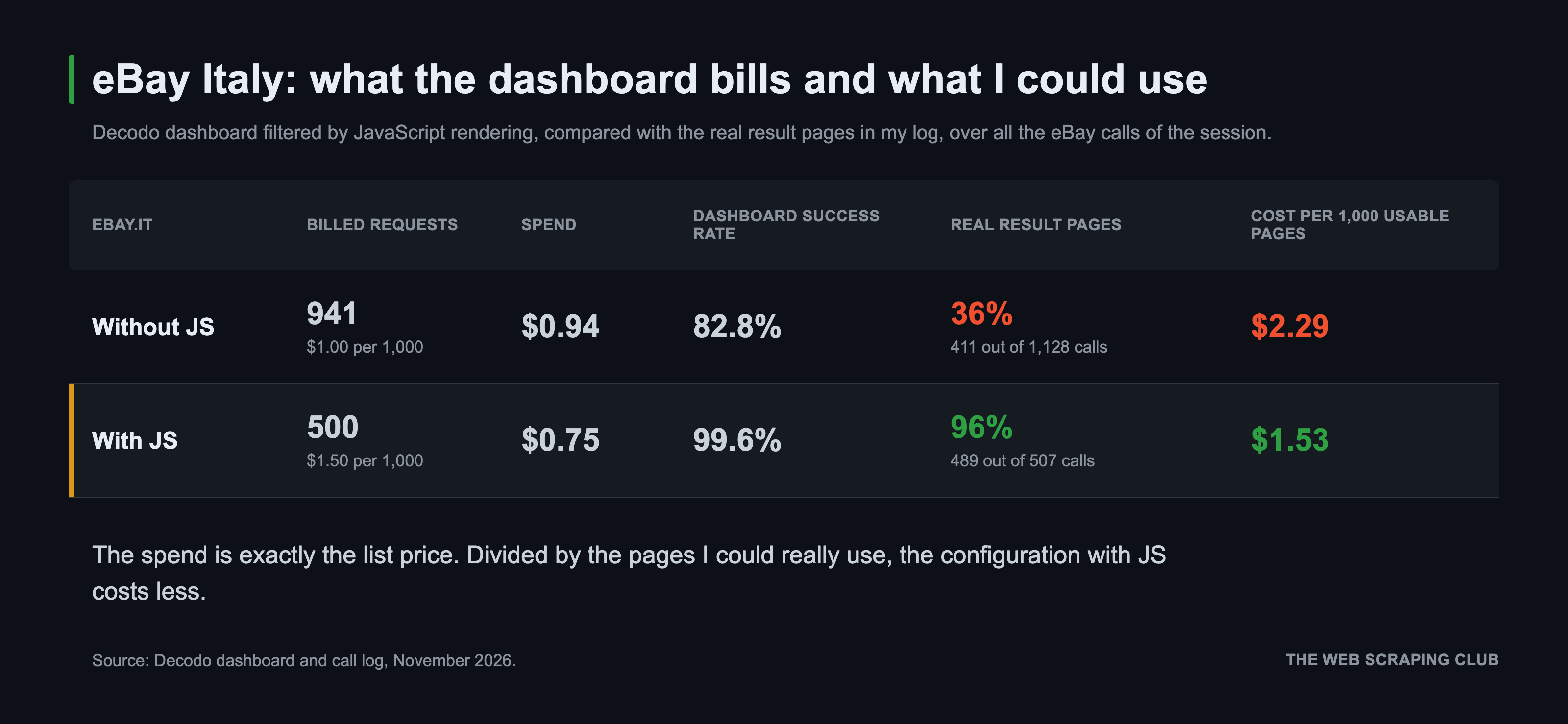
The dashboard lets you filter the requests by JavaScript rendering. So at the end I compared its numbers for ebay.it with the real result pages in my log, over all the eBay calls of the session.
Parsing the results
The last piece is the parser. Decodo has target templates with ready parsers for websites like Amazon, Google, Walmart, and TikTok, but eBay isn’t in the list. I also tried parse: true on the eBay URL, and the API answered with a validation error. So I asked Claude to build the boring part, and it used BeautifulSoup, something that I’d never use, but that’s it; it’s not the core of the article. A good old Python script with XPATH selector would have been way more readable.
PRICE = re.compile(r"EUR\s*([\d.]+,\d{2})")


def eur(text: str) -> list[float]:
    return [float(p.replace(".", "").replace(",", ".")) for p in PRICE.findall(text or "")]


def parse(html: str) -> dict:
    soup = BeautifulSoup(html, "lxml")
    heading = soup.select_one(".srp-controls__count-heading")
    listings, seen = [], set()
    for card in soup.select("li.s-card"):
        title_el = card.select_one(".s-card__title .su-styled-text") or card.select_one(".s-card__title")
        price_el = card.select_one(".s-card__price")
        title = title_el.get_text(" ", strip=True) if title_el else ""
        lid = card.get("data-listingid")
        if not price_el or title == "Shop on eBay" or lid in seen:
            continue
        seen.add(lid)
        prices = eur(" ".join(p.get_text(" ", strip=True) for p in card.select(".s-card__price")))
        sub = card.select_one(".s-card__subtitle")
        subtitle = sub.get_text(" ", strip=True) if sub else ""
        attrs = [a.get_text(" ", strip=True) for a in card.select(".s-card__attribute-row")]
        shipping = next((a for a in attrs if "consegna" in a.lower() or "spedizione" in a.lower()), None)
        listings.append({
            "id": lid, "title": title,
            "condition": subtitle.split("|")[0].strip() or None,
            "seller_type": subtitle.split("|")[1].strip() if "|" in subtitle else None,
            "price": prices[0] if prices else None,
            "price_max": prices[-1] if len(prices) > 1 else None,
            "price_text": price_el.get_text(" ", strip=True),
            "shipping_text": shipping,
            "shipping": (eur(shipping) or [0.0 if "gratis" in shipping.lower() else None])[0] if shipping else None,
            "from": next((a[3:] for a in attrs if a.startswith("da ")), None),
            "auction": any("offert" in a.lower() and "proposta" not in a.lower() for a in attrs),
        })
    count_heading = heading.get_text(" ", strip=True) if heading else None
    m = re.match(r"([\d.]+)\+?\s+risultat", count_heading or "")
    total = int(m.group(1).replace(".", "")) if m else None
    # eBay pads short result lists with looser matches; keep only the cards covered by the result count
    if total is not None:
        listings = listings[:total]
    return {"count_heading": count_heading, "total_results": total, "listings": listings,
            "challenge": "Ci scusiamo per l'interruzione" in (soup.title.get_text() if soup.title else "")}
And this is the function of the final run, with the check on the content. PLAN is a list of three {"headless": "html"}, one for every attempt, and ebay is the module with the parser above. A response counts only if the page has the results heading of eBay.
def run(set_number: str) -> dict:
    path = OUT / f"{set_number}.json"
    if path.exists():
        return json.loads(path.read_text())
    url = f"https://www.ebay.it/sch/i.html?_nkw=lego+{set_number}&_sacat=19006&_ipg=240"
    for attempt, extra in enumerate(PLAN, 1):
        mode = "js" if extra else "no_js"
        t0 = time.time()
        r = parsed = None
        try:
            body = scrape(url, attempts=1, proxy_pool="premium", geo="Italy", **extra)
            r = body["results"][0]
            parsed = ebay.parse(r["content"])
            outcome = "challenge" if parsed["challenge"] else ("page" if parsed["count_heading"] else "other")
        except WebDataError as exc:
            outcome = "613" if "613" in str(exc) else "error"
        elapsed = round(time.time() - t0, 1)
        with lock, ATTEMPTS_LOG.open("a") as f:
            f.write(json.dumps({"set": set_number, "attempt": attempt, "mode": mode, "outcome": outcome, "s": elapsed}) + "\n")
        if outcome == "page":
            out = {"set_number": set_number, "url": url, "status_code": r["status_code"], "task_id": r["task_id"],
                   "attempts": attempt, "mode": mode, "elapsed_s": elapsed, "html_bytes": len(r["content"]), **parsed}
            path.write_text(json.dumps(out, ensure_ascii=False))
            return out
    return {"set_number": set_number, "error": f"no result page in {len(PLAN)} attempts"}
Comparing the prices
My first query was “lego set 10123”, and to be honest the results were useless. A search like this on eBay returns mostly spare parts, minifigures and instruction manuals, all with the set number in the title. The cheapest “new” listing for the Cloud City was 1.43 euros.
So in the final run I changed two things. In the URL, I added the category of the complete sets (_sacat=19006, “Set e pacchetti completi”) and 240 results per page. Sellers put spare parts in that category too, so I added a filter on the title. I keep a card only if the title has the set number, no other set number, and none of the words that mark a partial item (ref, minifig, istruzioni, LED, and so on). Again Claude came with a boring but effective solution.
PARTIAL = re.compile(
    r"\b(ref|minifig\w*|figur\w*|personaggi\w*|istruzion\w*|manual\w*|libretto|anleitung|bauanleitung|instructions?|solo|"
    r"scatola vuota|box vuot\w*|empty box|leerkarton|pezz[oi]|ricamb\w*|parti|part[es]?|teile|adesiv\w*|stickers?|"
    r"aufkleber|led|luci|light\w*|beleuchtung|illuminazione|teca|vetrina|display|acrylic|acrilic\w*|espositore|stand|"
    r"supporto|compatibil\w*|moc|custom|polybag|sacchett\w*|bag|busta|incomplet\w*|senza|poster|depliant)\b", re.I)


def complete_set(title: str, num: str) -> bool:
    if not re.search(rf"(?<!\d){num}(?!\d)", title):
        return False
    others = [n for n in re.findall(r"(?<!\d)\d{4,7}(?!\d)", title) if n != num and not n.startswith(("19", "20"))]
    return not others and not PARTIAL.search(title)
Out of 53,604 cards, the filter keeps 18,217. For every set I take the median price by condition, because the minimum is still dirty. For the Millennium Falcon 75192, the cheapest “new” listing that passes the filter is a 29.90 euros chess board from the set, while the median of the 91 new listings is 1,000 euros.
Just to draw some numbers, a new set on eBay Italy is listed about 30% above the last sale on StockX, and a used one about 30% below it. The lowest ask on StockX is often far from the last sale. For example, the Colosseum (set 10276) has a lowest ask of 2,258 euros and a last sale of 1,181.
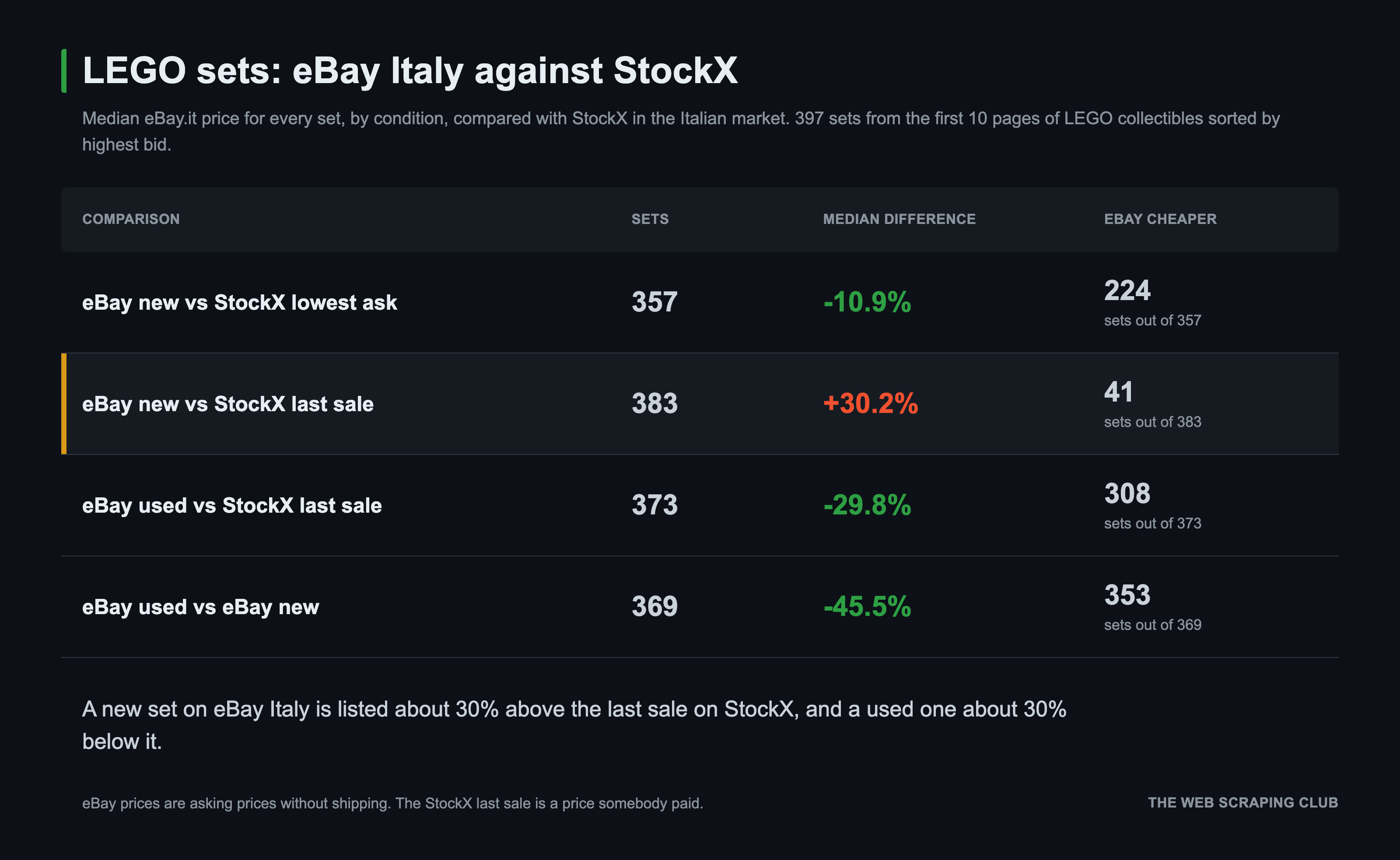
I want to be clear about the limits of this comparison. On eBay we read the price the seller asks, without shipping, while the last sale of StockX is a price somebody paid. The title filter is a list of keywords and some partial items still pass. And for 77 sets eBay has more than 240 results, so we see only the first 240 in its default order.
Last but not least, this comparison is really naive, do not buy LEGO sets in production!
The other endpoints: /map and /search
After being happy for building my pricing comparison, I’ve just realized that I’ve used only the /scrape endpoint and not all the other ones, so let’s be creative.
What if we want to know what LEGO asks for the sets that are still in production? To find them, I used /map on the Italian LEGO store.
/map to find the product pages
/map reads the sitemap of a website and the links of the page you give it, and returns the list of URLs. My first call, on https://www.lego.com/it-it with a filter on the product paths, returned zero links. The response had a warning field that explains why: “sitemap index lists 341 child sitemaps; 19 fetched (at most 25 sitemap files per map)”. This limit of 25 files isn’t in the docs, and on a big website it means that the sitemap route doesn’t reach the products.
The other route worked well. With sitemap: "skip", /map reads only the links of the page. One call on the home page returned the 47 theme pages (Star Wars, Technic, Icons and so on). Then I made one call for every theme page and kept only the product URLs (JS is false here, I didn’t need the rendering).
home = map_site("https://www.lego.com/it-it", sitemap="skip", geo="Italy")
themes = sorted({l["url"].split("?")[0] for l in home["results"][0]["content"]["links"]
                 if re.search(r"/it-it/themes/[^/]+$", l["url"].split("?")[0])})


def one(url):
    t0 = time.time()
    params = {"sitemap": "skip", "select_paths": ["^/it-it/product/"], "geo": "Italy"}
    if JS:
        params["JS_rendering"] = True
    try:
        r = map_site(url, attempts=2, **params)["results"][0]
        return {"theme": url, "status_code": r["status_code"], "s": round(time.time() - t0, 1),
                "links": [l["url"].split("?")[0] for l in r["content"]["links"]]}
    except WebDataError as exc:
        return {"theme": url, "error": str(exc)[:200], "s": round(time.time() - t0, 1), "links": []}
The 47 calls took 26 seconds with 4 workers, with no errors and no JavaScript. They returned 551 product URLs, and every URL ends with the set number (/it-it/product/millennium-falcon-75192). Of the 397 StockX sets, 48 are in this list, so they’re still on sale at the official store. The real number can be higher, because I read only the first page of every theme.
Two formats in one call
For the 48 product pages I went back to /scrape, with a feature I hadn’t tried yet. If you add ?type=raw,markdown to the endpoint, the response contains two results, the HTML and the Markdown of the same page.
def jsonld_price(html: str):
    for block in re.findall(r'<script[^>]+application/ld\+json[^>]*>(.*?)</script>', html, re.S):
        try:
            data = json.loads(block)
        except ValueError:
            continue
        for item in data if isinstance(data, list) else [data]:
            offers = item.get("offers") if isinstance(item, dict) else None
            offer = offers[0] if isinstance(offers, list) and offers else offers
            if isinstance(offer, dict) and offer.get("price") is not None:
                return float(offer["price"]), offer.get("priceCurrency"), (offer.get("availability") or "").rsplit("/", 1)[-1]
    return None, None, None


def one(item):
    num, url = item
    t0 = time.time()
    try:
        body = call("POST", "/scrape?type=raw,markdown",
                    {"url": url, "proxy_pool": "premium", "geo": "Italy", "markdown": True}, attempts=3)
    except WebDataError as exc:
        return {"set": num, "url": url, "error": str(exc)[:200]}
    by_type = {r.get("type"): r for r in body["results"]}
    html = (by_type.get("raw") or {}).get("content") or ""
    md = (by_type.get("markdown") or {}).get("content") or ""
    price, currency, availability = jsonld_price(html)
    m = re.search(r"(\d{1,3}(?:\.\d{3})*,\d{2})\s*€", md)
    p = stockx[num]
    return {"set": num, "url": url, "s": round(time.time() - t0, 1), "types": sorted(by_type), "html_chars": len(html),
            "md_chars": len(md), "retail": price, "currency": currency, "availability": availability,
            "first_price_in_markdown": m.group(1) if m else None, "title": p["title"],
            "stockx_highest_bid": p["highest_bid"], "stockx_lowest_ask": p["lowest_ask"], "stockx_last_sale": p["last_sale"] or None}
In the code, matches is the list of the 48 sets with their URLs and stockx is the catalog we built before. I read the price from the JSON-LD in the HTML, and I used the Markdown to check what an LLM would see. The median page is 1.17 million characters of HTML and 53,000 of Markdown, 22 times smaller. On all the 48 pages the first price in the Markdown was the same as the JSON-LD one.
The retail price tells something I didn’t expect. Of these 48 sets, 46 have a last sale on StockX, and only 17 were sold above the retail price. The Millennium Falcon 75192 costs 849.99 euros at the LEGO store, and its last sale on StockX was 804 euros. The Death Star 75419 costs 999.99 and its last sale was 858. So, in this sample, most of the sets still in production sell on StockX below the price of the official store.
/search to find who else sells
/search is the simplest of the three. You send a query and you get the Google results as a flat JSON, with organic, people_also_ask, related_searches and a few other keys. I used it to check if eBay and StockX were the right sources. For the 20 sets with the highest bid I searched “lego 10123 prezzo” (and so on) with geo: "Italy", and counted the domains in the organic results.
def one(r):
    t0 = time.time()
    try:
        body = search(f"lego {r['set_number']} prezzo", geo="Italy", locale="it-it")
    except WebDataError as exc:
        return {"set": r["set_number"], "error": str(exc)[:200]}
    return {"set": r["set_number"], "s": round(time.time() - t0, 1), "body": body}


domains = Counter()
for r in ok:
    organic = r["body"].get("organic") or []
    for d in {urlparse(o["link"]).netloc.removeprefix("www.") for o in organic}:
        domains[d] += 1
All 20 calls answered, with a median of 1.3 seconds and 8 to 10 organic results each.
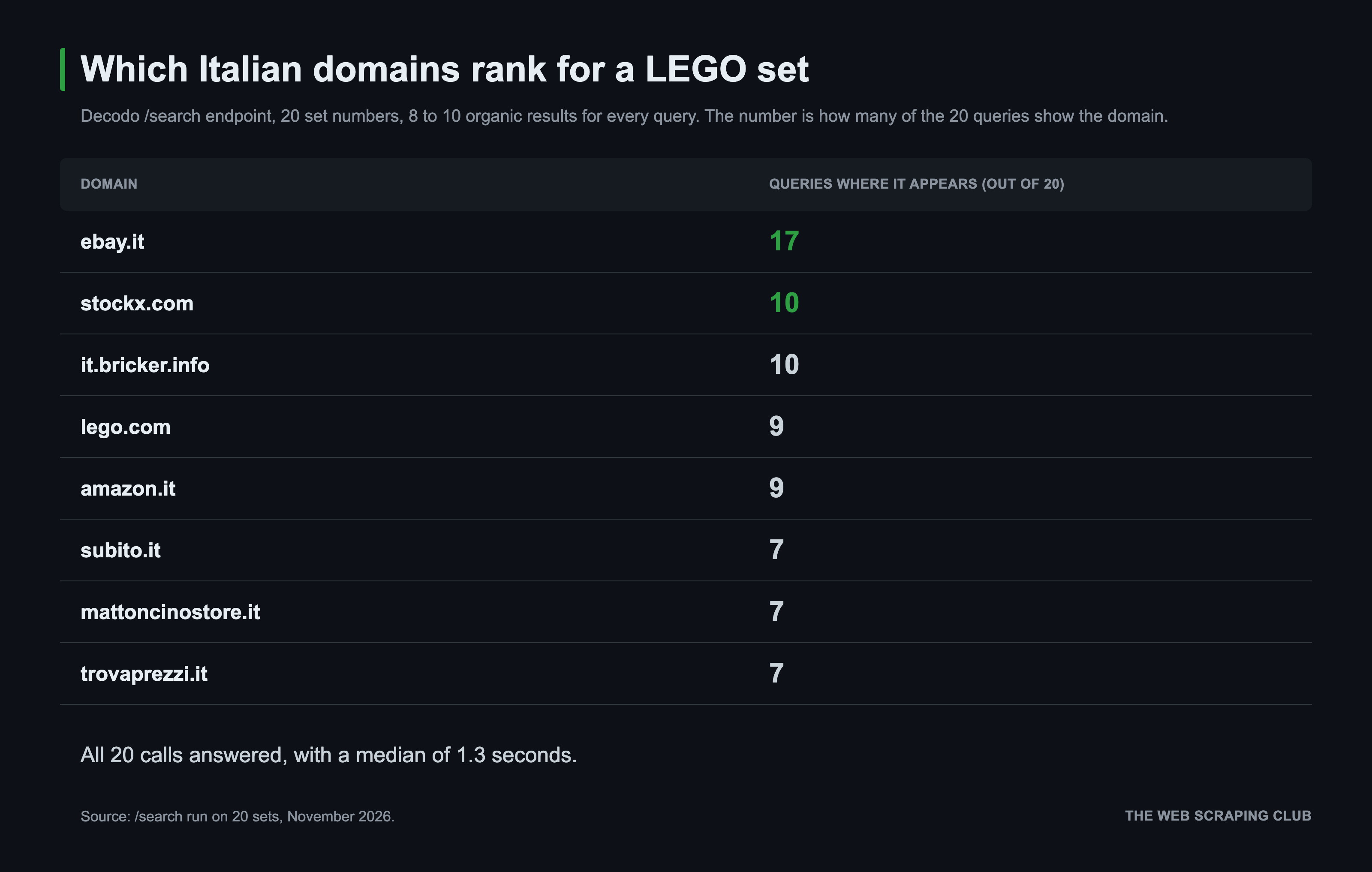
eBay and StockX are the first two, so the choice was fine. If I wanted to extend the comparison, the next sources would be Amazon, Subito (the Italian classifieds website), and Trovaprezzi, an Italian pricing comparison website.
Final considerations
The xhr parameter is the reason I’d use this API. Reading the internal API of StockX took one field in a JSON payload, and the same call gave me the requests too, with headers and payloads. The cost is time (around 25 seconds for a page), and you get every call without a filter. In the dashboard, the 14 StockX calls cost 2 cents in total, at the JavaScript rate.
A cost-wise way of using it could be to let your agent write a scraper based on the call that the API made, the payload, and results, and then check if you could bypass the bot protection on the APIs (if there are, since it often happens that a website is protected but its endpoints are not).
On eBay the product works with JavaScript rendering, and you need to know it before you start. Without it, in my run, almost half of the calls returned a block page marked as a success. My advice is the same I’d give for any scraping API. Check results before you read it, and validate the content of every page with a rule of your own (a selector, a title, a minimum size).
/map is fast when it reads the links of a page. On the sitemap side it stops at 25 files, which is a problem on big websites. /search did what it says. The multi-format response is a small feature, but it saved me a second call on every page.
All the code you need is in this article. It runs on Python 3.11 with requests, python-dotenv, beautifulsoup4 and lxml, which were already in our environment, and it reads a DECODO_WEB_DATA_API_KEY from a .env file next to client.py.
Do you think the Decodo Web Data API would be useful in your scraping routines or your colleague’s? If so, share this article and the API page.