I’ve been looking at Kasada for a while now, and every time I tried to approach it in a simple way. If you send the right token, you get the page and move on. That’s exactly what I did in THE LAB #76, and also the first time I ran into it back in 2022, when getting a 429 on a parka page was the main issue. This method works, but it doesn’t really tell you anything about how the system decides if you’re a real user.
That program has gotten harder to look at. Kasada doesn’t ship obfuscated JavaScript anymore, at least not in the sense that a beautifier helps you. It ships a custom virtual machine and a blob of bytecode for it. You can pretty-print the file all day, and you’ll still be reading an interpreter loop, not logic. So I stopped asking how to get past it. I wanted to know what it costs to open one of these things and what you’re allowed to claim once you have one.
Give your AI a web data layer – Decodo’s Web Scraping API turns any site into clean, structured data your models can actually use.
To find out, I pointed an autonomous agent at Kasada on nike.com. What I wanted out of it, mostly, was the list. Which values does this thing actually reach for when it builds your fingerprint? Not a bypass, not a token generator, just the inventory of what it reads off your browser and how solid the evidence is for each entry.
That list came back at 412 entries, and it lives in the code rather than in this article. You’ll find it in fingerprint_inventory.csv, with the category, the reference count, and the byte positions for every one.
Everything below is the client side of j-1.2.726 as observed on August 26, 2026, plus the parts I re-ran myself, because I wasn’t going to publish somebody else’s numbers on trust.
The tools
Manus AI did the collection and the first pass of analysis. It’s an agent that pairs a language model with a sandboxed Linux VM and a Chromium browser, so it can fetch assets, run Node and Python, drive a page, and iterate on its own output inside the sandbox. We used it the same way in THE LAB #108 against Akamai on Net-a-Porter. The reason it gets this class of work rather than a chat assistant is the guardrail gap. Ask a heavily guarded model to deobfuscate a production anti-bot sensor and enumerate the signals it scores, and you hit a wall.
Node 22 performs deobfuscation, and the important point is that it never executes anything Kasada served. We reimplemented the decoders from the beautified source and ran them over the captured bytes, so nothing from nike.com was ever evaluated.
The Chrome DevTools Protocol side is deliberately boring. It reads browser APIs, resource timing, and deterministic canvas, WebGL and audio probes, and that’s all it does. No hooks, no replaced natives, no Proxies over DOM APIs. Python 3.11 from our shared venv runs the comparison afterward.
That script fires an mfc request and creates two iframe navigations to an fp endpoint. The fp response is a tiny HTML document that bootstraps the real work, and here it is as captured, with session values stripped:
Four things are worth pulling out of those nine lines. window.KPSDK gets created here, not in p.js. The clock is pinned to performance.now bound to performance, with Date.now as fallback, and KPSDK.start is stamped immediately, so everything downstream measures against that origin. The iframe communicates with the parent via postMessage using a KPSDK:MC: prefix. And ips.js gets loaded with three query parameters, one of which is the SDK version in cleartext.
So there are four layers here, and I should say which one I’m after. The loader and its integrity checks live in p.js. The fingerprinting program lives in ips.js. Then there’s whatever transport carries the result back, and behind that the server-side decision.
ips.js is the one I care about, because that’s where the browser values get read. p.js comes along for the ride, since you can’t reach ips.js without going through it. The transport we’ll get to, and the answer is unsatisfying. The server-side scoring is out of scope for the boring reason that nobody outside Kasada can see it, and I’d rather say that than dress a guess up as a finding.
The rules we set before collecting anything
This part is boring and it’s the reason the rest is usable.
The collection was read-only by construction. No native API replacement, no getters or Proxies added, no scripts or requests modified, no payload decryption, no token reuse. Five loads of https://www.nike.com/men, same profile, same session, cache-busting on each, with the same snapshot script every time. Arrays and keys that may return in arbitrary order are sorted before hashing. API errors are recorded as errors rather than being replaced with an invented value. Raw tokens never make it into the artifacts, only length, alphabet class and SHA-256.
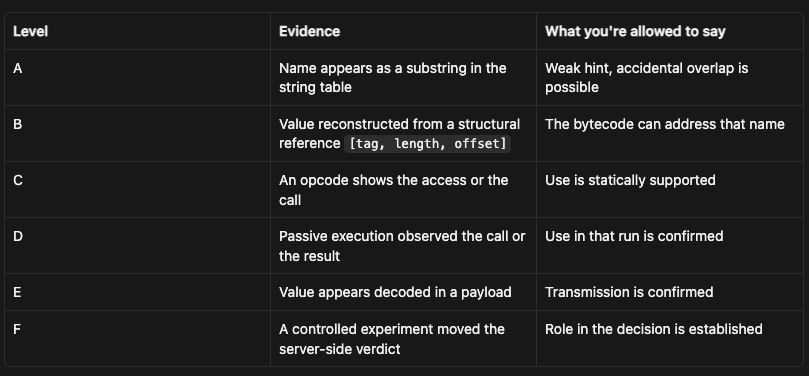
More important, every claim carries an evidence level:
The census below lives at B and D. Level E was never reached, and level F was never attempted against the live service. If you’ve read anti-bot writeups that announce “83 signals collected and transmitted”, the number almost always comes from level A. A string sitting in a table hasn’t been read by anything, and a property that does get read hasn’t necessarily been sent anywhere.
Both assets hide their actual content in a string blob that is converted into an integer array. The blobs are large. p.js was 163,120 bytes with a main blob of 136,736 characters; ips.js was 655,603 bytes with a main blob of 603,415.
The p.js decoder is a variable-radix varint and nothing else. Alphabet of 72 characters, radix 48, no seed, no checksum. It produces 74,029 integers.
ips.js keeps the same varint base and wraps it in a time lock. Alphabet of 71, radix 46, and a correction seed derived from the wall clock:
Math.round(Date.now() / 18000081) * 11
Each decoded integer has a decimal digit of that seed subtracted from it, cycling through the digits and starting at an index equal to the sum of those digits. After 14 values, the decoder checks the running result against the constant 1611118298. If the checksum misses, that seed was wrong. Three candidates get tried: the current window and the two neighbors, and during the capture, the seed that worked was 1,092,509. With the right seed, you get 305,595 integers.
I re-ran both decodes on my own machine, out of the archived assets, and they came back identical:
Now, 18000081 milliseconds is five hours. Three candidate windows mean that a captured ips.js only decodes within a 15-hour band; after that, it’s a permanent blob. That’s the kind of claim that’s easy to assert and annoying to prove, because the obvious way to test it is to wait. So instead of waiting, we walked a synthetic clock past the decoder and watched where it broke:
clock -10h  window seed 1092498  decoded 305595 integers with seed 1092509
clock  -5h  window seed 1092509  decoded 305595 integers with seed 1092509
clock +  0h  window seed 1092520  decoded 305595 integers with seed 1092509
clock +  5h  window seed 1092531  DECODE FAILED (checksum mismatch on all 3 candidates)
clock + 10h  window seed 1092542  DECODE FAILED
clock + 24h  window seed 1092575  DECODE FAILED
clock + 72h  window seed 1092685  DECODE FAILED

asset seed        1092509 (window 99319)
band opens        2026-08-26T05:44:04.717Z
band closes       2026-08-26T20:44:04.960Z
band width        15.00 hours
fetched at        2026-08-26T15:30:09.000Z
already spent     9.77 hours of the band
usable after that 5.23 hours
I ran that at 20:16 UTC on the day of the capture, with about half an hour to spare. Here’s the part that took me a second to appreciate. The validity band is exactly fifteen hours wide, three windows of five hours, and it’s anchored to the window the asset was minted in. It is not anchored to when you fetched it.
Nike handed us that ips.js at 15:30 UTC, which was 9 hours and 46 minutes into its own band. So we didn’t get fifteen hours to work with; we got five hours and fourteen minutes. Fetch the same file an hour and a quarter later in its cycle, and you’d be down to four. Fetch it near the end of the band and you’d get minutes.
You have no way to know in advance where in that band your download lands, because the asset doesn’t tell you when it was minted. You find out by decoding it and reading which of the three candidate seeds came back valid. That’s what the seed field in the decoder output is for, and it’s the first thing I’d log in any tooling.
After 20:44 that file is bytes. No amount of cleverness gets the bytecode back out of it, because the key was the clock and the clock moved on. So if you’re building anything that involves reading ips.js, the reading must occur in the same session as the fetch. Archiving the assets to analyze at your leisure doesn’t work, and I’d rather you learn that here than from a folder of files that no longer open. The script is at seed_window.js.
The string table, and why substring search lies
Both files pull a string table out of the integer array. The index comes from the last decoded integer XORed with the array length plus four, the slice gets removed, and the value decoder reads the whole thing back as one long string. p.js yields 6,145 characters, ips.js yields 38,946, and 99.87% of the latter is printable ASCII.
Here’s the first 600 characters of the ips.js table, verbatim:
There are no delimiters. onmouseenter, voiceURI, _globalProxy, screenTop, getComputedStyle, outerHeight, MediaRecorder and audio/webm;codecs=opus are all in there, and so are khq, jxrkgvdtht, KidoPizzeria, angela2 and a revolver emoji. Substring-matching a property name against that soup will find things that aren’t there. canva appears twice, and it isn’t the design tool.
The way to get a defensible answer is to stop searching for substrings and reconstruct structural references instead. The value decoder encodes a string as a triple of a tag, a length and an offset into the table. Scan the integer stream for well-formed triples and you get values the bytecode can genuinely address, not characters that happen to sit next to each other. That scan found 14,734 references resolving to 3,789 distinct values.
Level A says the letters w-e-b-d-r-i-v-e-r appear somewhere in that soup. Level B says the interpreter holds a reference it can resolve to webdriver. Only the second one is worth writing down.
The Web Scraping Club is a reader-supported publication. To receive new posts and support my work, consider becoming a free or paid subscriber.
Two VMs, 86 opcodes and 193
The two files run different machines, and this surprised me.
p.js is the straightforward one. It carries a literal array of 86 opcode functions wrapped in a Proxy, and the handler adds a layer of indirection so the opcode number in the bytecode doesn’t map directly to a slot in the array. The instruction reader is three tokens long:
Continue reading this post for free, courtesy of Pierluigi Vinciguerra.