

CSS selectors and XPath can both find the same product card on the same web page, and for most scrapers they return the same data. So “Which one is better?” is not the correct question to ask.
Three questions settle the choice between the two:
What identifies the record you want?
What do you need back?
Does your tool support the expression you’re about to write (which is a different question from whether a browser supports it)?
When those three leave you a genuine choice, the rule of thumb is the following:
Start with CSS selectors: They match the way you already look at a page, class matching is built into the syntax, and they handle ordinary extraction with less to read.
Reach for XPath per query rather than per project: When the rule depends on text, on moving up or back through the tree, or on filtering before positioning.
This article starts with the tree that CSS selectors and XPath expressions query, covers each language’s syntax against the same running example, compares them directly, and finishes with the question that matters more than either syntax: “What makes a selector survive a website redesign?”
Let’s get into this!
Give your AI a web data layer – Decodo’s Web Data API turns any site into clean, structured data your models can actually use.

What Is the DOM?
Before you can choose between CSS selectors and XPath expressions, you need to understand what they do at a high level.
Both languages query a parsed document tree, and the shape of that tree decides what your expressions can find. In a browser, that tree is exposed through the Document Object Model (DOM): A programming interface for accessing and modifying a document’s elements, attributes, and text. Thanks to this, a product card on a website becomes an element with other elements nested inside it. Its name becomes text within one of those elements. Its destination URL becomes an attribute on a link.
So, you’re dealing with elements, nesting, attributes, and text. And that mapping is the entire vocabulary you’re about to query with. For example, consider a catalog containing two products:
<section id="catalog">
  <article class="product" data-product-id="p101">
    <h2 class="product-name">
      <a href="/products/trail-backpack">Trail Backpack</a>
    </h2>
    <p class="price">€79.00</p>
  </article>

  <article class="product" data-product-id="p102">
    <h2 class="product-name">
      <a href="/products/camping-lantern">Camping Lantern</a>
    </h2>
    <p class="price">€24.00</p>
  </article>
</section>
The element relationships are:
Parent: The
<section>is the parent of both<article>elements. A parent sits exactly one level above its child.Child: Each
<article>has an<h2>and a<p>as element children.Sibling: The two
<article>elements share the same parent, so they’re siblings. Within each product card, the<h2>and<p>are also siblings.Descendant: Each
<a>is a descendant of its<h2>, its<article>, and the<section>. A descendant can sit one or several levels below an ancestor.Ancestor: From the link’s perspective, its enclosing
<h2>,<article>, and<section>are ancestors.
Below is a schema to help you visualize the structure:
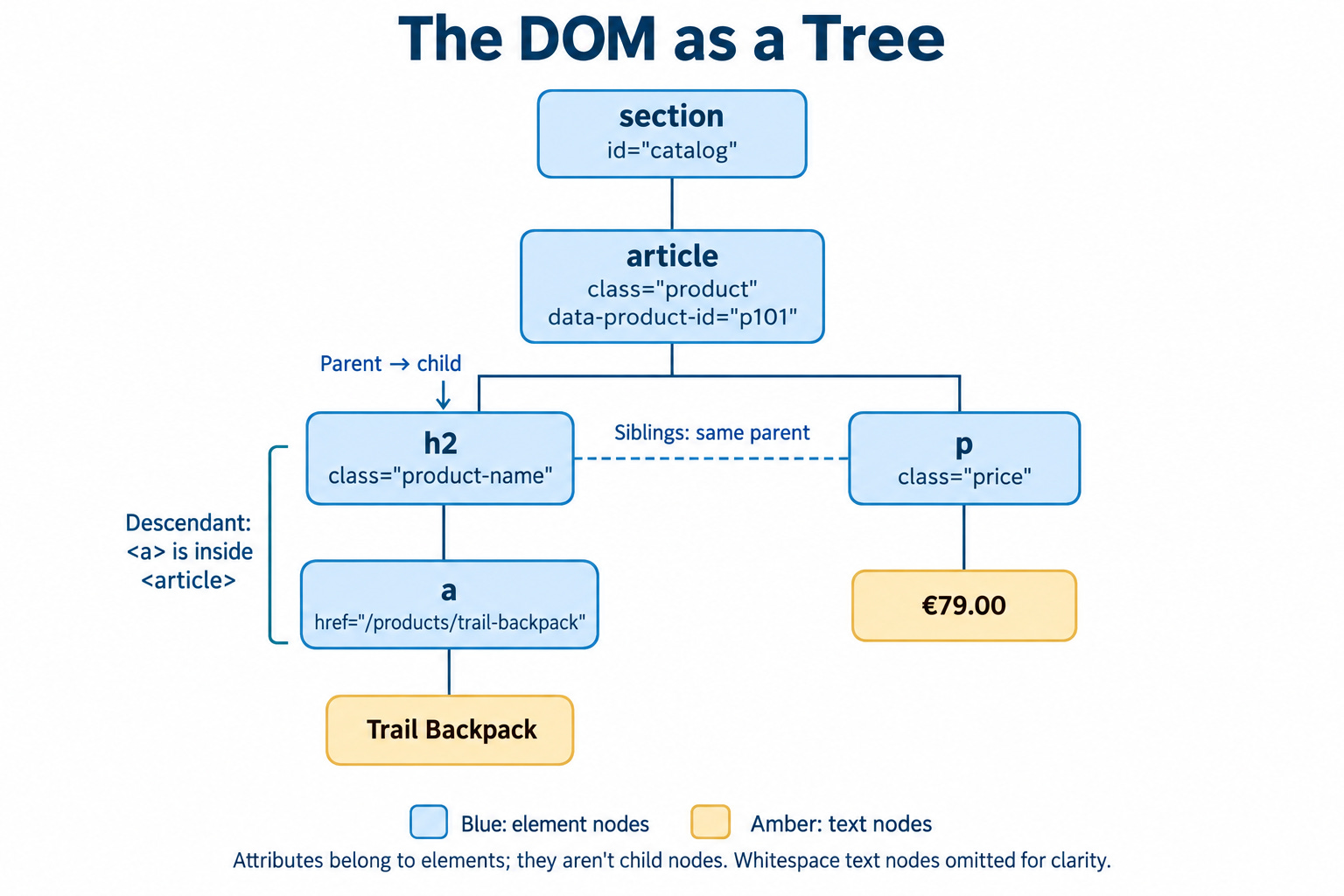
These relationships describe elements, but the DOM also contains text nodes. For instance, the words Trail Backpack form a text node inside the first <a>. Whitespace between tags can also create text nodes, which matters when you distinguish an element’s children from all its child nodes.
Datafuel is The Fuel for Web Scraping & AI Agents, with proxies and scraping APIs.

XPath: Syntax, Expressions, and Practical Usage
XPath, short for XML Path Language, is the language to reach for when a record is defined by where it sits. An expression describes a path through the document tree, and each step along that path says where to look and which nodes to keep. That buys you two things CSS selectors don’t have: Movement upward and backward through the tree, and conditions on text.
For example, with respect to the HTML shown in the previous chapter, you can start from the catalog section, find its product cards, and select the links inside their headings:
//section[@id='catalog']/article/h2/aIn the above snippet:
//sectionfinds section elements anywhere in the document.The predicate
[@id='catalog']keeps the ones whoseidiscatalog./article/h2/afollows direct-child relationships from each survivor down to the links.
Predicates are anything inside the square brackets. They’re how XPath filters what a step found, and most real-world expressions contain several of them.
Beyond that, the working vocabulary is small:
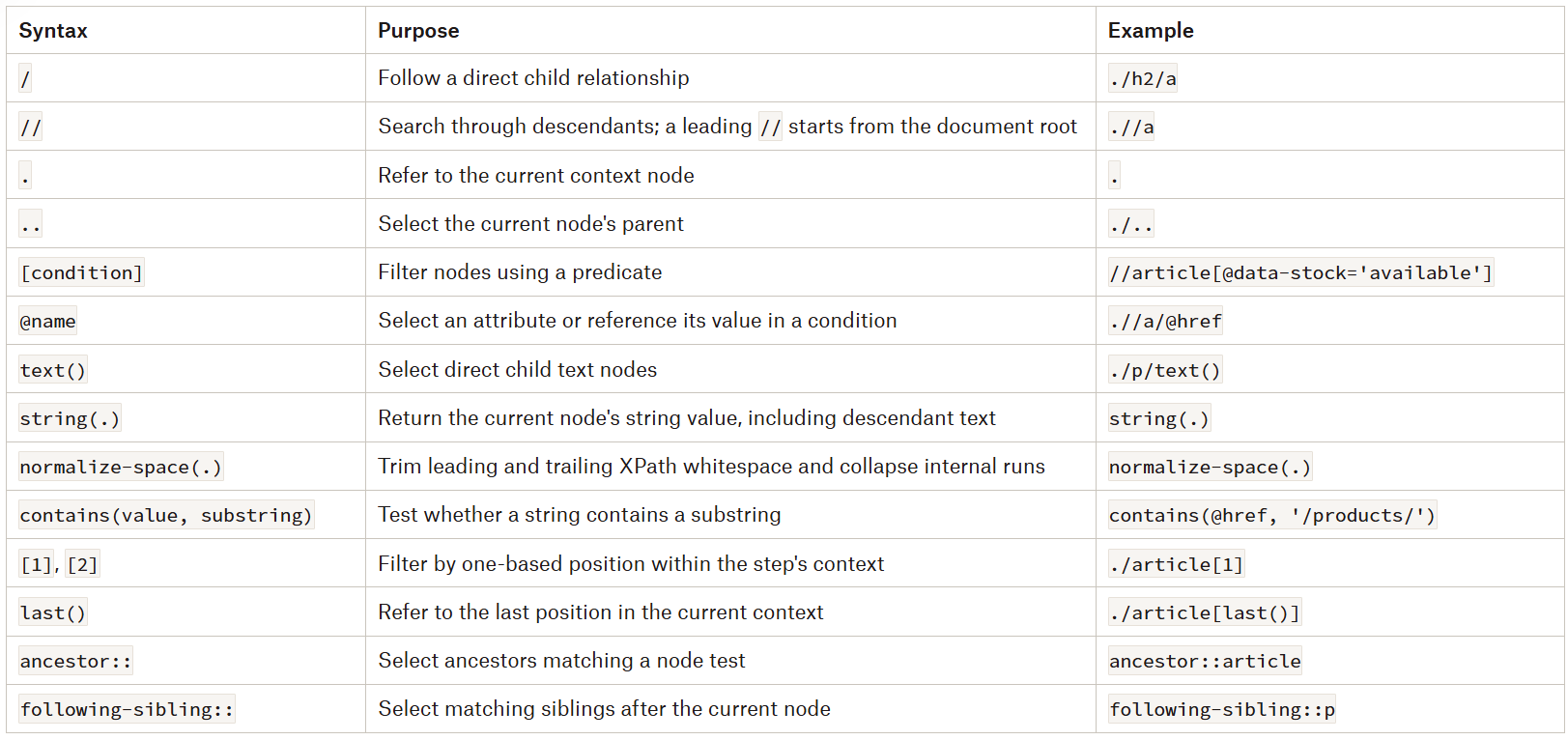
If you’d like a gentler walkthrough of these building blocks first, XPath and CSS selectors in web scraping covers them step by step.
Now, let’s make the catalog a little more realistic. Adding a stock flag, a second class, a shipping note, and a product name split across two nodes gives us enough structure to exercise every row of that table:
 <section id="catalog">
  <article class="product featured"
           data-product-id="p101"
           data-stock="available">
    <h2 class="product-name">
      <a href="/products/trail-backpack">
        <span>Trail</span> Backpack
      </a>
    </h2>
    <p class="price" data-currency="EUR">€79.00</p>
    <p class="shipping">Free shipping</p>
  </article>

  <article class="product"
           data-product-id="p102"
           data-stock="unavailable">
    <h2 class="product-name">
      <a href="/products/camping-lantern">Camping Lantern</a>
    </h2>
    <p class="price" data-currency="EUR">€24.00</p>
    <p class="shipping">Shipping calculated at checkout</p>
  </article>
</section>
Selecting the available products takes a single attribute predicate as follows:
//article[@data-stock='available']With the expression above, you select the first article. If you want a specific product ID, combine conditions using and:
//article[@data-stock='available' and @data-product-id]Note that @data-product-id on its own only proves the attribute exists, not that it holds a usable value.
Class matching is where XPath pays for its power. An HTML class attribute, in fact, holds several whitespace-separated tokens, and both obvious expressions get it wrong:
@class='product'compares the entire attribute, so it misses the first article, whose value isproduct featured.contains(@class, 'product')tests a substring, so it will happily returnproduct-summarynext to your product cards.
This means that matching a complete token takes the longer form, which is the following one:
 //article[
  contains(concat(' ', normalize-space(@class), ' '), ' product ')
]
This pads the attribute with spaces and collapses its whitespace. This way, ' product ' only matches a whole token, selects both articles, and nothing that merely contains the string.
Advantages of XPath
It navigates upward as well as downward: Parent and ancestor axes let you find a product card through a nested link or label.
It combines several kinds of conditions: Predicates can test attributes, text, position, and nested structure in the same expression, such as selecting available products that contain a particular link.
It expresses relationships between nodes: Sibling axes let you find a value beside a known label or a shipping notice after a price, rather than relying only on the target element’s attributes.
It can select the values you need directly: Expressions ending in
/@hrefor/text()select attributes or text nodes when the library exposes those results. String functions can also return a scalar value instead of an element.It suits relationship-driven extraction and XML: XPath is useful when a document’s structure provides better anchors than its classes or IDs. Its namespace-aware node tests also support XML extraction when you configure the required namespace bindings.
Disadvantages of XPath
Long absolute paths are fragile: A path tied to every container between
/htmland a field can break when a site inserts, removes, or rearranges intermediate elements.Complex expressions take effort to maintain: Several nested predicates and axes can make a query difficult to review or debug. Splitting extraction into a record-selection step and smaller field queries often makes it clearer.
Features depend on the version and implementation: XPath 2.0 functions and library-specific extensions aren’t available everywhere. Browser-native evaluation generally provides XPath 1.0, so you can’t assume it supports regex functions or other newer features.
Namespaces require explicit handling: In XPath 1.0, an unprefixed element name matches elements in no namespace. Namespaced XML, including documents with a default namespace, usually requires a prefix bound through the evaluator.
Small syntax differences can change the result:
text()isn’t the same as an element’s full string value,node()includes more than elements, and[1]depends on its position and axis. These expressions can return valid but unexpected results, so checking the matched nodes matters as much as checking the syntax.
CSS Selectors: Syntax, Expressions, and Practical Usage
CSS selectors are the default language for scraping HTML, and for a mundane reason: They match the way you already look at a page. Indeed, if you can open DevTools on your browser, click an element, and read article.product, you can already write the selector that finds it.
With this syntax, a selector matches tag names, classes, IDs, attributes, and the relationships between elements. To find the links inside product headings:
#catalog article.product h2 aHere:
#catalogmatches the element whose ID iscatalog.article.productmatchesarticleelements carrying theproductclass.The spaces describe descendant relationships, so
h2 afinds links anywhere inside those headings even if another element sits between the heading and the link.
Note that one property shapes every other decision in this section: Standard CSS selects elements, and nothing else. It returns nodes, not the attribute values or text strings you ultimately want. So, once you have a link, retrieving its href or its text is a separate operation performed by your scraping tool’s API.
In this context, note that there are libraries that bolt on extraction syntax. Those extensions are convenient, but they aren’t CSS, and they don’t move between tools. This means that whichever tool you’re using determines how much of your extraction code is portable - and the tool-by-tool comparison later in this article covers exactly how far that stretches.
For now, let’s only focus on the patterns that cover nearly all routine extraction in the table below:
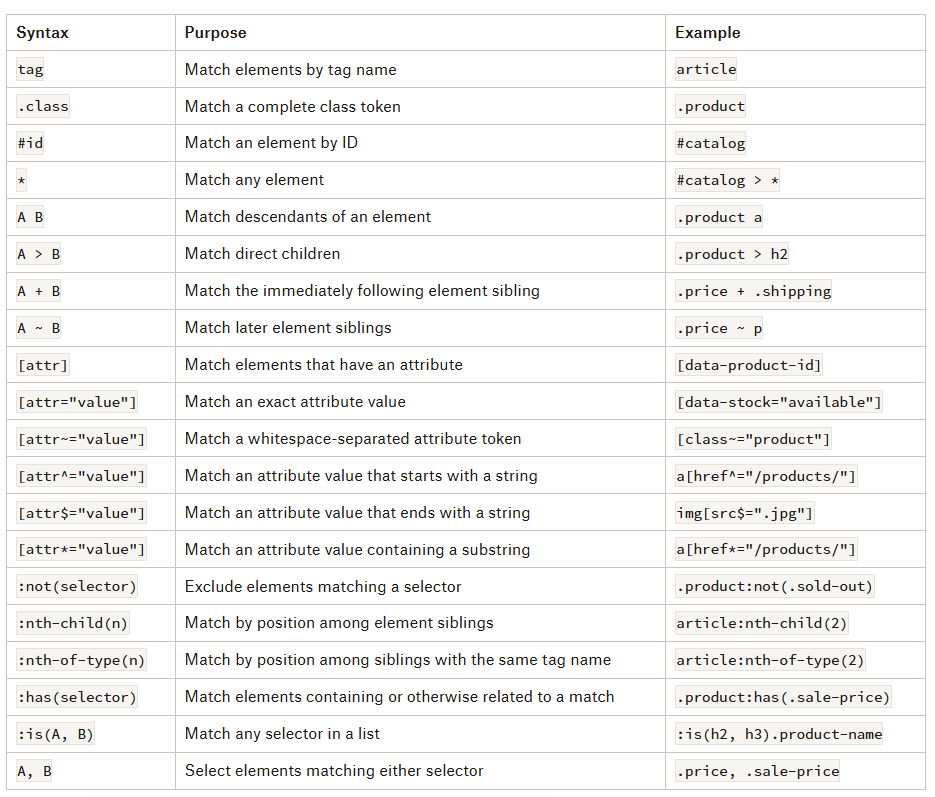
Two rows earn more attention than the others:
[attr~="value"]is the token matcher that XPath has to rebuild from three nested function calls, and.classgives you the same behaviour for free.:has()is the only relational escape hatch in the list, and it’s also the least portable.
To make some examples, let’s make the catalog realistic again, this time by adding a product image to each card:
<section id="catalog">
  <article class="product featured"
           data-product-id="p101"
           data-stock="available">
    <a class="product-image" href="/products/trail-backpack">
      <img src="/images/trail-backpack.jpg" alt="Trail Backpack">
    </a>
    <h2 class="product-name">
      <a href="/products/trail-backpack">
        <span>Trail</span> Backpack
      </a>
    </h2>
    <p class="price" data-currency="EUR">€79.00</p>
    <p class="shipping">Free shipping</p>
  </article>

  <article class="product"
           data-product-id="p102"
           data-stock="unavailable">
    <a class="product-image" href="/products/camping-lantern">
      <img src="/images/camping-lantern.jpg" alt="Camping Lantern">
    </a>
    <h2 class="product-name">
      <a href="/products/camping-lantern">Camping Lantern</a>
    </h2>
    <p class="price" data-currency="EUR">€24.00</p>
    <p class="shipping">Shipping calculated at checkout</p>
  </article>
</section>
Select the repeated records first with the following:
#catalog > article.productThat matches both product cards:
.producttests a complete class token, so it matchesclass="product"andclass="product featured"alike without also matchingclass="product-summary".
From there, each field has its own query:
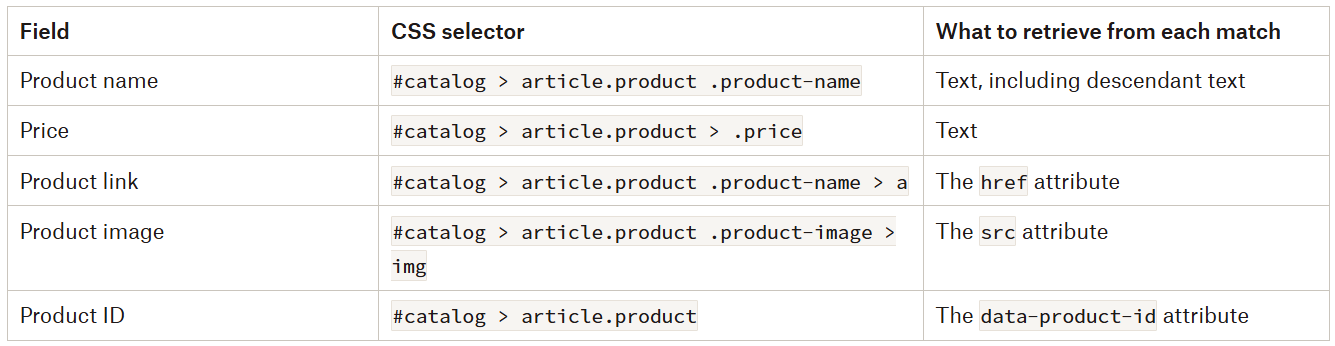
Run those five against the first card, and you get Trail Backpack, €79.00, /products/trail-backpack, /images/trail-backpack.jpg and p101:
Three of the five are attributes;
Two are text;
None of those values came from the selector itself.
Two further assumptions are embedded in the name: The code has to include descendant text, because Backpack and Trail live in different nodes, and it should normalize whitespace. The link and image paths are relative, and reading an attribute does not resolve them; so, joining them against the page URL is a step you write yourself.
This is also where the scoping decision should be made deliberately when you’re about to start a new scraping project. It’s easier to select the cards, then query within each one — .product-name > a finds that card’s name link when your library evaluates against the card’s subtree. However, collecting all names and all prices separately and zipping them by position gives the same output today, but misaligns every later record when one product lacks a price.
Also, choosing the right relationship makes these queries more precise. For instance, compare the following:
.product .price

.product > .price
Both match here, but they mean different things:
The first says “any price element below a product card”.
The second says “the price element that belongs directly to this card”.
If a card later embeds a recommended product with its own price, the descendant version collects that nested price too. The child version excludes it, and would instead stop matching if the site wrapped the main price in a new container.
Neither failure is hypothetical: Both can happen on real listing pages. So, which one you can tolerate depends on what identifies the field, so state that and stop.
As another example, note that attribute conditions narrow the record set without touching field extraction at all:
article.product[data-stock="available"]So, if you also want to require a product ID, add an attribute-existence condition as follows:
article.product\[data-stock="available"\][data-product-id]Like the equivalent XPath condition, [data-product-id] checks whether the attribute exists, not whether it contains a useful value. You still need to validate the extracted ID.
Advantages of CSS Selectors
The syntax is familiar: If you’ve worked with HTML and stylesheets, selectors such as
.product,#catalog, and[data-stock="available"]already describe elements in a recognizable way.Common queries stay concise: Expressions such as
.product-name > amake routine extraction easy to read and review without lengthy class-matching predicates.They cover everyday extraction needs: Classes, IDs, attributes, and combinators handle many product listings, article pages, tables, and other repeated structures.
They integrate with common tools: Browser APIs such as
[querySelectorAll()](https://developer.mozilla.org/en-US/docs/Web/API/Document/querySelectorAll)accept CSS selectors, as do popular scraping and automation libraries, although their supported features and return types differ.They can avoid unnecessary structural dependencies: A selector anchored to a stable attribute or meaningful class can keep working when unrelated containers elsewhere on the page change.
Disadvantages of CSS Selectors
It can’t look backward and it can’t read text: There’s no general way to move from a matched link to its parent or an arbitrary ancestor, and no standard selector for “elements containing this string”.
:has()covers part of the first gap by selecting an enclosing element based on its contents; the second gap means filtering text in application code or reaching for tool-specific extensions that won’t travel.Text-based matching needs another approach: Standard CSS doesn’t provide a general selector for elements containing a particular text string. You’ll usually filter through your application code or use tool-specific extensions that aren’t portable.
Complex relationships can become hard to follow: Several nested pseudo-classes and combinators can make a selector difficult to maintain, especially when it encodes a page’s layout rather than a stable identifying feature.
Advanced syntax isn’t equally portable: A selector that works in a browser may fail in a library with a smaller supported subset. Library-specific extraction extensions also won’t necessarily work in browser query APIs.
Small assumptions can produce incorrect matches: Exact class-attribute comparisons miss elements with additional classes, positional pseudo-classes count siblings rather than arbitrary result sets, generated classes can change, and broad descendant selectors can include fields from nested records.
XPath vs. CSS Selectors: In-Depth Comparison
CSS selectors and XPath can handle many of the same scraping tasks, but they describe those tasks differently:
CSS usually starts with an element’s identifying features, such as its class or attributes.
XPath combines node tests with paths and predicates, giving you more control over navigation and filtering.
This section compares them on five axes: whether the same selection ends up readable, what each can navigate to, what each returns, what your tool actually supports, and how fast either one evaluates.
Equivalent Selections, Different Grammar
Selecting available product cards is straightforward in both syntaxes:
# CSS
article.product[data-stock="available"]

# XPath
//article[
  contains(concat(' ', normalize-space(@class), ' '), ' product ')
  and @data-stock='available'
]
Both select the same articles, but:
CSS expresses the class condition more naturally because class matching is built into its syntax.
XPath needs a longer condition to tell the
productclass apart from values such asproduct-summary.
That difference shrinks as soon as the task depends on text or relationships rather than classes. For instance, to find a product through its name, XPath expresses the condition directly:
//article[.//a[normalize-space(.)='Trail Backpack']] Instead, standard CSS can’t test that text value. You’d select candidate cards and filter their text in application code, or use a tool-specific text-matching feature.
Also, when the condition depends on a descendant’s attributes instead, a supported :has() selector keeps the query concise:
article.product:has(a[href="/products/trail-backpack"]) So the more readable option depends on what identifies the record:
CSS reads better when classes and attributes provide clear anchors.
XPath reads better when you need to describe text conditions, ancestors, or relationships between several nodes.
The table below shows the two syntaxes side by side against the same catalog. The expressions assume document-level evaluation unless a row specifies a product-card context:
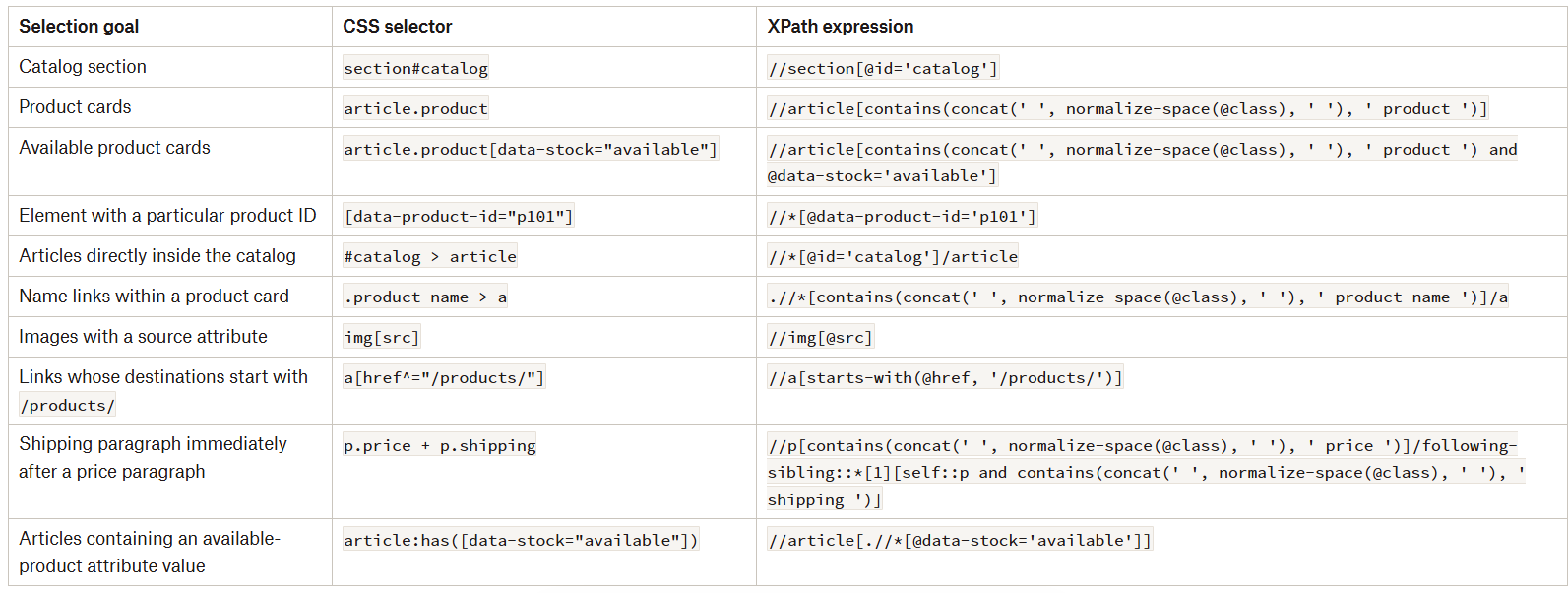
Read the rows as a cost curve rather than a scorecard. The top half is where CSS is shorter, the middle rows are roughly even, and the shipping paragraph is where XPath’s verbosity becomes obvious.
Navigation: The Direction CSS Can’t Go
Both syntaxes describe descendants, direct children, and following siblings. XPath adds explicit axes for parents, ancestors, and preceding siblings, and that’s a capability difference rather than a spelling difference.
If you already hold a link as your context node, you can select its nearest enclosing article with:
ancestor::article[1] There’s no equivalent standard CSS expression that traverses upward from that link. You can sometimes rewrite the task as article:has(...), but that selects candidate articles based on a relationship rather than navigating from the link itself. Alternatively, your library may expose a parent-traversal method outside its selector interface entirely.
What Comes Back: Elements, Attributes and Strings
The distinction between selector syntax and library functionality matters as much when extracting values:
Standard CSS selects elements, so retrieving a link’s
hrefrequires another API operation.XPath can select
@hrefdirectly or return a string through a function, but only if the calling API accepts that result type.
What’s interesting to note is that Scrapy, the framework that has stayed relevant for over a decade, exposes both approaches:
# Scrapy with CSS
response.css(".product-name > a::attr(href)").getall()

# Scrapy with XPath
response.xpath(
    "//*[contains(concat(' ', normalize-space(@class), ' '), "
    "' product-name ')]/a/@href"
).getall()
Here ::attr(href) is Scrapy’s extraction extension, not standard CSS. So, you can’t paste it into document.querySelectorAll() and expect it to work. Likewise, an XPath expression ending in /@href works through Scrapy’s selector interface, but Selenium’s XPath element locator expects elements rather than attribute nodes.
Support Varies by Tool
As previously introduced in this article, the tools themselves draw the boundaries you’re working inside. The following table summarizes the landscape of the different possibilities available:
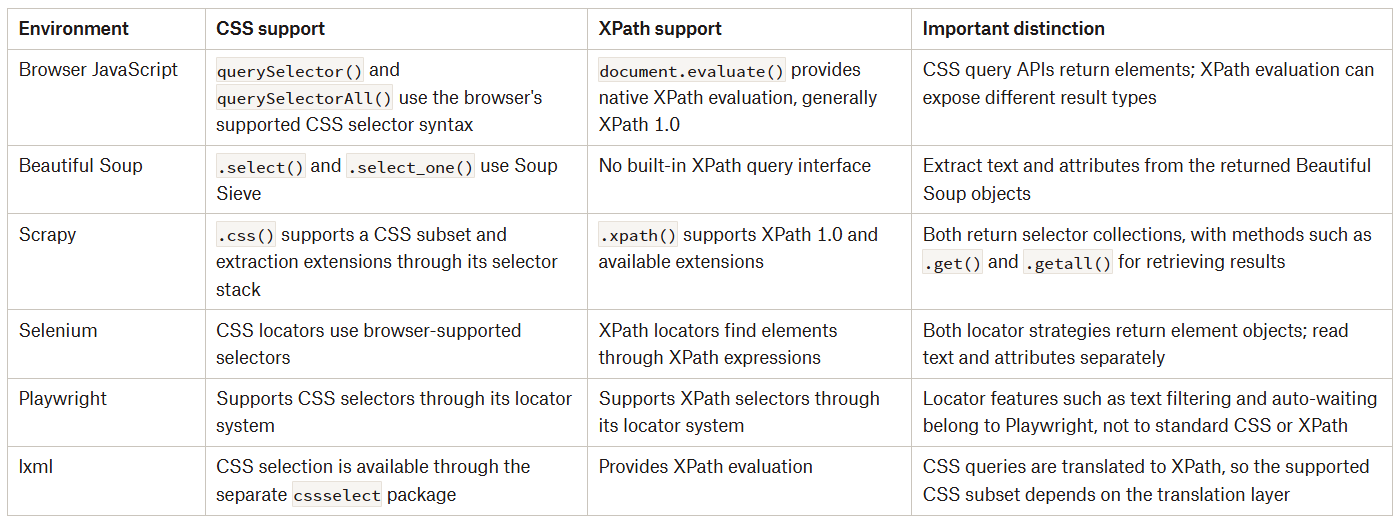
A browser’s support, therefore, doesn’t establish what every scraping library supports. In other words, a browser may accept :has() while a CSS-to-XPath translator rejects it. Similarly, Beautiful Soup may accept a selector through Soup Sieve, but that doesn’t mean the same expression works in Scrapy, and a library’s XPath extension won’t necessarily work through native browser evaluation.
Portability also depends on what you’re querying. Beautiful Soup and Scrapy typically query trees parsed from downloaded HTML. Selenium and Playwright query a browser’s DOM, which scripts may have modified, and knowing when a page really needs a headless browser is its own skill.
Performance: Measure It, Don’t Assume It
Even if we’re talking about querying something (the DOM), let’s state this clearly: Syntax doesn’t determine speed. A short CSS selector isn’t automatically faster than a longer XPath expression, and XPath’s extra navigation options don’t automatically make it slower.
Based on that, for routine extraction, you can just write the expression that clearly identifies the right elements in your actual tool. If it stays understandable, handles the document’s structure, and returns the expected records, you’ve addressed the part that usually decides whether a scraper holds up. Execution speed becomes a separate question, and you measure it when selector evaluation contributes meaningfully to the scraper’s workload.
Are CSS Selectors Easier to Learn and Use?
For common tasks, yes, and the earlier sections have been building that case. An ID uses #, a class uses ., an attribute condition goes inside square brackets, and the same syntax you use in stylesheets and DevTools works in a scraper.
Conversely, XPath starts from a different point: Paths through the tree, with predicates filtering the nodes along the way. Simple attribute conditions are still easy to follow, but some everyday HTML tasks need more explanation.
The following expressions select the same elements from the same catalog:
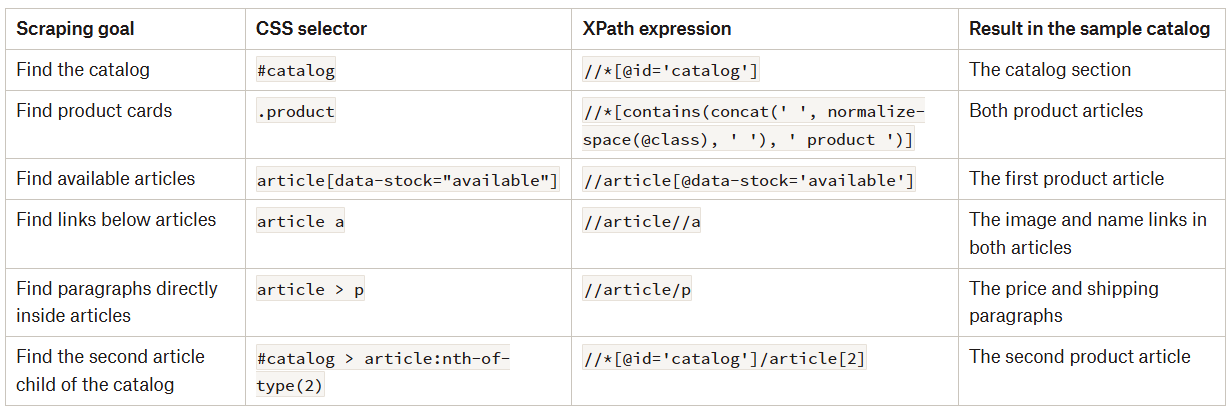
For these six tasks, CSS needs less syntax, and row two is the clearest case: .product is easier to recognize than the XPath class-token condition, especially when the same condition appears several times in one query.
Readability is where the advantage gets complicated, though, because adding conditions exposes what each syntax costs. For example, selecting available articles that contain an image is manageable in either:
# CSS
article[data-stock="available"]:has(img[src])

# XPath
//article[@data-stock='available' and .//img[@src]]
However:
The CSS expression requires
:has()support, which varies by tool.The XPath expression uses a descendant test inside its predicate, which standard XPath 1.0 has supported for decades.
In that case, if you only add one more requirement — for example, an article containing a link whose normalized text is Trail Backpack — and XPath keeps every condition in the query, you need the following expression:
//article[
  @data-stock='available'
  and .//img[@src]
  and .//a[normalize-space(.)='Trail Backpack']
]
Standard CSS can’t express that final text condition, so the extraction splits into a selector plus a separate filtering step. At that point, XPath is easier to understand than CSS, because the expression keeps the related conditions together.
But that doesn’t mean every condition belongs in one query. If an expression becomes difficult to explain, select the records first and extract their fields separately.
XPath Has More Advanced Filtering Logic
The previous examples show where XPath offers more than a different spelling for the same selection: Its predicates combine attribute values, text, position, and relationships with other nodes, while its axes navigate beyond descendants and following siblings.
Now, suppose you need the first available article that contains a price paragraph with a currency attribute:
(
  //article[
    @data-stock='available'
    and ./p[
      contains(concat(' ', normalize-space(@class), ' '), ' price ')
      and @data-currency
    ]
  ]
)[1]
The inner predicate identifies a suitable price paragraph. The outer predicate keeps available articles containing that paragraph. The final [1] selects the first article from the complete filtered result set — and where that [1] applies is the point worth dwelling on. @data-currency here only proves the attribute exists, so whether the currency and price text are usable remains validation your extraction code owns.
Now, look at the last row of the learnability table above: #catalog > article:nth-of-type(2) versus //*[@id='catalog']/article[2]. Both count article siblings rather than selecting the second member of an arbitrary result set, and that distinction costs you in CSS. Now, consider this:
#catalog > article.product:nth-of-type(2) This selects the second article child, but only if it also has the product class. So, if the first article isn’t a product card, it still counts toward that position, so the selector matches nothing at all.
What’s interesting to consider is that XPath can filter first and position afterwards:
//*[@id='catalog']/article[
  contains(concat(' ', normalize-space(@class), ' '), ' product ')
][2]
Here [2] applies to the articles that passed the class condition. That difference matters as soon as a page mixes product cards with promotional articles, sponsored blocks, or other records sharing a tag name (which most real listing pages do, by the way…).
The same directional logic applies to reverse axes. From a price paragraph, the nearest preceding heading sibling is:
preceding-sibling::h2[1] Because the axis runs backward, [1] selects the closest matching heading rather than the earliest one in document order. Getting that backwards silently returns the wrong node.
Text conditions provide the other main distinction, and they connect back to the nested span in the first product name. You can identify that link and then select its enclosing product card:
//a[normalize-space(.)='Trail Backpack']
  /ancestor::article[
    contains(concat(' ', normalize-space(@class), ' '), ' product ')
  ][1]
As covered earlier, normalize-space(.) includes descendant text, so the nested <span> is accounted for. From the matching link, ancestor::article[...] finds enclosing product articles and [1] keeps the nearest one. That’s how you locate a record through a recognizable field even when the record itself has no unique identifying attribute (which is a common situation on pages where IDs are generated per session).
CSS handles some similar tasks with :has(). If you know the link’s destination, you can select its enclosing product article with:
article.product:has(a[href="/products/trail-backpack"]) That’s often more concise than the XPath equivalent. But it tests an attribute rather than the link’s text, and it selects articles containing a matching link rather than traversing upward from an existing link context.
Reliability and Maintainability: Which Selectors Break Less Often?
Neither CSS nor XPath is inherently more resistant to website changes. What matters is which details the expression depends on, and how likely those details are to change.
A redesign can remove anything without touching the underlying product data, so generated class names and IDs can be worse still, changing between builds or even between sessions.
That’s why a field-specific attribute provides a better anchor:
# CSS
[data-field="product-name"]

# XPath
//*[@data-field='product-name']
That attribute is hypothetical, so its advantage would come from its role as a field identifier, not from the data- prefix itself.
The same reasoning applies to semantic markup and structural relationships. A heading inside a product card may provide a useful anchor, but selecting every <h2> on the page is far too broad. Combining a stable record boundary with a meaningful field selector gives you better balance:
# CSS
article.product .product-name > a
The same holds in XPath:
# XPath
/html/body/main/div/section[@id='catalog']/article/h2/a
Here’s a rule of thumb: Anchor to the nearest stable boundary that contains the record, not to the page structure above it. And for a better alternative - when applicable - you can choose to go beyond the DOM and LLMs and GPT vision for extracting your web data.
Overall, the selectors that need less maintenance describe stable record boundaries and meaningful field relationships without depending on unrelated layout details. You can write those selectors in either CSS or XPath: The language helps you express the rule, but choosing and testing the rule is what makes it reliable. And for the times a redesign breaks even a well-chosen rule, self-healing scrapers built with AI can take some of the repair work off your plate.
When to Use CSS Selectors and When to Use XPath
CSS selectors are usually the right starting point for routine HTML extraction: Classes, IDs, attributes, and predictable relationships are often enough to identify product cards and their fields. XPath becomes more useful when selection depends on text, ancestor navigation, or conditions involving several related nodes.
But the choice also depends on your tool. As introduced previously, a selector that’s clear and supported in one library may require a workaround in another. The following table summarizes where each approach fits and which exceptions to consider:
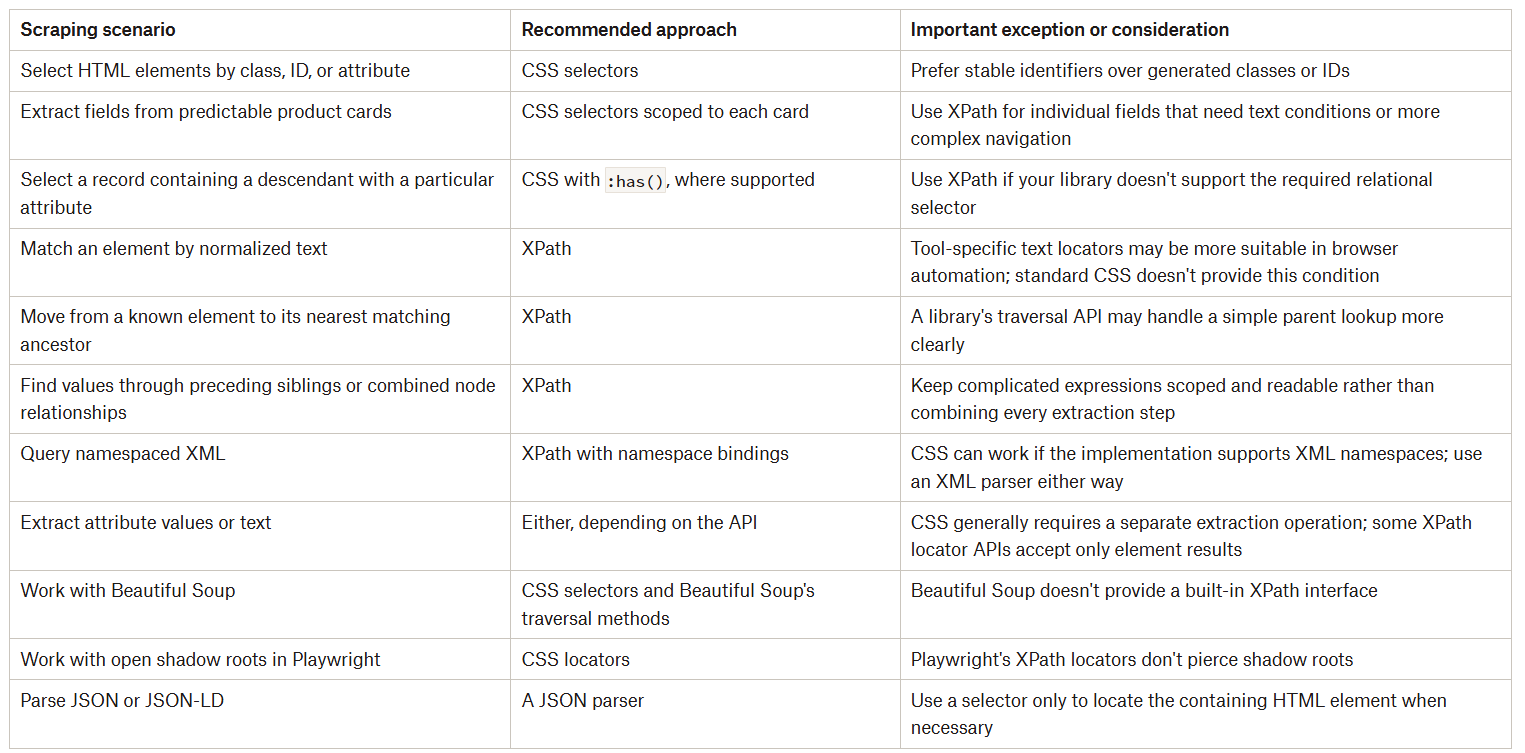
Read the last column as the part that saves debugging time:
Beautiful Soup makes CSS the straightforward option because there is no XPath interface.
Scrapy exposes both, so you can choose per query, and it’s easy to try by building your first Scrapy scraper.
Selenium and Playwright support both through element-finding interfaces, but their locator behavior isn’t identical to querying a static parsed document. The Selenium vs Playwright comparison shows where they differ in practice.
Team familiarity belongs in the decision too. That’s because forcing a relationship-heavy query into CSS plus several application-level workarounds can make the extraction harder to understand than a relative XPath expression. In simple words, the syntax your maintainers can reason about confidently is the one that will still be correct in six months.
Conclusion
Neither CSS nor XPath is better for web scraping a priori. The better one is whichever states your selection rule with the fewest assumptions about the page. And before either argument matters, three practical considerations usually decide: What identifies the record, which result type you need, and what your specific tool supports.
And whichever language you write in, neither protects you from a brittle anchor. A selector tied to presentation classes, generated IDs, or every container between <html> and your target field will break no matter how elegant its syntax. What survives a redesign is an expression anchored to a stable record boundary and a meaningful field relationship - a rule you chose deliberately and tested against the pages you actually scrape. So the answer to the question in the title isn’t CSS or XPath: it’s whichever of them depends on as little as possible.
So, let us know in the comments: Which of the two do you prefer?
Did you like this article? Share it with someone who might find it useful and get a discount on paid plans.