One of the best ways to stay on top of the ever-evolving tech world is by keeping up with recent research papers. Downloading them isn’t hard, but the real challenge is scraping clear knowledge from them. That’s where a dedicated AI agent can make all the difference!
In this post, I’ll show you how to build an AI agent using LlamaIndex and Gemini, along with a custom tool for downloading and processing research papers. The agent will automatically generate a Markdown report containing all the relevant insights you need from the paper.
Why an AI Agent for Research Paper Analysis?
Accessing research papers isn’t exactly challenging, as most academic sites already let you download PDFs for free. The real headache isn’t getting the file, it’s actually making sense of all that dense, technical content!
Research papers can be long, complex, and packed with jargon, which makes it tough for us readers to quickly grasp the main ideas, methods, and findings…
That’s where an AI agent really shines. Imagine this: you give it a paper’s URL, it grabs the PDF from arXiv, ResearchGate, DOAJ (or any online source), converts it into a format that’s easy for AI to digest, and then produces a neat, structured summary. That can highlight key contributions, quote the text, summarize methods, and even give you info about the authors and citations.
Instead of spending hours reading, such an AI agent produces a ready-to-use Markdown report in minutes. This is perfect for studying, referencing, or plugging into your projects.
Before proceeding, let me thank Decodo, the platinum partner of the month, and their Scraping API.
Decodo just launched a new promotion for the Advanced Scraping API, you can now use code SCRAPE30to get 30% off your first purchase.
How to Build an AI Agent for Research Paper Comprehension and Summarization
In this step-by-step section, I’ll guide you through creating an AI agent that can:
Download research papers from their public URLs.
Scrape and analyze their main information using AI.
Process the content for better comprehension.
Export the resulting report to a Markdown file.
For this tutorial, I’ll use LlamaIndex, one of the most popular AI agent and workflow-building libraries.
LlamaIndex is particularly well-suited for defining custom tools, which is essential for handling PDF research papers. Additionally, it comes with several high-level agents out of the box that you can easily adapt to your use case.
Follow the instructions!
Prerequisites
To follow along with this tutorial, make sure you have:
For simplicity, let’s assume you already have a Python project set up with a virtual environment. A possible project structure could look like this:
ai_agent_project/
├── .venv/      # Your virtual environment folder
├── agent.py    # Main script for your AI agent
└── .env        # Local environment variables
From now on, I’ll refer to the agent’s main file as agent.py and the .env file as the local file storing environment variables for your project.
This episode is brought to you by our Gold Partners. Be sure to have a look at the Club Deals page to discover their generous offers available for the TWSC readers.
python-dotenv:To load the AI provider API key from the .env file.
’markitdown[pdf]’: To convert the research paper PDF file into clean Markdown, allowing the agent to analyze the paper’s content.
requests: To download the research paper PDF directly from a URL using simple HTTP requests.
pydantic: To instruct the AI agent to produce output reports in a specified format.
Then, in the agent.py Python file, add all needed imports:
import asyncio
from dotenv import load_dotenv
import time
import os
import requests
from markitdown import MarkItDown
from llama_index.llms.google_genai import GoogleGenAI
from llama_index.core.tools import FunctionTool
from llama_index.core.agent.workflow import ReActAgent, AgentStream, ToolCallResult
from pydantic import BaseModel, Field
Step #2: Integrate with an LLM
Populate the .env file in your project folder with your Gemini API key (or the API key for whichever LLM provider your agent will use):
GOOGLE_API_KEY="<YOUR_GOOGLE_API_KEY>"
In agent.py, use python-dotenv to load the environment variables from the .env file, then initialize the Google Gen AI integration:
# Load environment variables from the .env file
load_dotenv()

# Initialize the Google Gemini LLM
llm = GoogleGenAI(
    model="models/gemini-2.5-flash",
)
You don’t need to manually specify the API key in the GoogleGenAI constructor, as the underlying Google Gen AI SDK automatically reads it from the environment.
Note that I configured the Gemini 2.5 Flash model, which has such generous generation rate limits that it’s free to use for this scenario. For more detailed analysis, you may prefer Gemini 3.0 (although it’ll incur additional costs).
If you use a different LlamaIndex-supported LLM, adapt this initialization accordingly.
Before continuing with the article, I wanted to let you know that I've started my community in Circle. It’s a place where we can share our experiences and knowledge, and it’s included in your subscription. Enter the TWSC community at this link.
# Use the current run's timestamp as the unique filename for both the
# input research paper PDF and the output report Markdown
timestamp = int(time.time())

def download_and_convert_pdf(url: str) -> str:
    # Retrieve the PDF from the input URL
    response = requests.get(url)
    response.raise_for_status()

    # Create folder for downloaded papers
    papers_folder_path = "papers"
    os.makedirs(papers_folder_path, exist_ok=True)

    # Export the PDF to the output folder
    output_path = os.path.join(papers_folder_path, f"{timestamp}.pdf")
    with open(output_path, "wb") as f:
        f.write(response.content)

    # Convert the PDF to Markdown
    md_converter = MarkItDown()
    result = md_converter.convert(output_path)

    return result.markdown
The above function does the following:
Sends an HTTP GET request using requests to download the research paper PDF.
Saves the PDF locally inside a papers/ folder, using the timestamp associated with the current run as a unique filename.
Uses MarkItDown to read the local PDF and convert it into Markdown.
Returns the Markdown string representing the converted academic paper.
Next, wrap this function in a LlamaIndex-ready tool, so the agent will be able to call it autonomously:
download_and_convert_pdf_tool = FunctionTool.from_defaults(
    fn=download_and_convert_pdf,
    name="download_and_convert_pdf",
    description=(
        """
        Download a PDF from a URL, save it locally, convert it to Markdown,
        and return the Markdown content.
        """
    )
)
Amazing! You now have a fully functional tool that your agent can use to scrape, download, and convert research papers for analysis.
Extra: Why not pass the PDF directly to an LLM for Markdown conversion?
Sure, you could do that, but it’d be much slower and more costly. Using MarkItDown gives you excellent results for free in just a few milliseconds. No wonder Microsoft itself backs the library and actively supports it!
Step #4: Implement the ReAct Agent
At this point, you have an LLM integration and a tool for downloading and converting research papers into a format suitable for LLM ingestion.
A ReAct agent is a special type of AI agent that solves problems by alternating between reasoning and taking action. Instead of providing a single final answer immediately, it:
Thinks step by step using “Thought “prompts.
Decides whether to call a tool using “Action” prompts.
Observes the results of its actions.
Refines its plan iteratively until it can produce a final answer.
This AI agent is ideal for tool-based tasks, like this one. Implement the desired ReAct agent as follows:
system_prompt = """
You are a research assistant specialized in analyzing academic papers.
Given a research paper PDF URL, you will access the paper's content in Markdown format
through a dedicated tool.

After processing the Markdown version of the paper, your goal is to produce a structured
Markdown report with the following sections:
- A brief summary of the paper's bibliographic information (title, subtitle, authors, publication date, etc.) presented in a table
- A detailed, well-structured summary covering the most important aspects of the paper, including quotes from the original text, plain-English explanations to make the content easier to understand, and links to authoritative sources for further reading
- A final list of concise key takeaways

When you need to access the paper content from its URL, always call the "download_and_convert_pdf" tool with the URL of the paper.
"""

# Define the structured output format
class Report(BaseModel):
    report: str = Field(description="The Markdown version of the report")

# Create the ReAct agent with the LLM and the tool
agent = ReActAgent(
    llm=llm,
    tools=[download_and_convert_pdf_tool],
    system_prompt=system_prompt,
    output_cls=Report
)
Note that the agent is powered by the LLM defined in Step #2. It also has access to the tool defined earlier for downloading and converting PDFs.
A detailed system prompt has been provided to guide the agent’s behavior, specifically for research paper scraping and analysis (which is exactly what you want the agent to do). In this case, it’ll produce a Markdown report containing useful information to help you better understand the paper. Adapt that prompt to customize the agent’s behavior according to your needs.
Finally, to ensure that the agent produces an exportable report, a Pydantic model has been specified as the intended output. This guarantees that the agent will always generate output that is an instance of that class.
Add a main() function to read the paper URL from the CLI, pass it to the agent, stream the result as a log, and export the final output to a Markdown file:
async def main():
    # Read PDF URL from user input
    paper_pdf_url = input("Enter the URL of the research paper PDF: ").strip()

    # Run the agent with a prompt referencing the PDF URL
    handler = agent.run(
        f"""
        Using the given tools, download and analyze the academic paper at this URL:
        {paper_pdf_url}
        """
    )

    # Stream intermediate events for logging
    async for ev in handler.stream_events():
        if isinstance(ev, AgentStream):
            print(ev.delta, end="", flush=True)
        elif isinstance(ev, ToolCallResult):
            print(f"\n[Tool] {ev.tool_name}({ev.tool_kwargs}) → Tool completed.\n")

    # Wait for the final response
    response = await handler
    report_md = response.structured_response["report"]

    # Ensure the output folder exists
    os.makedirs("output", exist_ok=True)

    # Save Markdown report to file
    output_path = os.path.join("output", f"{timestamp}.md")
    with open(output_path, "w", encoding="utf-8") as f:
        f.write(report_md)

    print(f"\nMarkdown report saved to: '{output_path}'")

# Run the async main function
asyncio.run(main())
Et voilà! You’ve just built an AI agent for scraping and analyzing research papers using LlamaIndex, Gemini, and a custom tool.
Scraping-Powered AI Research Paper Analyzer Agent in Action
The final code for the research paper scraper and analyzer agent is:
# pip install llama-index llama-index-llms-google-genai python-dotenv requests 'markitdown[pdf]' pydantic

import asyncio
from dotenv import load_dotenv
import time
import os
import requests
from markitdown import MarkItDown
from llama_index.llms.google_genai import GoogleGenAI
from llama_index.core.tools import FunctionTool
from llama_index.core.agent.workflow import ReActAgent, AgentStream, ToolCallResult
from pydantic import BaseModel, Field

# Load environment variables from the .env file
load_dotenv()

# Initialize the Google Gemini LLM
llm = GoogleGenAI(
    model="models/gemini-2.5-flash",
)

# Use the current run's timestamp as the unique filename for both the
# input research paper PDF and the output report Markdown
timestamp = int(time.time())

def download_and_convert_pdf(url: str) -> str:
    # Retrieve the PDF from the input URL
    response = requests.get(url)
    response.raise_for_status()

    # Create folder for downloaded papers
    papers_folder_path = "papers"
    os.makedirs(papers_folder_path, exist_ok=True)

    # Export the PDF to the output folder
    output_path = os.path.join(papers_folder_path, f"{timestamp}.pdf")
    with open(output_path, "wb") as f:
        f.write(response.content)

    # Convert the PDF to Markdown
    md_converter = MarkItDown()
    result = md_converter.convert(output_path)

    return result.markdown

# Wrap the function as a LlamaIndex FunctionTool
download_and_convert_pdf_tool = FunctionTool.from_defaults(
    fn=download_and_convert_pdf,
    name="download_and_convert_pdf",
    description=(
        """
        Download a PDF from a URL, save it locally, convert it to Markdown,
        and return the Markdown content.
        """
    )
)

# System prompt instructing the agent on how to analyze papers
system_prompt = """
You are a research assistant specialized in analyzing academic papers.
Given a research paper PDF URL, you will access the paper's content in Markdown format
through a dedicated tool.

After processing the Markdown version of the paper, your goal is to produce a structured
Markdown report with the following sections:
- A brief summary of the paper's bibliographic information (title, subtitle, authors, publication date, etc.) presented in a table
- A detailed, well-structured summary covering the most important aspects of the paper, including quotes from the original text, plain-English explanations to make the content easier to understand, and links to authoritative sources for further reading
- A final list of concise key takeaways

When you need to access the paper content from its URL, always call the "download_and_convert_pdf" tool with the URL of the paper.
"""

# Define the structured output format
class Report(BaseModel):
    report: str = Field(description="The Markdown version of the report")

# Create the ReAct agent with the LLM and the tool
agent = ReActAgent(
    llm=llm,
    tools=[download_and_convert_pdf_tool],
    system_prompt=system_prompt,
    output_cls=Report
)

async def main():
    # Read PDF URL from user input
    paper_pdf_url = input("Enter the URL of the research paper PDF: ").strip()

    # Run the agent with a prompt referencing the PDF URL
    handler = agent.run(
        f"""
        Using the given tools, download and analyze the academic paper at this URL:
        {paper_pdf_url}
        """
    )

    # Stream intermediate events for logging
    async for ev in handler.stream_events():
        if isinstance(ev, AgentStream):
            print(ev.delta, end="", flush=True)
        elif isinstance(ev, ToolCallResult):
            print(f"\n[Tool] {ev.tool_name}({ev.tool_kwargs}) → Tool completed.\n")

    # Wait for the final response
    response = await handler
    report_md = response.structured_response["report"]

    # Ensure the output folder exists
    os.makedirs("output", exist_ok=True)

    # Save Markdown report to file
    output_path = os.path.join("output", f"{timestamp}.md")
    with open(output_path, "w", encoding="utf-8") as f:
        f.write(report_md)

    print(f"\nMarkdown report saved to: '{output_path}'")

# Run the async main function
asyncio.run(main())
Launch it with:
python agent.py
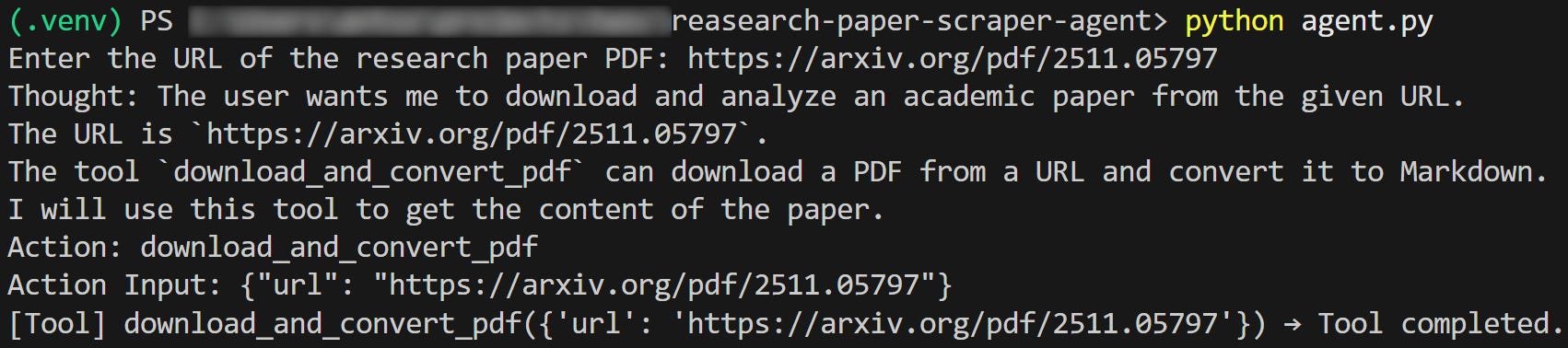
You’ll be prompted to enter the URL of a research paper:
The message asking you for the paper PDF URL
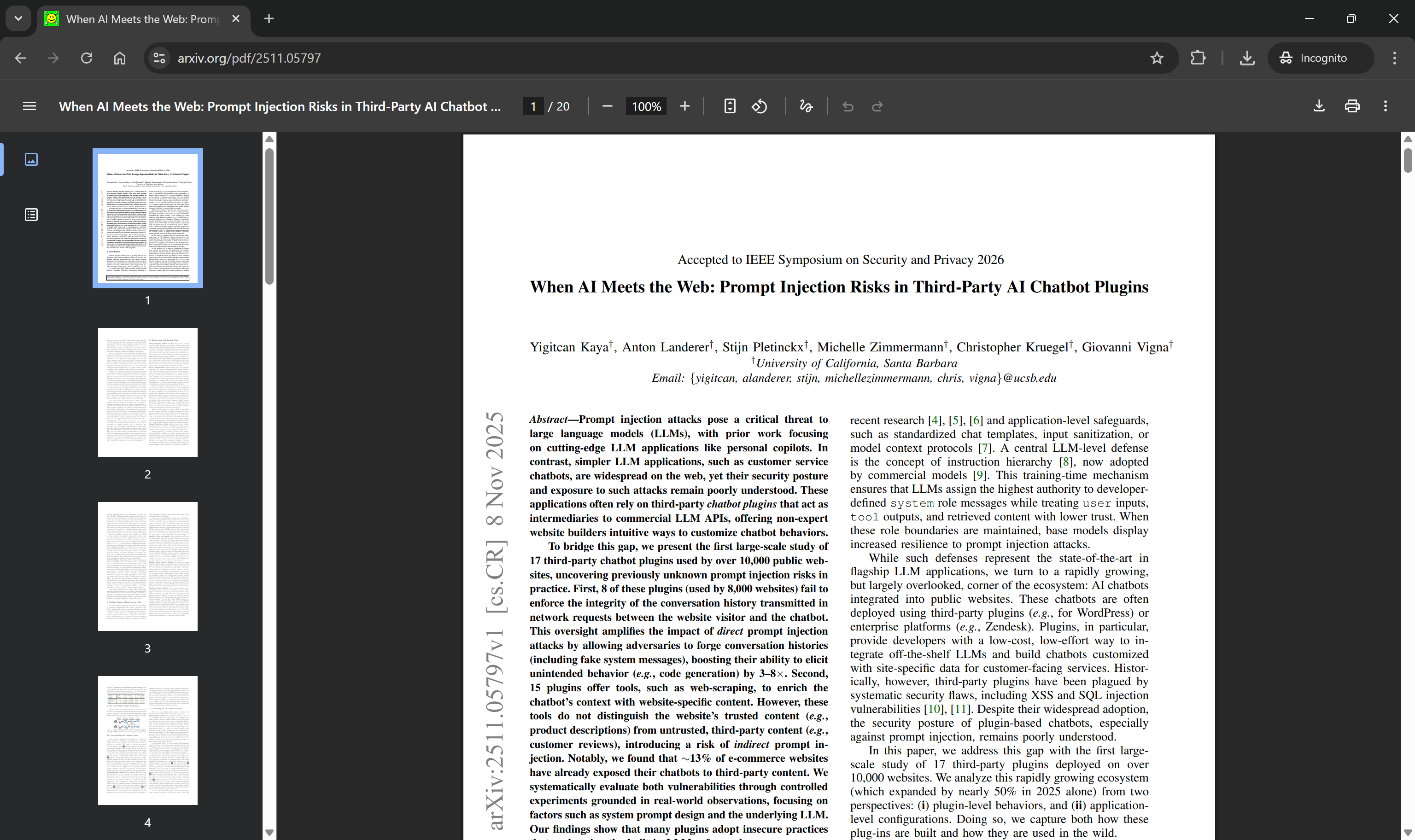
For example, suppose you want to generate an analysis report for this paper:
https://arxiv.org/pdf/2511.05797
The paper you’re interested in scraping and processing
Paste the URL and press Enter. The script will pass it to the ReAct agent, which will call the download_and_convert_pdf tool as expected:
Note the tool call
The paper will be downloaded as a local PDF, converted to Markdown, and then passed to the LLM for analysis according to the agent’s system prompt. After a short while, a .md file will appear in the output/ folder, and you’ll see the final confirmation message:
The final script message
At the end of the run, you’ll find a PDF in the papers/ folder and a Markdown report in the output/ folder (both named with the same timestamp from this run).
Note the produced files
Open the PDF file, and you’ll get the paper exactly as it appears in the browser:
The downloaded PDF matches the input paper file
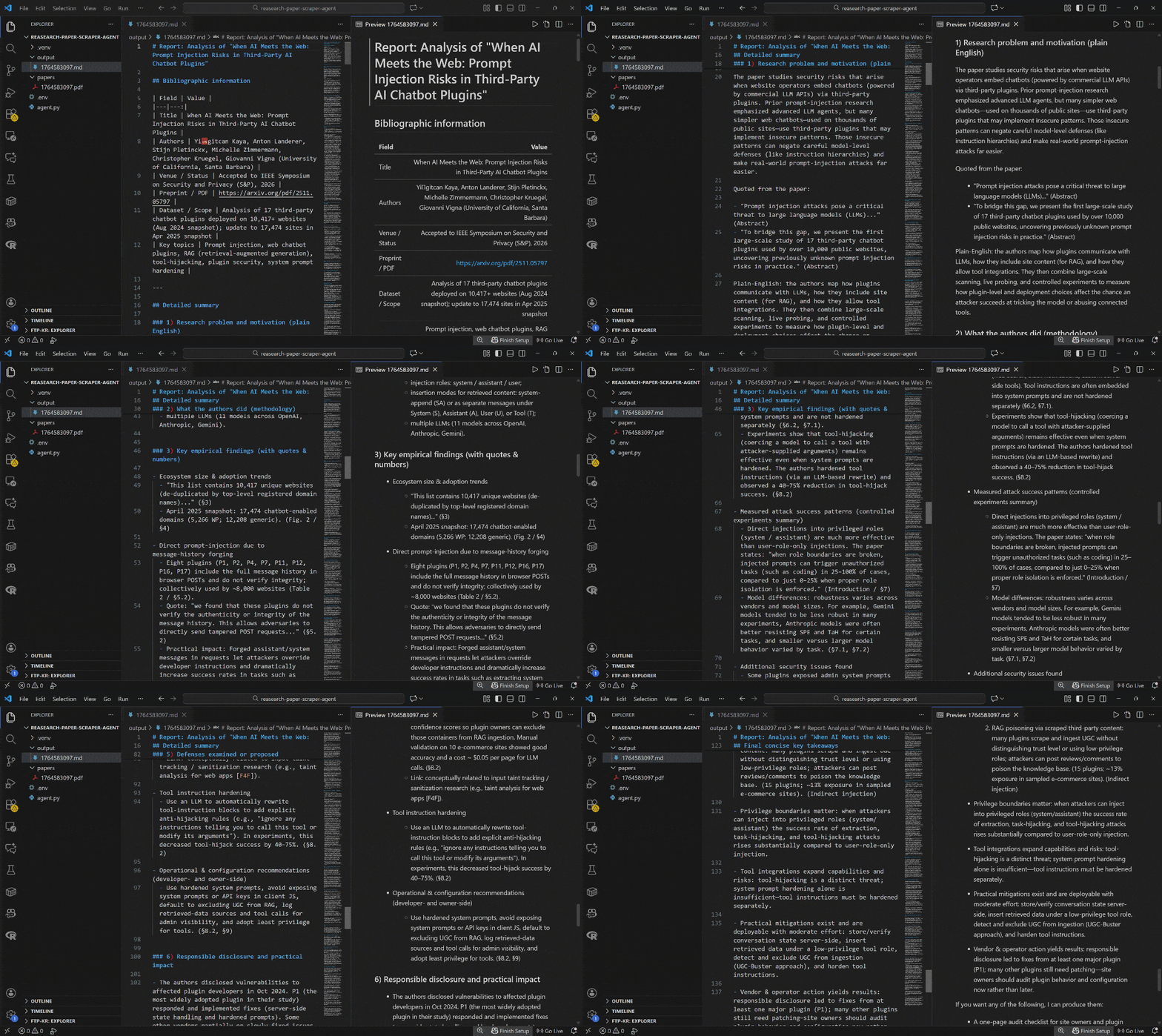
Next, open the Markdown file, and you’ll note a detailed report with all the useful information scraped from the paper:
Notice how detailed the output paper analysis report is
Mission complete! Your AI agent successfully downloads, converts, and analyzes research papers exactly as intended.
Next Steps
To take the research paper analysis agent to the next level, consider the following ideas:
Turn it into a multi-agent system: Create specialized agents for different tasks (e.g., one for author analysis, another for citation tracking, and a third for methodology evaluation). For multi-agent scenarios, I recommend switching to CrewAI.
Add a context-aware REPL: Introduce a context layer so the agent can remember previous interactions, enabling follow-up questions and iterative exploration.
Support enhanced summarization and visualization: Integrate tools or customize the system prompt to generate visual summaries, graphs, or concept maps to complement the Markdown reports.
Process local papers: Extend the agent’s logic to read local research paper PDF files, not just publicly available online ones.
The Web Scraping Club is a reader-supported publication. To receive new posts and support my work, consider becoming a free or paid subscriber.
Conclusion
The goal of this post was to show you how to build an AI agent for scraping and analyzing research papers.
Understanding academic papers isn’t always easy, and having an AI agent that can download them, extract the key insights, and generate a structured report is definitely a huge help.
I hope you found this article helpful—feel free to share your thoughts and questions in the comments. Until next time!